Blog Layouts for Elementor
Antivirus scan
Powered by ClamAV
✅ Verified clean
This product file has passed our security filters.
Want to run a fresh ClamAV scan right now? Takes a few seconds and shows scanner version, signature DB and live result.
This can take 5 to 30 seconds.
Clean file Threat detected
No threats detected in this file.
- File
- Size
- Scanned
- ClamAV
- Signature database
⚡ Powered by ClamAV
Scan could not be completed
Report product
If you detected an issue (broken file, malware, inappropriate content, etc.) let us know and we'll review it ASAP.
Sign in to report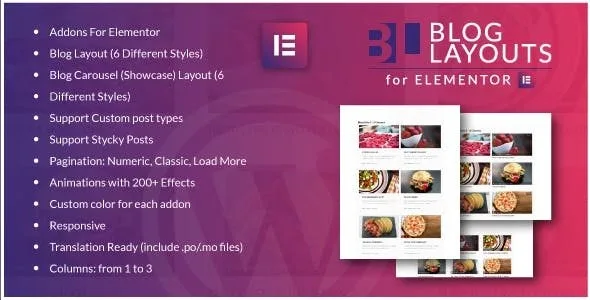
About Blog Layouts for Elementor
Building a blog post list with Elementor usually ends in one of two ways: you use the basic posts widget, which falls short on styles, or you fight with templates that don't match the rest of your design. Blog Layouts for Elementor is an add-on made to solve exactly that part: showing your articles with a polished design without writing code.
The blog is the most visited showcase and the least designed
Anyone who publishes content regularly (a magazine, a company blog, a news or resources site) tends to take care of the home page and neglect the article list. Yet that list is where visitors decide whether to read one more or leave. A good list design, with image, title and excerpt neatly arranged, keeps older content visible instead of buried.
Two widgets and six styles for each: what Blog Layouts for Elementor does
The plugin adds two widgets to Elementor:
- Classic blog layout: six different styles to choose from.
- Blog carousel: also with six styles.
It also lets you:
- Work with custom post types, not just regular posts.
- Handle sticky posts.
- Choose between three pagination types: numeric, classic or a load more button.
- Show one to three columns.
- Apply animations, with more than 200 effects available.
- Change the color of each widget separately.
- Adapt to small screens (responsive).
It needs Elementor installed
It is an add-on, it doesn't work on its own: without Elementor active there is nothing to use. Nor is it a theme or a full template builder: it only covers the post list and the carousel. The single post page, the header or the footer must be handled with other tools. And with a maximum of three columns, if you want denser grids it is not the right option.
Questions from people about to install it
Is it useful for more than blog posts?
Yes, it supports custom post types, so you can list, for example, projects or news items if your site defines them that way.
Can I highlight a sticky post?
Yes, it supports sticky posts.
Do I have to load all posts at once?
No: you can choose numeric pagination, classic pagination or a load more button, depending on how you want readers to browse.
Can it be translated?
It comes translation ready and includes .po and .mo files.
Does it work on mobile?
It is responsive, although it is worth checking in the demo how each style behaves on small screens before you decide.
Pick the style in the demo first, then the widget
Before installing, look at the six styles of each widget in the preview and decide which one fits your typography and colors. Then add the widget to a page with Elementor, adjust columns, pagination and color, and use the animations sparingly: with more than 200 effects it is tempting to overdo it, and a list that moves too much tires the reader.
Topics
Version history
-
v
1.0 Current 30 May 2024
Customer reviews
Sign in to leave a review. Only people who have the product can review it.
No reviews for this product yet.
Frequently asked questions
-
GPL (General Public License) is the license under which WordPress and most premium plugins/themes are distributed. It grants you the right to use, modify and redistribute the software in as many projects as you want, with no domain restrictions.
-
Yes. With membership you get automatic updates via our GPLClub Updater plugin (installed on your WP, detects new versions and applies them). With individual purchase, you get one year of manual updates from your account.
-
Depends on the plan. Monthly: 3 domains. Semi-annual: 7. Annual and Lifetime: 15. Individual purchase: 1 domain.
-
GPLClub offers its own support for installation, configuration and compatibility. For direct support from the original author (feature requests, product-specific bugs), a license purchased from the author is required.