Bookly PRO WordPress Plugin
Antivirus scan
Powered by ClamAV
✅ Verified clean
This product file has passed our security filters.
Want to run a fresh ClamAV scan right now? Takes a few seconds and shows scanner version, signature DB and live result.
This can take 5 to 30 seconds.
Clean file Threat detected
No threats detected in this file.
- File
- Size
- Scanned
- ClamAV
- Signature database
⚡ Powered by ClamAV
Scan could not be completed
Report product
If you detected an issue (broken file, malware, inappropriate content, etc.) let us know and we'll review it ASAP.
Sign in to report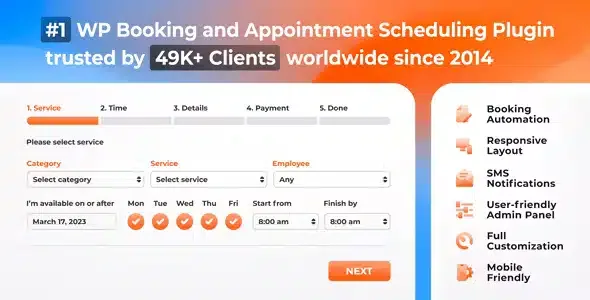
About Bookly PRO WordPress Plugin
When bookings still arrive by phone and WhatsApp
Anyone who lives off appointments knows the problem: calls during working hours, lost messages, two clients for the same slot and an employee who knew nothing about it. Bookly PRO is an add-on for the Bookly plugin that removes the limits of the free version and turns your website into the calendar where people book, the right professional is assigned and everyone is notified.
The calendar belongs to your team, not just to you
In a service business the bottleneck is rarely the website, but coordinating who does what and when. Bookly PRO is built for that: it allows an unlimited number of staff members, each with their own schedule, prices and management of their own profile and booking calendar. The client picks the service, professional, date and time, and availability is calculated automatically.
Services are also unlimited and can be grouped into categories, with a color per service so you can tell them apart at a glance in the Bookly calendar. If you have several pages or campaigns, you can create and publish multiple booking forms: all appointments end up in the same calendar.
The Bookly PRO form adapts to the way you sell
The booking process runs from 2 to 6 steps: service, time slot, client details, payment and confirmation. You can change the layout of each step, show or hide fields, add your own, adjust colors, reorder the list of professionals, categories and services, and edit any text. The more the form looks like your site, the fewer doubts the person booking will have.
- Client details: name, phone and email are there by default and cannot be removed. The phone can be replaced with a Skype ID, and the client can leave notes.
- Payment: there is an in-person payment option and more than 10 online payment methods, plus coupons. If a service costs 0, the payment step is skipped.
- Confirmation: with notifications on, the client receives an email and an SMS with the details. If you work with pending appointments that need approval, change the final text to say you will confirm later.
Day-to-day management: booking list, clients and Google Calendar
The booking list can be filtered, sorted, searched, printed or exported to CSV. The customer base can also be imported and exported, and shows payment stats and internal notes. It includes analytics with booking statistics, customizable email and SMS notification templates (useful as reminders for the team and to reduce no-shows) and two-way synchronization between Bookly Calendar and Google Calendar. It is also compatible with WooCommerce and comes with 9 languages.
Extras and multiple bookings need other add-ons
Bookly PRO is not a closed system: part of what you will see in demos belongs to separate add-ons. This list separates what it already solves from what you will have to cover another way.
- Already solved: unlimited staff and services, multiple forms, booking list, customer base, notifications, Google Calendar sync, analytics and WooCommerce compatibility.
- Needs free Bookly: PRO does not work on its own, it requires the Bookly plugin to be active.
- Group booking add-on: so the client can say how many people are booking.
- Service extras add-on: to add extra products or services to the appointment.
- Cart add-on: to book several appointments in one session.
- Chained or multiplied appointments: also separate add-ons (for example, cleaning, whitening and check-up in a row at a dental clinic).
PayPal Express Checkout appears in the integration, but it is a method deprecated since 2017 and PayPal no longer offers it to new customers; do not count on it as your main gateway.
Frequently asked questions
Can I use Bookly PRO without the Bookly plugin?
No. PRO is an add-on: it needs the Bookly plugin installed and active.
Can I charge online?
Yes, there are more than 10 online payment methods and also in-person payment. Check in the demo which ones suit you.
Can I remove the phone or email from the form?
No: name, phone and email are required, although the phone can be swapped for a Skype ID. You can add more fields.
Does it work for several professionals?
Yes, with no limit on staff, each with their own schedule, prices and calendar.
Can the client book several appointments in a row?
Only with the corresponding add-ons, such as the cart one.
Topics
Version history
-
v
10.7 Current 28 Oct 2026
-
v
10.6 2 Oct 2026
-
v
10.5 23 Sep 2026
-
v
10.4 5 Sep 2026
-
v
10.2 29 Jul 2026
-
v
10.0 25 Apr 2026
Customer reviews
Sign in to leave a review. Only people who have the product can review it.
No reviews for this product yet.
Frequently asked questions
-
GPL (General Public License) is the license under which WordPress and most premium plugins/themes are distributed. It grants you the right to use, modify and redistribute the software in as many projects as you want, with no domain restrictions.
-
Yes. With membership you get automatic updates via our GPLClub Updater plugin (installed on your WP, detects new versions and applies them). With individual purchase, you get one year of manual updates from your account.
-
Depends on the plan. Monthly: 3 domains. Semi-annual: 7. Annual and Lifetime: 15. Individual purchase: 1 domain.
-
GPLClub offers its own support for installation, configuration and compatibility. For direct support from the original author (feature requests, product-specific bugs), a license purchased from the author is required.