Builderius PRO
Antivirus scan
Powered by ClamAV
✅ Verified clean
This product file has passed our security filters.
Want to run a fresh ClamAV scan right now? Takes a few seconds and shows scanner version, signature DB and live result.
This can take 5 to 30 seconds.
Clean file Threat detected
No threats detected in this file.
- File
- Size
- Scanned
- ClamAV
- Signature database
⚡ Powered by ClamAV
Scan could not be completed
Report product
If you detected an issue (broken file, malware, inappropriate content, etc.) let us know and we'll review it ASAP.
Sign in to reportNewer version out, or a problem?
About Builderius PRO
Control of HTML and CSS without writing every block by hand
People who build websites for clients usually have to choose between coding everything from scratch, with a lot of repeated setup, or using a visual builder that decides the markup for them. Builderius PRO tries to sit between the two: you work visually, but you get access to every HTML element, its attributes and the exact structure the project needs.
You can create custom elements, add any attributes you want and use any CSS selector, not just classes. There are also CSS variables with local overrides, and you can switch smoothly between visual controls and direct code.
- Reusable components, with scoped styles and isolated data.
- Loops, accessible menus, native accordions, responsive images and flexible forms.
- Semantic, clean markup, with your own classes or without them.
Sense AI builds the base and you decide every detail
Sense AI is an integration that works with the full project context, the builder and WordPress itself. It builds HTML and styles, sets up posts and fields, writes queries and JavaScript, and sees the builder state as you do. You can refine it visually or touch the code whenever you need to.
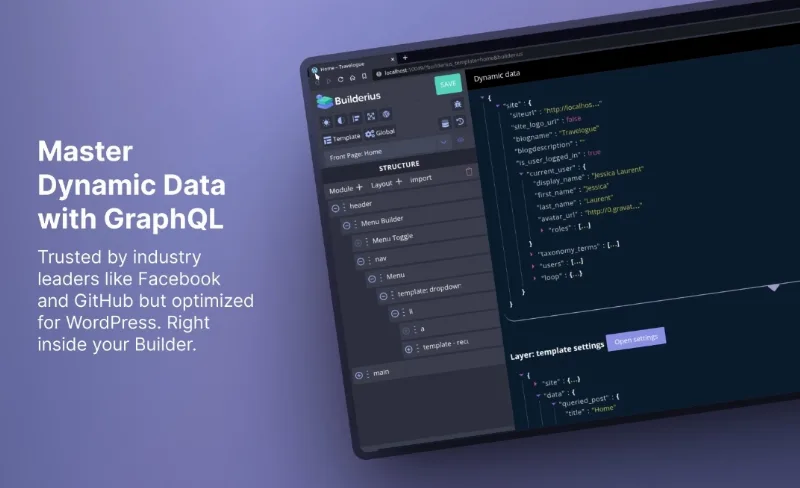
The workflow comes down to three steps: you generate the base with AI, refine it with visual and code control, and deploy as WordPress or as a static site. Dynamic data is queried with GraphQL, through an editor with snippets and real-time previews.
Versions, rollback and deployment
A release system underpins version control and one-click rollback. You can prepare changes in staging, undo what does not convince you and move the site elsewhere, export or import it, or push it to a remote installation.
If your site already uses another theme and other builders, Builderius works alongside them
It works with any theme and does not conflict with other builders, so you can move templates over gradually from Elementor, Divi or any other builder instead of rebuilding the site all at once.
Builderius is a visual development environment for WordPress. The online demo requires no installation.
Frequently asked questions about Builderius PRO
Do I need to know how to code to use it?
You can work visually and write CSS or direct code when the project calls for it.
Can I see the builder before installing it?
Yes. The demo opens without installation, so you can check how the editor works before you decide.
What happens if a change goes wrong?
You can undo any change from the release system, with a one-click rollback.
Can I turn the site into a static website?
Yes. The same releases let you deploy it as a static site or as WordPress.
Can it display WordPress data in templates?
Yes. Queries are made with GraphQL on WordPress data, with snippets and real-time previews, so you can pull only what the page needs.
Version history
-
v
0.12.1 Current 12 May 2024
Customer reviews
Sign in to leave a review. Only people who have the product can review it.
No reviews for this product yet.
Frequently asked questions
-
GPL (General Public License) is the license under which WordPress and most premium plugins/themes are distributed. It grants you the right to use, modify and redistribute the software in as many projects as you want, with no domain restrictions.
-
Yes. With membership you get automatic updates via our GPLClub Updater plugin (installed on your WP, detects new versions and applies them). With individual purchase, you get one year of manual updates from your account.
-
Depends on the plan. Monthly: 3 domains. Semi-annual: 7. Annual and Lifetime: 15. Individual purchase: 1 domain.
-
GPLClub offers its own support for installation, configuration and compatibility. For direct support from the original author (feature requests, product-specific bugs), a license purchased from the author is required.