Bulk Table Editor for WooCommerce
Antivirus scan
Powered by ClamAV
✅ Verified clean
This product file has passed our security filters.
Want to run a fresh ClamAV scan right now? Takes a few seconds and shows scanner version, signature DB and live result.
This can take 5 to 30 seconds.
Clean file Threat detected
No threats detected in this file.
- File
- Size
- Scanned
- ClamAV
- Signature database
⚡ Powered by ClamAV
Scan could not be completed
Report product
If you detected an issue (broken file, malware, inappropriate content, etc.) let us know and we'll review it ASAP.
Sign in to report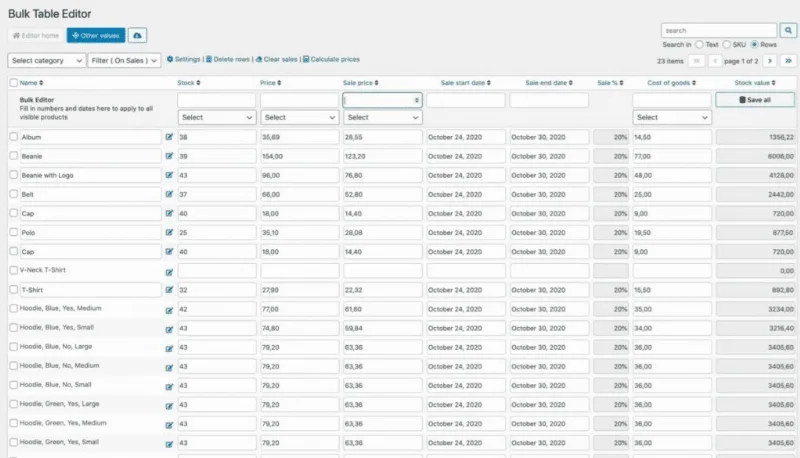
About Bulk Table Editor for WooCommerce
When changing one price means opening a hundred product pages
Raising a supplier's prices by 5%, scheduling Black Friday sales or fixing stock after an inventory count often ends in hours of opening product after product, with the risk of missing a variation or editing the wrong one. Bulk Table Editor for WooCommerce replaces that back and forth with a table where you see products and variations together and change whatever you need in one go.
There is a truth that people managing a large catalog learn late: the costly mistake is rarely mistyping a price, but applying a correct change to the wrong group of products. That is why what matters in this tool is not bulk editing itself, but filtering well before you edit.
Prices, stock and sales from a single table
- Price adjustments: increase or decrease by percentage or fixed value, set an exact price (for example 9.99) or apply rounding so you don't end up with odd decimals.
- Stock: bulk stock updates.
- Sales: discounts or sale prices with start and end dates across many products at once, and removal of sales when the campaign ends.
- Sale memory: it remembers previous sale prices, so for recurring promotions you can restore them and change only the dates.
Filters so you only touch what you mean to touch
Filters are the part that gives you safety. You can combine multi-select filters for categories, tags and stock status, separate products on sale from those that are not, and use ranges: products priced between two amounts or with stock below a threshold. Filters stay active while you navigate, so you don't lose your selection halfway through the job.
What it offers depending on how you run your store
If you sell with many variations
You can edit simple products and variations in the same table: prices, stock, attributes and linked products. It also works with global and custom attributes, and with some custom fields, without opening each product, which helps keep data consistent across long spec sheets.
If you buy from suppliers and readjust margins
Percentage changes, rounding and range filters help you review entire price lists. It integrates with extensions such as Cost of Goods, Cost & Reports and Product Vendors, among others.
If you work by campaigns and seasons
Scheduling sales with dates, reusing previous sales and reassigning categories in bulk (add, remove, replace or clear) lets you set up and take down a seasonal collection without repeating tasks. You can also update featured and gallery images, and zoom into them in the table to check them.
If you care about cross-selling
The linked products tab assigns upsells, cross-sells and related products in bulk, with suggestions to find candidates faster. If you sell several brands, it also manages WooCommerce brands in bulk.
What else is worth knowing before you use it
- You can export your product data to CSV, useful for backups, reports or reviewing it outside WordPress.
- It works with WooCommerce Subscriptions, Min/Max Quantities, Name Your Price, Roles & Rules B2B, Pick List and Bulk Category Editor, and it is compatible with high performance order storage (HPOS).
- The interface is available in English, Spanish, French, German and Norwegian.
It needs WooCommerce and is built for catalogs, not orders
It is a WooCommerce extension: without it, it makes no sense. It focuses on managing products, variations and subscriptions, not on editing orders or customers. And although it requires no technical knowledge, it does require judgment: in a table it is very easy to apply a bulk change, so always check the filter before confirming.
Frequently asked questions about Bulk Table Editor for WooCommerce
Does it edit variations?
Yes, both simple products and variations, including prices, stock, attributes and linked products.
Do I need to know how to code?
No. You work from a table interface designed for the people who run the store.
Can I remove all the sales from a campaign at once?
Yes: you filter by sale status and remove the sale prices in bulk.
Can I get a list of my products?
Yes, with the CSV export.
Is it suitable for small stores?
You notice it most when editing by hand already costs you hours every week.
Topics
Version history
-
v
2.6.10 Current 22 Sep 2026
-
v
2.6.9 5 Sep 2026
-
v
2.6.7 18 Apr 2026
Customer reviews
Sign in to leave a review. Only people who have the product can review it.
No reviews for this product yet.
Frequently asked questions
-
GPL (General Public License) is the license under which WordPress and most premium plugins/themes are distributed. It grants you the right to use, modify and redistribute the software in as many projects as you want, with no domain restrictions.
-
Yes. With membership you get automatic updates via our GPLClub Updater plugin (installed on your WP, detects new versions and applies them). With individual purchase, you get one year of manual updates from your account.
-
Depends on the plan. Monthly: 3 domains. Semi-annual: 7. Annual and Lifetime: 15. Individual purchase: 1 domain.
-
GPLClub offers its own support for installation, configuration and compatibility. For direct support from the original author (feature requests, product-specific bugs), a license purchased from the author is required.