Cbk Price Subscribe
Antivirus scan
Powered by ClamAV
✅ Verified clean
This product file has passed our security filters.
Want to run a fresh ClamAV scan right now? Takes a few seconds and shows scanner version, signature DB and live result.
This can take 5 to 30 seconds.
Clean file Threat detected
No threats detected in this file.
- File
- Size
- Scanned
- ClamAV
- Signature database
⚡ Powered by ClamAV
Scan could not be completed
Report product
If you detected an issue (broken file, malware, inappropriate content, etc.) let us know and we'll review it ASAP.
Sign in to reportNewer version out, or a problem?
About Cbk Price Subscribe
Price alerts for buyers waiting for a drop
When an Osclass listing has a price, interested buyers often wait: they want to pay less, but they don't know when it will drop, and checking the page every day gets tedious. Cbk Price Subscribe solves that wait. The user leaves their email on the listing itself, sets the price limit that suits them, and gets the alert as soon as the price reaches it, without having to check back.
The alert form appears on the page of each listing that has a price set, so the alert is created right when the interest is there.
Buyer without an account on the site
No registration is needed. An email is enough to create the alert, and the system sends it when the price reaches the limit. If they want to cancel, they receive an email with a link to delete the alert. You can set a delay between those emails so they can't request several delete links in a row.
User who is logged in
If you want, the email on their account is saved and replaces the one they type in the form. You can also turn off the alert option for registered users if you don't want to offer it to people who are logged in.
Buyer who tries to create repeated alerts
The same user can't create several alerts for the same listing, even if they change email.
Price evolution chart for listings whose price changes often
When the seller changes a listing's price, the plugin stores that change and draws the evolution in a daily chart. Changes are saved by day and, if the price is changed several times on the same day, only the last one is kept.
When there are no saved values yet in the chart table, the script adds a start point and an end point with the current price. You set the period in the admin with the number of days of changes you want to keep, and that number defines how far back the chart goes.
Needs an active site cron to send the alerts
Sending alerts and cleaning up old subscriptions runs on a cron task of your own site, so cron has to be active and running. If cron doesn't run, the alerts don't go out.
Another point to keep in mind is HTML email. This plugin includes an HTML template for its emails, and it is incompatible with any other plugin that generates HTML email templates. If you use one, turn off this plugin's template option in the admin.
Frequently asked questions about Cbk Price Subscribe
Does the form appear on every listing?
Only on listings that have a price set. On a listing without a price, the alert form is not shown.
Does the buyer need an account?
No. They create the alert with their email and don't need to register or log in.
Can the buyer cancel the alert?
Yes. If you turn on the option in the admin, logged-in users can delete the alert, and those without an account receive an email with a link to remove it.
How many emails are sent at once?
You can set how many emails go out in each sending.
Is the price history saved for every listing?
The price changes the seller makes are saved, one per day, and the chart uses the number of history days you have configured.
Admin settings to control the alerts and the chart
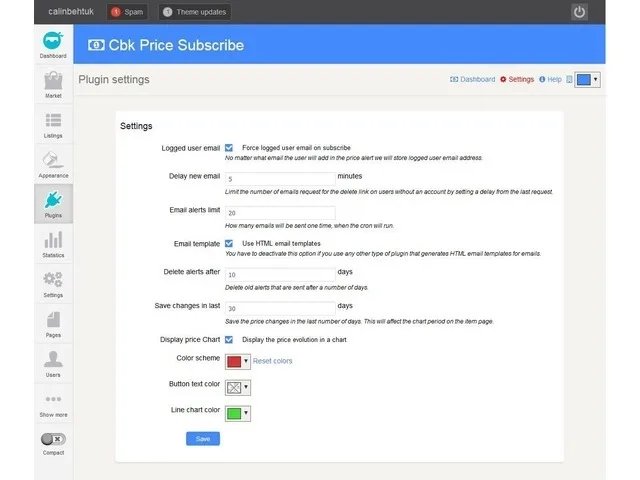
From the admin panel you control several things: how many emails go out in each sending, the color scheme of the alert form, whether the email from the account replaces the one the user types, and how many days are kept for the price chart.
Topics
Version history
-
v
1.0.0 Current 13 May 2024
Customer reviews
Sign in to leave a review. Only people who have the product can review it.
No reviews for this product yet.
Frequently asked questions
-
GPL (General Public License) is the license under which WordPress and most premium plugins/themes are distributed. It grants you the right to use, modify and redistribute the software in as many projects as you want, with no domain restrictions.
-
Yes. With membership you get automatic updates via our GPLClub Updater plugin (installed on your WP, detects new versions and applies them). With individual purchase, you get one year of manual updates from your account.
-
Depends on the plan. Monthly: 3 domains. Semi-annual: 7. Annual and Lifetime: 15. Individual purchase: 1 domain.
-
GPLClub offers its own support for installation, configuration and compatibility. For direct support from the original author (feature requests, product-specific bugs), a license purchased from the author is required.