Checkoutify - Checkout Field Editor For WooCommerce
Antivirus scan
Powered by ClamAV
✅ Verified clean
This product file has passed our security filters.
Want to run a fresh ClamAV scan right now? Takes a few seconds and shows scanner version, signature DB and live result.
This can take 5 to 30 seconds.
Clean file Threat detected
No threats detected in this file.
- File
- Size
- Scanned
- ClamAV
- Signature database
⚡ Powered by ClamAV
Scan could not be completed
Report product
If you detected an issue (broken file, malware, inappropriate content, etc.) let us know and we'll review it ASAP.
Sign in to report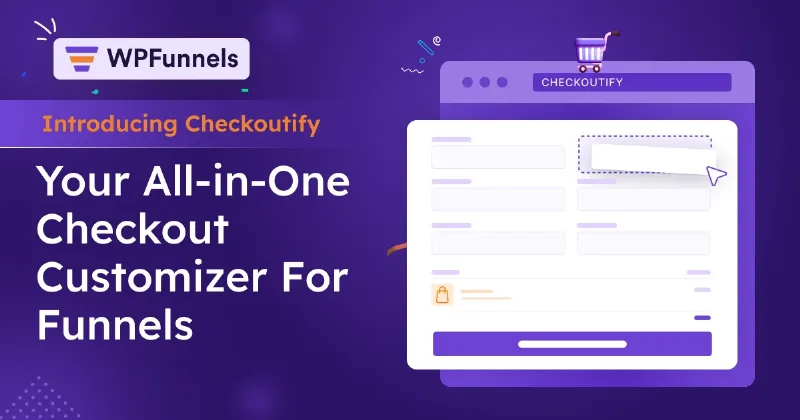
About Checkoutify - Checkout Field Editor For WooCommerce
Your shop checkout is a page whose design you never chose
You looked after the home page and the product photos. And when someone finally decides to buy, they reach a form your shop inherited from WooCommerce: almost the same fields for someone buying a table and someone downloading a PDF.
Checkout is one more sales page, and whatever is surplus on it is paid for by the person about to buy. Asking for a full postal address to download a PDF lengthens the form, and that buyer has to go through all of it anyway.
Checkoutify, by WPFunnels, treats checkout as a page you design: with a drag-and-drop editor you choose which fields appear, in what order, in how many steps and with what look.
A visual editor for the checkout form
- Fields: you add your own fields, remove or disable existing ones and reorder them.
- By product: you limit the fields to what that product needs, for example no address for digital ones.
- Design: colours, typography, columns and layout of fields, headings and sections.
- Multiple steps: you split checkout into stages, reorder them and add a progress bar.
- Express layout: a ready-made design so you do not start from zero.
- Payments: it shows the methods you have active on the site.
- Guest checkout: first-time buyers can finish without creating an account.
- Heading fields and hidden fields on the form.
Several forms per shop, with funnels and without them
You can add an order bump, an extra offer inside the form itself, to raise the value of each order. It also works on the standard checkout: you create the form, include the offer in it and put it in place of the default WooCommerce checkout.
There is not just one design. You can create as many forms as you want, and each one can replace the default WooCommerce checkout, replace the checkout of a specific funnel or be placed on any page of the site.
Checkoutify belongs to the WPFunnels family, and that can confuse: it is not limited to funnels. It serves to customize the normal WooCommerce checkout and also to prepare forms for WPFunnels funnels.
If you already use WPFunnels, you can apply it to your existing funnels to replace the WooCommerce checkout they carry, or set it with one click as the default checkout for every funnel you create afterwards.
It also does not rely on a page builder for the design: the editor is its own.
Gateways, funnels and carts stay outside the editor
Checkoutify changes the shape of checkout. Among its features there are no payment gateways of its own: it shows the ones you already have active, so payment methods are still configured in WooCommerce.
It is not a funnel builder either. Post-purchase upsells, A/B tests and the visual canvas belong to WPFunnels, not to this editor.
Among its features there is also no abandoned cart recovery, which in this family belongs to Mail Mint.
From active WooCommerce to your new default checkout
It needs WooCommerce installed and active. To get it running:
- Install the plugin from Plugins, Add New, Upload Plugin, and activate it.
- Go to WooCommerce, Checkoutify tab, to open its panel.
- Click + Add New and, under Find Your Layouts, choose a layout or start from scratch.
- Adjust the fields, steps and design in the editor.
- In the Settings tab, enable Set as default WooCommerce checkout and click Update.
- Open your shop checkout page and place a complete test order.
Other checkout editors in the catalogue
If what you want is to show fields according to the situation of the order, WPC Checkout Field Editor brings more than twenty field types and conditional logic on payment method, shipping, country and cart. Checkout Field Editor and Manager works along the same lines, with rules by product, category or customer role.
If you want the full funnel, the product from the same family is WPFunnels Pro.
Questions about Checkoutify and your current checkout
Do I need to use funnels to get value from it?
No. It serves to customize the normal WooCommerce checkout, as well as WPFunnels funnels.
Can I remove the address for digital products?
Yes. You can leave the address fields out if you sell digital products.
Can I put an order bump on the normal checkout?
Yes. Create a form with the offer and use it in place of the default WooCommerce checkout.
Topics
Version history
-
v
1.0.10 Current 25 Jan 2025
Customer reviews
Sign in to leave a review. Only people who have the product can review it.
No reviews for this product yet.
Frequently asked questions
-
GPL (General Public License) is the license under which WordPress and most premium plugins/themes are distributed. It grants you the right to use, modify and redistribute the software in as many projects as you want, with no domain restrictions.
-
Yes. With membership you get automatic updates via our GPLClub Updater plugin (installed on your WP, detects new versions and applies them). With individual purchase, you get one year of manual updates from your account.
-
Depends on the plan. Monthly: 3 domains. Semi-annual: 7. Annual and Lifetime: 15. Individual purchase: 1 domain.
-
GPLClub offers its own support for installation, configuration and compatibility. For direct support from the original author (feature requests, product-specific bugs), a license purchased from the author is required.