Contact Us Form – WordPress Contact Form Plugin
Antivirus scan
Powered by ClamAV
✅ Verified clean
This product file has passed our security filters.
Want to run a fresh ClamAV scan right now? Takes a few seconds and shows scanner version, signature DB and live result.
This can take 5 to 30 seconds.
Clean file Threat detected
No threats detected in this file.
- File
- Size
- Scanned
- ClamAV
- Signature database
⚡ Powered by ClamAV
Scan could not be completed
Report product
If you detected an issue (broken file, malware, inappropriate content, etc.) let us know and we'll review it ASAP.
Sign in to reportNewer version out, or a problem?
About Contact Us Form – WordPress Contact Form Plugin
Asking only for what you need and keeping what the visitor has written
A form that is too long makes the visitor leave halfway, and one that is too short leaves your team without the details it needs to reply. That balance changes from site to site, and here you control it field by field.
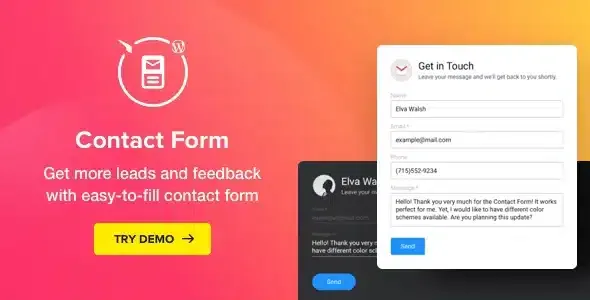
You can show only the fields you need, change their labels, order them in the sequence you prefer and choose which ones are required, which are marked automatically with an asterisk. Placeholders guide the visitor on how to fill in each field, so the data you receive arrives in the format you need.
Validation runs in the browser, so the error appears before sending. The form also saves what the visitor has already typed, so a failure or an accidental page close does not force them to start over.
Thank-you message, sending without reloading the page and spam protection
Sending uses AJAX, so the page does not reload when the message is submitted. Afterwards an animated thank-you message appears, where you can write whatever you want: a thank-you, the response time or other instructions.
The header offers three pieces: a title that invites people to write, such as Contact us or Leave a message, an informative text shown right above the form, and a picture, which can be an email icon or a photo of your support team.
Against spam, the form is protected by Google reCAPTCHA, which filters out bots without complicating things for real visitors. In the settings you decide which email address receives the messages.
Fixed or floating form in Contact Us Form: which one to choose and where it fits
If your site already has a contact page where people look for a way to reach you, the classic form on that page is the natural choice. If you want contact available from anywhere, the floating format is the right one: a message icon in the right corner opens the form with one click and follows the visitor while they browse. The plugin lets you use both at once.
It fits the way you already build your pages:
- A shortcode that you generate in the admin panel and paste wherever you need it.
- A widget you can add to the sidebar or the footer of the site.
- An element for WPBakery Page Builder if you use that builder.
- Compatibility with popular themes such as Avada, Jupiter, BeTheme, Enfold, Flatsome, X, Salient and Bridge.
It needs WordPress with jQuery, which WordPress itself includes by default. The plugin is configured in a live visual editor, so you see the result while adjusting the look.
Frequently asked questions about Contact Us Form
Can I hide the fields I don't use?
Yes. In the settings of each field you switch it off and it stops showing. If you change your mind, you can bring it back whenever you want.
How do I make a field required?
In the field settings, switch on the Required option. The field is marked with an asterisk and the form cannot be sent until it is filled in.
How do I use the floating format?
A message icon appears in the right corner of the page and, when clicked, the form opens ready to fill in.
Can it be placed anywhere on the site?
Yes. You insert it with its shortcode on a page, add it as a widget in the sidebar or footer, or use the WPBakery element if you build with that page builder.
Topics
Version history
-
v
2.3.1 Current 8 Jan 2025
Customer reviews
Sign in to leave a review. Only people who have the product can review it.
No reviews for this product yet.
Frequently asked questions
-
GPL (General Public License) is the license under which WordPress and most premium plugins/themes are distributed. It grants you the right to use, modify and redistribute the software in as many projects as you want, with no domain restrictions.
-
Yes. With membership you get automatic updates via our GPLClub Updater plugin (installed on your WP, detects new versions and applies them). With individual purchase, you get one year of manual updates from your account.
-
Depends on the plan. Monthly: 3 domains. Semi-annual: 7. Annual and Lifetime: 15. Individual purchase: 1 domain.
-
GPLClub offers its own support for installation, configuration and compatibility. For direct support from the original author (feature requests, product-specific bugs), a license purchased from the author is required.