Cookie Plus – GDPR for Master Popups
Antivirus scan
Powered by ClamAV
✅ Verified clean
This product file has passed our security filters.
Want to run a fresh ClamAV scan right now? Takes a few seconds and shows scanner version, signature DB and live result.
This can take 5 to 30 seconds.
Clean file Threat detected
No threats detected in this file.
- File
- Size
- Scanned
- ClamAV
- Signature database
⚡ Powered by ClamAV
Scan could not be completed
Report product
If you detected an issue (broken file, malware, inappropriate content, etc.) let us know and we'll review it ASAP.
Sign in to report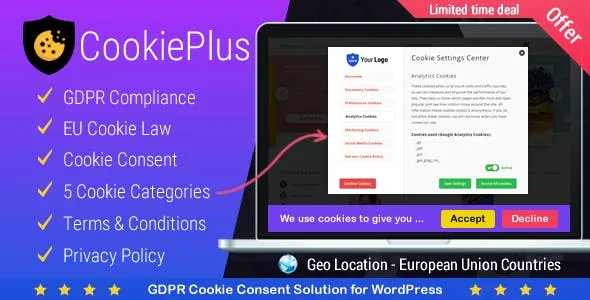
About Cookie Plus – GDPR for Master Popups
A cookie banner that blocks nothing is just decoration
Many websites show a cookie notice, the visitor clicks «Accept» or doesn't touch it at all, and meanwhile Google Analytics, the Facebook pixel and half a dozen scripts have already left their cookies in the browser. The notice is there, but consent isn't respected. Cookie Plus – GDPR for Master Popups starts from that point: it doesn't just display the message, it blocks non-essential cookies until the user accepts them.
The people who install this usually have a site with several measurement tools, forms and maybe a shop, and each one adds its own cookies without warning. The real problem isn't the banner text, it's knowing what runs and when.
Block everything or block by category: how Cookie Plus decides what loads
The plugin offers two blocking methods:
- Block everything: no non-essential cookie is activated until the user accepts, whatever group they choose.
- Block by groups: only the cookies and scripts of the categories the visitor hasn't accepted are stopped. The plugin comes with 5 cookie groups (including one for social media).
Besides the main notice, you can enable a second settings popup where users choose which categories they accept or decline, and they can change it again whenever they want. That panel has two predefined themes and three presentation modes: with tabs, compact, and compact with tabs.
Consent can be given by clicking the accept button, by closing the popup or by scrolling. There are also options to reload the page or close the popup after accepting or declining, and to remove cookies if they are declined.
Consent log, geo detection and services it already recognizes
Cookie Plus keeps a log of consents: cookies, terms and conditions and privacy policy. The columns include whether everything was accepted, whether it was declined, platform, browser and device. You can delete logs and mask users' IPs. It also automatically detects your site's cookies and shows them in a list.
IP geolocation lets you show the notice only in certain countries, with a checkbox to select all European Union countries at once. By default the popup appears in every country. This is useful if your audience is mixed and you don't want the notice in markets where you don't need it, although that legal decision is yours.
It manages cookies from common services: Google Analytics, Google Tag Manager, Google AdWords, Facebook Pixel, Hotjar, DoubleClick, Cloudflare, Sharethis, WooCommerce, BuddyPress, Contact Form 7, Gravity Forms and WordPress comments. There is a custom code option for any other tracking script.
Customization: templates, shortcodes and translation
There are 8 popup templates, fully customizable, with an option for your own logo and an overlay background that hides the content until the user decides. You can link terms and conditions and privacy policy, and use shortcodes. It is WPML compatible and includes translation files, with Spanish included.
It needs Master Popups: the decision before buying
Cookie Plus is an add-on, it doesn't work on its own: it requires the Master Popups plugin to be installed. If you already use it for your popups, it fits naturally. If not, you will have to add it and learn how it works.
It also doesn't write your policies or guarantee legal compliance by itself: it gives you blocking and logging tools, but which cookies to declare and which texts to publish depends on your site and your legal advisor.
Does it work if my site uses Google Analytics and Facebook Pixel?
Yes, both are among the services it manages, and you can group them into categories so visitors accept them separately.
Can I show the notice only to EU visitors?
Yes, with IP geo detection you choose specific countries or tick all European Union ones.
Can I see what each user has accepted?
Yes, the consent log records each acceptance or refusal, with browser and device, and lets you mask the IP.
Does it work without Master Popups?
No, it needs it installed to display the popups.
Version history
-
v
1.6.5 Current 26 Oct 2026
-
v
1.6.3 8 May 2024
Customer reviews
Sign in to leave a review. Only people who have the product can review it.
No reviews for this product yet.
Frequently asked questions
-
GPL (General Public License) is the license under which WordPress and most premium plugins/themes are distributed. It grants you the right to use, modify and redistribute the software in as many projects as you want, with no domain restrictions.
-
Yes. With membership you get automatic updates via our GPLClub Updater plugin (installed on your WP, detects new versions and applies them). With individual purchase, you get one year of manual updates from your account.
-
Depends on the plan. Monthly: 3 domains. Semi-annual: 7. Annual and Lifetime: 15. Individual purchase: 1 domain.
-
GPLClub offers its own support for installation, configuration and compatibility. For direct support from the original author (feature requests, product-specific bugs), a license purchased from the author is required.