CRM WordPress Plugin - RepairBuddy
Antivirus scan
Powered by ClamAV
✅ Verified clean
This product file has passed our security filters.
Want to run a fresh ClamAV scan right now? Takes a few seconds and shows scanner version, signature DB and live result.
This can take 5 to 30 seconds.
Clean file Threat detected
No threats detected in this file.
- File
- Size
- Scanned
- ClamAV
- Signature database
⚡ Powered by ClamAV
Scan could not be completed
Report product
If you detected an issue (broken file, malware, inappropriate content, etc.) let us know and we'll review it ASAP.
Sign in to reportNewer version out, or a problem?
About CRM WordPress Plugin - RepairBuddy
Knowing where each device is without calling the customer
In a repair shop, much of the day goes to answering the same question: is it ready yet? Every call interrupts the technician, and a customer who gets no news tends to call again. RepairBuddy is built for that business: phones, laptops, watches, jewelry, drones or appliances that move across a workbench and need tracking from check-in to pickup. It is a WordPress CRM plugin, so you can run customers, jobs and invoices from your own site.
Estimates, work orders and invoices in RepairBuddy
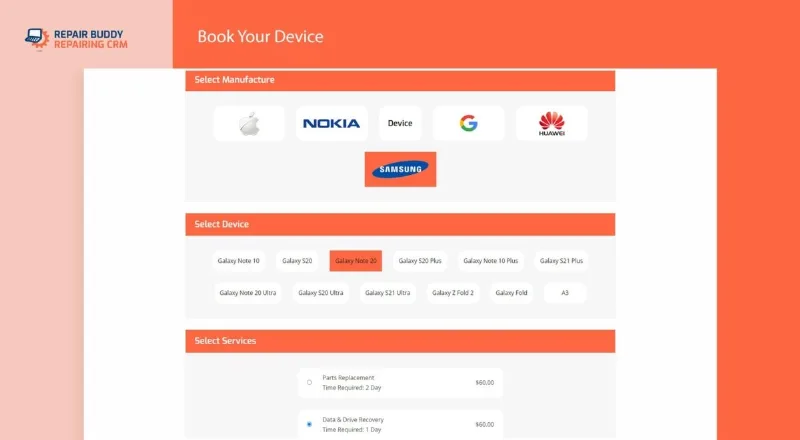
Customers request an appointment from your website by choosing the service type, the device and their preferred time, without calling. You send a detailed estimate that the customer approves or rejects with one click, which speeds up job processing. The work order assigns a technician, notes and a due date, and the invoice shows itemized charges, taxes, discounts and service details, ready to download or email.
In-store, online and WooCommerce payments
You can record payments made at the counter, collect through online gateways, or use the WooCommerce integration, which also helps manage parts, accessories and services. An automatic receipt is issued after each payment. Note that the WooCommerce integration requires WooCommerce to be installed and active on your site.
QR repair tickets, workbench labels and a delivery calendar
Each repair gets a ticket with a unique code that gathers the device details, the customer details and the status. The scannable label on each device shows the job ID, customer information and status, so the technician can identify the unit at a glance while working at the bench. A drag-and-drop calendar shows active jobs, due dates and technician schedules so no delivery slips through.
Diagnostics, notes, attachments and updates are kept inside each job from start to finish. Sales, job status, payment and top-customer reports let you review the business with real figures.
Customers who follow their repair in RepairBuddy
Each customer can have their own login to view their repairs, approve estimates, check status and download invoices, a self-service portal that reduces calls. There is also a secure job status page where customers check progress in real time. SMS or email updates go out automatically when a job, an estimate or a payment changes.
When a job is finished, you can request customer feedback and schedule maintenance or check-up reminders, a way to win back customers who already trusted your shop.
Frequently asked questions about RepairBuddy
Can I take online payments with RepairBuddy?
Yes. You can use online payment gateways, record manual payments or connect payments with WooCommerce, as long as WooCommerce is active on your site.
Which types of devices does it cover?
RepairBuddy is aimed at repairs of phones, laptops, computers, watches, jewelry, drones and appliances, with dedicated pages for each industry.
Can customers see their repair status without calling?
Yes, through their own portal access or through the secure job status page, which updates in real time.
Can I use the cloud version instead of my own WordPress?
Yes. Besides the WordPress version, RepairBuddy Cloud exists.
Before you decide: your own WordPress or the cloud version
The first decision is where you want the system to live. With the WordPress version, the platform is yours. RepairBuddy Cloud spares you from hosting it yourself. Compare both options based on who will use the system and where you want to keep the data.
If you take payments through your shop, WooCommerce must be active on the same site. And if you repair another type of device, check in the demo that the workflow fits you.
Topics
Version history
-
v
3.7941 Current 14 May 2024
Customer reviews
Sign in to leave a review. Only people who have the product can review it.
No reviews for this product yet.
Frequently asked questions
-
GPL (General Public License) is the license under which WordPress and most premium plugins/themes are distributed. It grants you the right to use, modify and redistribute the software in as many projects as you want, with no domain restrictions.
-
Yes. With membership you get automatic updates via our GPLClub Updater plugin (installed on your WP, detects new versions and applies them). With individual purchase, you get one year of manual updates from your account.
-
Depends on the plan. Monthly: 3 domains. Semi-annual: 7. Annual and Lifetime: 15. Individual purchase: 1 domain.
-
GPLClub offers its own support for installation, configuration and compatibility. For direct support from the original author (feature requests, product-specific bugs), a license purchased from the author is required.