Divi Ajax Filter Plugin
Antivirus scan
Powered by ClamAV
✅ Verified clean
This product file has passed our security filters.
Want to run a fresh ClamAV scan right now? Takes a few seconds and shows scanner version, signature DB and live result.
This can take 5 to 30 seconds.
Clean file Threat detected
No threats detected in this file.
- File
- Size
- Scanned
- ClamAV
- Signature database
⚡ Powered by ClamAV
Scan could not be completed
Report product
If you detected an issue (broken file, malware, inappropriate content, etc.) let us know and we'll review it ASAP.
Sign in to report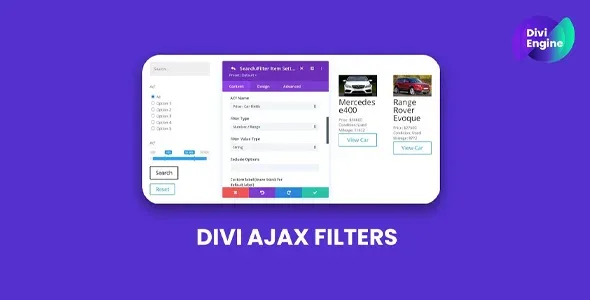
About Divi Ajax Filter Plugin
Divi displays listings and does not know how to filter them
It is the gap that appears the moment a Divi project grows. The blog module pulls the posts, the shop module pulls the products, and that is where it ends: the visitor sees a grid and to find anything specific has to page through it.
With twenty items it does not matter. With two hundred products or four hundred articles, the listing stops being navigable and the visitor leaves without having seen what they came for.
Divi Ajax Filter adds the missing filter panel, and it responds without reloading the page.
What it can filter
- WooCommerce products, by attribute, category, tag and price range.
- Blog posts and custom content types.
- Advanced Custom Fields data, which is what allows filtering by your catalogue's real information.
With dropdowns, checkboxes and radio buttons as suits, plus a switcher between list and grid views. The filters are modules placed inside the Divi builder like any other.
What makes it worthwhile: the custom fields
Filtering by category is something almost anything does. What sets this plugin apart is being able to filter by the fields you defined.
On a property catalogue that means filtering by square metres, bedrooms and floor. On a machinery one, by power output and capacity. On a professional directory, by specialty and area. That is the filter people genuinely use, and the one that does not exist if you can only filter by taxonomies.
Requirements
It needs the Divi theme, with PHP 7.4 or above, WordPress 5.8 or above and at least 512 MB of memory. Filtering by custom fields also requires Advanced Custom Fields, which is what defines them.
Worth checking compatibility with your specific Divi version before buying: builder addons are coupled, and a large gap between plugin and theme shows up immediately.
How to start
One. Check first that your data lives in fields rather than written inside the description. If each property's square metres are in the text, there is nothing to filter.
Two. Start with three filters, the ones people genuinely use. A panel with twelve options does not get used, it gets ignored.
Three. Test with the catalogue full, not with ten sample items. Filtering without reload shows its worth at volume.
Four. Look at what addresses the filters generate and decide which ones you want Google indexing. A large catalogue generates thousands of nearly identical combinations.
Alternatives in the catalogue
If besides filtering you need to create the catalogue itself (content types, fields and dynamic listings), the piece needed first is Divi Machine, which is the dynamic content system equivalent for Divi and brings its own filters.
If what you want is presentation modules generally rather than filters specifically, DiviFlash extends the builder's module catalogue.
And if your shop sells products and what you want is the carousel more than the filter, the product carousel for Divi handles only that, with considerably more control than the standard module gives.
Frequently asked questions
Does it work without Divi?
No. It adds modules to the Divi builder and needs it installed.
Does it filter without reloading the page?
Yes, results update instantly.
Can I filter by ACF fields?
Yes, and it is what most sets it apart. ACF has to be installed.
Is it suitable for WooCommerce products?
Yes, by attribute, category, tag and price.
Does it bring a list and grid switcher?
Yes, among the display options.
Which Divi version does it need?
Worth checking compatibility with yours before buying, because they are coupled.
Topics
Version history
-
v
4.1.10 Current 11 Apr 2026
Customer reviews
Sign in to leave a review. Only people who have the product can review it.
No reviews for this product yet.
Frequently asked questions
-
GPL (General Public License) is the license under which WordPress and most premium plugins/themes are distributed. It grants you the right to use, modify and redistribute the software in as many projects as you want, with no domain restrictions.
-
Yes. With membership you get automatic updates via our GPLClub Updater plugin (installed on your WP, detects new versions and applies them). With individual purchase, you get one year of manual updates from your account.
-
Depends on the plan. Monthly: 3 domains. Semi-annual: 7. Annual and Lifetime: 15. Individual purchase: 1 domain.
-
GPLClub offers its own support for installation, configuration and compatibility. For direct support from the original author (feature requests, product-specific bugs), a license purchased from the author is required.