Everest Forms (Pro)
Antivirus scan
Powered by ClamAV
✅ Verified clean
This product file has passed our security filters.
Want to run a fresh ClamAV scan right now? Takes a few seconds and shows scanner version, signature DB and live result.
This can take 5 to 30 seconds.
Clean file Threat detected
No threats detected in this file.
- File
- Size
- Scanned
- ClamAV
- Signature database
⚡ Powered by ClamAV
Scan could not be completed
Report product
If you detected an issue (broken file, malware, inappropriate content, etc.) let us know and we'll review it ASAP.
Sign in to report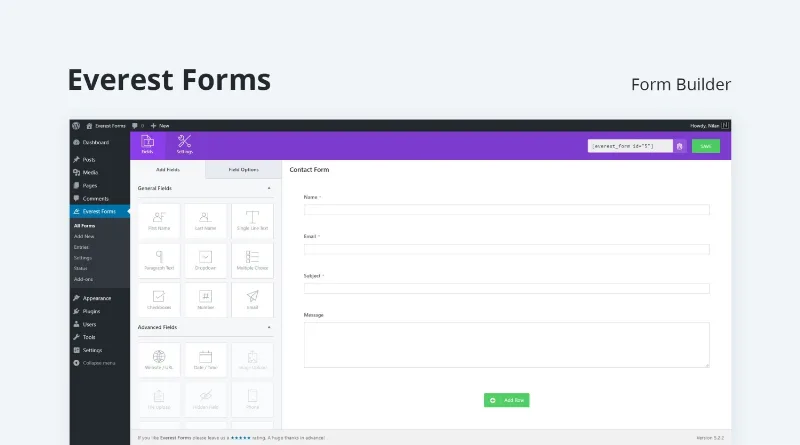
About Everest Forms (Pro)
A form nobody finishes is a customer who leaves
Publishing a form is easy; getting people to reach the end is the hard part. Long forms get abandoned, notifications get lost in the inbox and answers end up scattered across loose emails. Everest Forms (Pro) is a form builder for people who need the form to actually do its job: capture contacts, take payments, measure or collect opinions.
The key is that most businesses only look at how many forms they receive, and almost never at how many people start one and leave halfway. Here you have tools to tackle that problem.
Forms that don't overwhelm: steps, one question at a time and saving
For long forms, Everest Forms (Pro) lets you use:
- Multi-step forms: split a long questionnaire into several pages.
- Conversational forms: show a single question at a time.
- Save and continue: users save their progress and finish later.
- Conditional logic: show or hide fields depending on the person's answers, so they only see what applies to them.
With more than 35 field types and ready-made templates (simple contact, product order, donations, customer survey, affiliate application) you start from a base and adjust it. There is also an AI generator: you describe the form in your own words and it creates fields, logic and layout, and then you can tweak it through a chat.
What happens with each submission: alerts, entries and analytics
Each submission can trigger an automatic email to the administrator or the user. Entries are stored in the WordPress dashboard, where you can edit, delete, sort, filter and export them to CSV, Excel or PDF. A practical detail: you see the answers inside your own WordPress, without depending on an external service.
There are also analytics for entries, submissions and conversion, a public entry listing on a page in table format, redirection after submission and spam protection with captcha, honeypot and other tools.
Charge, calculate and capture leads from the same form
Payment forms support up to six gateways, with no separate checkout page, for one-time or recurring payments. There are price calculators with conditional logic, discount coupons in supported cases, an e-signature field, a QR code generator that points to the form, pop-up forms via shortcode and standalone landing pages to capture leads.
It connects with services such as Mailchimp, Brevo, HubSpot, Salesforce, MailPoet, MailerLite, Zapier, Pipedrive, PayPal or Razorpay, depending on what you use.
Bookings with a calendar are not solved
It helps to separate what the plugin covers from what you will have to solve yourself:
- Already solved: contact, orders, donations, surveys, quizzes, price calculation, payments, content submitted by visitors with file upload and entries in the dashboard.
- With another plugin or by hand: a schedule with real availability and blocked hours, if you are after appointments. A form collects the request, but it does not manage a calendar.
- With a professional: the privacy policy, consent and handling of the personal data you collect, which depend on your case.
- With your design: the style customizer helps match the form to your site, but if your theme is very particular, check in the demo how it looks.
Frequently asked questions about Everest Forms (Pro)
Can I create a form without building it field by field?
Yes, with the AI generator you describe what you need, or you start from a template and adjust it by dragging fields.
Can it take payments?
Yes, with up to six payment gateways, for both one-time and recurring payments.
Can I connect it to my email marketing tool?
Yes, there are integrations with services such as Mailchimp, Constant Contact, AWeber or GetResponse, among others.
Can I export the answers to a spreadsheet?
Yes, entries can be exported to CSV, Excel and PDF.
Does it let visitors publish content?
Yes, with front-end forms that support file upload, for example for testimonials, listings or media.
Topics
Version history
-
v
1.9.21 Current 7 Sep 2026
-
v
1.9.20 5 Sep 2026
-
v
1.9.19 5 Aug 2026
-
v
1.9.16 5 May 2026
Customer reviews
Sign in to leave a review. Only people who have the product can review it.
No reviews for this product yet.
Frequently asked questions
-
GPL (General Public License) is the license under which WordPress and most premium plugins/themes are distributed. It grants you the right to use, modify and redistribute the software in as many projects as you want, with no domain restrictions.
-
Yes. With membership you get automatic updates via our GPLClub Updater plugin (installed on your WP, detects new versions and applies them). With individual purchase, you get one year of manual updates from your account.
-
Depends on the plan. Monthly: 3 domains. Semi-annual: 7. Annual and Lifetime: 15. Individual purchase: 1 domain.
-
GPLClub offers its own support for installation, configuration and compatibility. For direct support from the original author (feature requests, product-specific bugs), a license purchased from the author is required.