Fonts Plugin Pro Google Fonts for WordPress
Antivirus scan
Powered by ClamAV
✅ Verified clean
This product file has passed our security filters.
Want to run a fresh ClamAV scan right now? Takes a few seconds and shows scanner version, signature DB and live result.
This can take 5 to 30 seconds.
Clean file Threat detected
No threats detected in this file.
- File
- Size
- Scanned
- ClamAV
- Signature database
⚡ Powered by ClamAV
Scan could not be completed
Report product
If you detected an issue (broken file, malware, inappropriate content, etc.) let us know and we'll review it ASAP.
Sign in to report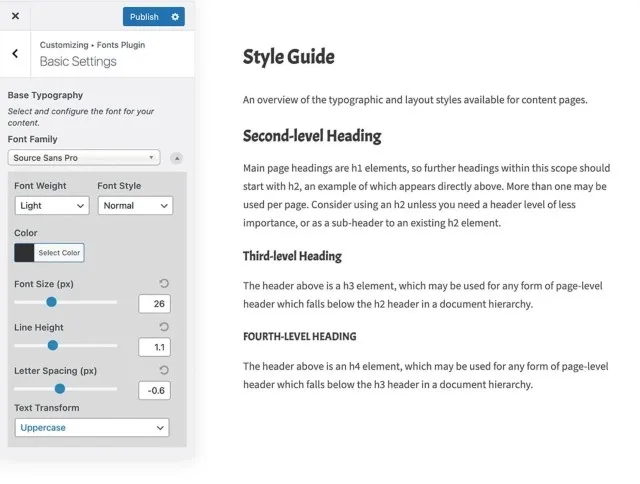
About Fonts Plugin Pro Google Fonts for WordPress
If your theme limits you to four typefaces and you don't want to touch CSS
Changing a website's typography usually ends up in a stylesheet nobody dares to edit, or in a theme that only offers a handful of fonts with fixed sizes. Fonts Plugin Pro moves all of that into the WordPress Customizer: you pick the font from a dropdown list, see the change in real time, and nothing goes live until you decide it does.
It fits you if you run your own site or those of a few clients and want to control fonts, sizes, colours and spacing without writing code, or if the weight of Google fonts and requests to external servers worry you.
It doesn't fit you if you want to redesign your layout: the plugin only touches typography. Nor if you expect the free version to do everything: it only changes fonts, while local hosting, selective loading, custom font uploads and per-element controls are Pro features. It works with any theme that uses standard CSS (Astra, GeneratePress, Kadence, OceanWP and block themes). For the rare theme that overrides font rules there is the Force Styles option, also in Pro.
What a single Google Fonts family weighs and your visitor never uses
A single Google font can drag along more than 400 KB of data nobody benefits from: weights that don't appear in your design and languages you don't write in. The selective loading in Fonts Plugin Pro keeps only the weights and language subsets your site needs.
- Control per font, not a single global setting.
- Preloading of the weights visible when the page opens, so the text doesn't flash.
- A counter that updates as you change the options and shows you the saving.
With more than 1,000 families available you can combine one for headings and another for body text.
Fonts served from your own domain
With local hosting turned on, the plugin downloads the font files, stores them in your uploads folder and rewrites the CSS, all with one toggle. The fonts arrive over the same connection as the rest of the page and there is no request to a third party.
- Serve the fonts you choose from your own domain.
- Remove the Google Fonts loaded by other plugins and your theme.
- Rewrite those external fonts so they are also hosted locally.
Note: this reduces external requests, but it doesn't replace a review of your privacy policy. If you have visitors from the EU, check it with whoever advises you.
The settings your theme usually hides
In the Customizer you choose family, colour, weight, style, size in pixels, letter spacing and text transformation (none, capitalized, uppercase or lowercase). That way you break free of the sizes preset by the theme and adjust each element to your taste.
If you know a bit of CSS, you can create your own selectors to target a specific element. If not, you don't need them: the normal flow is to pick a font, decide where it appears and check the preview.
Common questions before installing Fonts Plugin Pro
Do I need to know CSS or code?
No. Everything is done with clicks inside the WordPress Customizer.
Will it slow down my site?
The free version loads fonts the way Google recommends. With Pro, local hosting and selective loading usually leave the site faster than before.
What if my theme ignores the font I choose?
Turn on Force Styles, the Pro option designed for themes that override font rules.
Can I use a font that isn't from Google?
Pro lets you upload your own fonts. The free version only switches between the available ones.
Version history
-
v
1.8.6 Current 6 Dec 2025
Customer reviews
Sign in to leave a review. Only people who have the product can review it.
No reviews for this product yet.
Frequently asked questions
-
GPL (General Public License) is the license under which WordPress and most premium plugins/themes are distributed. It grants you the right to use, modify and redistribute the software in as many projects as you want, with no domain restrictions.
-
Yes. With membership you get automatic updates via our GPLClub Updater plugin (installed on your WP, detects new versions and applies them). With individual purchase, you get one year of manual updates from your account.
-
Depends on the plan. Monthly: 3 domains. Semi-annual: 7. Annual and Lifetime: 15. Individual purchase: 1 domain.
-
GPLClub offers its own support for installation, configuration and compatibility. For direct support from the original author (feature requests, product-specific bugs), a license purchased from the author is required.