Free Gifts for WooCommerce
Antivirus scan
Powered by ClamAV
✅ Verified clean
This product file has passed our security filters.
Want to run a fresh ClamAV scan right now? Takes a few seconds and shows scanner version, signature DB and live result.
This can take 5 to 30 seconds.
Clean file Threat detected
No threats detected in this file.
- File
- Size
- Scanned
- ClamAV
- Signature database
⚡ Powered by ClamAV
Scan could not be completed
Report product
If you detected an issue (broken file, malware, inappropriate content, etc.) let us know and we'll review it ASAP.
Sign in to report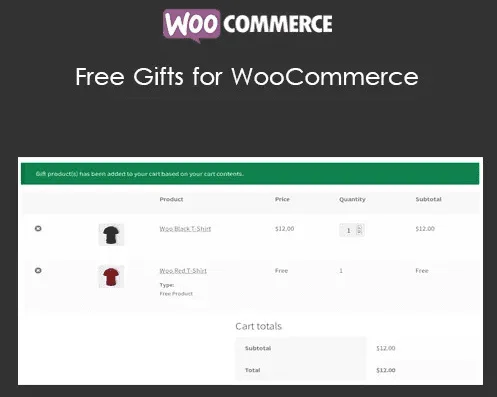
About Free Gifts for WooCommerce
Giving away a product in an online store often ends in an improvised coupon, a manual email to the customer or a zero-value order that nobody knows how to track. And when the gift depends on how much the customer spends, which category they buy from or whether it is their first order, the mess grows fast.
A gift is a promotion that raises the average order value
Whoever installs Free Gifts for WooCommerce is in the business of increasing cart value without touching prices. A discount cuts the margin on everything you sell; a conditional gift only costs you when the customer crosses the line you set. That is why the rule matters more than the gift: the same product can be a pointless expense or the reason to add one more item to the cart.
From cart to gift: the path of a promotion with Free Gifts for WooCommerce
Imagine you want to give a sample to anyone who spends a certain amount in a specific category. Here is how it would go:
- You create the rule. In the Rules tab you click "Add new rule" and choose the gift type: manual, automatic, "Buy X get Y" or coupon-based.
- You define the condition. You can base it on the cart subtotal or total, the total of a category or subcategory, the total of a brand (with WooCommerce Brands), points earned (with WooCommerce Points and Rewards), item quantity, the number of different products or a minimum number of units from selected categories.
- You narrow down who and when. You can limit by validity dates, days of the week, maximum gifts per rule, number of orders the rule applies to, orders per user or the customer's previous orders (these last two only work with logged-in users). You can also filter by product, category, brand or user.
- The customer sees it. Until they meet the condition, an eligibility notice in the cart and checkout tells them what is missing; it disappears once they qualify. That notice only appears on those two pages, not elsewhere in the store.
- The gift gets in. In automatic mode it is added to the cart on its own (depending on the settings, the customer can remove it); in manual mode a selection appears so they can choose. In neither case is the customer charged for the product.
Manual or automatic: which to choose for your catalog
Automatic mode works well when there is a single gift and you do not want anyone to miss it. Manual fits if you offer several options (sizes, flavors, colors) and want the customer to decide. The selection screen can be shown inline or in a pop-up, and as a table, carousel or dropdown. You can also place it on a specific page with a shortcode.
"Buy X get Y" lets you give away the same product or a different one, and with the Repeat Gift feature the customer receives it every time they meet the requirement again. Carefully planned, it helps move stock; badly calculated, it gives away more than you intend. Set a maximum number of gifts per rule.
Coupon-based gifts and gifts from the dashboard
In coupon-based rules you create a coupon whose discount type is "gift" and link it to the rule: the customer applies the code and receives the product. It is useful for email campaigns or collaborations. You can also decide, globally or rule by rule, whether the gift stays available when another coupon discount has already been applied, so you do not stack promotions by accident.
Outside the cart, the administrator can send a gift to a user from the Manual gift tab: an order is created in their name and the standard WooCommerce notification is sent. You can also add gift items when creating an order by hand.
Frequently asked questions
Can the customer choose several units of the same gift?
Yes, there is an option to allow selecting multiple quantities of the same product as a gift.
Can gifts be hidden from the catalog?
Yes, you can hide gift products on shop and category pages so nobody finds them as a regular item.
Does it work for customers without an account?
The general rules do, but the limits on orders per user or on previous purchases only apply to logged-in users.
What to know before building your rules
The plugin manages gifts of products from your own store: it is not a discount or loyalty points system. For brand or points conditions you also need WooCommerce Brands or WooCommerce Points and Rewards. And since each rule is independent, it is worth testing several at once in a trial cart before launching the campaign.
Topics
Version history
-
v
13.8.0 Current 1 Oct 2026
-
v
13.7.0 26 Aug 2026
-
v
13.1.0 18 Apr 2026
Customer reviews
Sign in to leave a review. Only people who have the product can review it.
No reviews for this product yet.
Frequently asked questions
-
GPL (General Public License) is the license under which WordPress and most premium plugins/themes are distributed. It grants you the right to use, modify and redistribute the software in as many projects as you want, with no domain restrictions.
-
Yes. With membership you get automatic updates via our GPLClub Updater plugin (installed on your WP, detects new versions and applies them). With individual purchase, you get one year of manual updates from your account.
-
Depends on the plan. Monthly: 3 domains. Semi-annual: 7. Annual and Lifetime: 15. Individual purchase: 1 domain.
-
GPLClub offers its own support for installation, configuration and compatibility. For direct support from the original author (feature requests, product-specific bugs), a license purchased from the author is required.