Frequently Bought Together
Antivirus scan
Powered by ClamAV
✅ Verified clean
This product file has passed our security filters.
Want to run a fresh ClamAV scan right now? Takes a few seconds and shows scanner version, signature DB and live result.
This can take 5 to 30 seconds.
Clean file Threat detected
No threats detected in this file.
- File
- Size
- Scanned
- ClamAV
- Signature database
⚡ Powered by ClamAV
Scan could not be completed
Report product
If you detected an issue (broken file, malware, inappropriate content, etc.) let us know and we'll review it ASAP.
Sign in to reportNewer version out, or a problem?
About Frequently Bought Together
WooCommerce stores that want to sell complementary products together
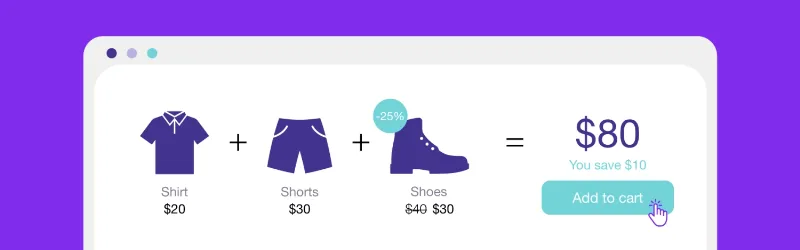
WooCommerce's own linked products recommend other products, but each one is added to the cart separately and at its full price. Frequently Bought Together suits stores that already have products that go together, such as a hoodie with its beanie and cap, and want to show them as a set with its own price. It needs WooCommerce active, since it is an extension of the store.
It doesn't generate recommendations on its own either: you choose the products in each set, so every set is a combination you'd recommend. Customers can't untick products within a set, because the button adds the full package. If you want to offer different combinations, create several sets for the same product.
Per-product discounts and the total price of the set
Each attached product has its own discount, from 0 to 100%. At 0% it is sold at full price; at 100% it works as a gift. If you prefer to think in amounts, type an amount in your store's currency and the plugin converts it to a percentage. The main product is always sold at its current price, including its sale price if it has one.
The product page shows the regular price struck out, the set price, the total and how much the customer saves, with a label such as “-10%” on the image of each discounted product. Removing the main product from the cart also removes its set.
| Function | WooCommerce upsells and cross-sells | Frequently Bought Together |
| Discount for buying together | No | Yes, set for each product |
| How products reach the cart | One at a time | The whole set with one button |
| Combined price and saving shown | No | Yes |
Frequently Bought Together adds no new products: stock and variations
A set is not a product type or a separate product: each item is sold as itself, with its stock, its taxes and its usual coupons. If the product in the set is variable, the customer picks the variation with the arrows and the total updates. You can also attach one specific variation.
When a product in the set goes out of stock or becomes a draft, the set stops showing until every product can be bought again. If it was already in someone's cart, it is removed with a notice. On the admin order screen, each product appears marked as “(bundled in ...)” with its main product, a note the customer does not see.
Where the set appears and how you manage it from the admin
You can show sets before or after the product description, in classic and block themes. You can display several one below the other or in a slider with arrows. From the WordPress Customizer you change the section title, for example “Frequently bought together”, and the colors of the price, the saving, the button and the labels.
Creating, editing or deleting sets is done from the product's own tab, without leaving the page. A category set shows the same attached products on every product in that category, with the product being viewed as the main one. To see all sets in a list, use the plugin's menu, where you can activate, deactivate or delete several at once. A shortcode on any page or post, or the WooCommerce Single Product block, also displays them.
Frequently Bought Together with block themes, HPOS and uninstalling
It works with the WooCommerce Cart and Checkout blocks, the classic cart and checkout, and High-Performance Order Storage (HPOS). It includes German, French, Spanish, Russian and Ukrainian translations. It loads its styles and scripts only on product pages and on pages that show a set.
Sets are stored in the plugin's own tables, and uninstalling it from the Plugins screen removes those tables. Past orders keep their products and prices.
Common questions before setting up a set
How is the set discount applied in the cart?
Each attached product goes into the cart at its set price, on its own line. The main product goes in at its current price. There is no separate discount line or coupon.
How many products can a set have?
The extension sets no fixed limit. A product can also have several sets.
Do coupons work with sets?
Yes, they apply to the products in the set at their set price, the same as any other cart item. The extension does not change how coupons work.
Topics
Version history
-
v
1.0.2 Current 13 May 2024
Customer reviews
Sign in to leave a review. Only people who have the product can review it.
No reviews for this product yet.
Frequently asked questions
-
GPL (General Public License) is the license under which WordPress and most premium plugins/themes are distributed. It grants you the right to use, modify and redistribute the software in as many projects as you want, with no domain restrictions.
-
Yes. With membership you get automatic updates via our GPLClub Updater plugin (installed on your WP, detects new versions and applies them). With individual purchase, you get one year of manual updates from your account.
-
Depends on the plan. Monthly: 3 domains. Semi-annual: 7. Annual and Lifetime: 15. Individual purchase: 1 domain.
-
GPLClub offers its own support for installation, configuration and compatibility. For direct support from the original author (feature requests, product-specific bugs), a license purchased from the author is required.