Google Apps Directory Enterprise
Antivirus scan
Powered by ClamAV
✅ Verified clean
This product file has passed our security filters.
Want to run a fresh ClamAV scan right now? Takes a few seconds and shows scanner version, signature DB and live result.
This can take 5 to 30 seconds.
Clean file Threat detected
No threats detected in this file.
- File
- Size
- Scanned
- ClamAV
- Signature database
⚡ Powered by ClamAV
Scan could not be completed
Report product
If you detected an issue (broken file, malware, inappropriate content, etc.) let us know and we'll review it ASAP.
Sign in to reportNewer version out, or a problem?
About Google Apps Directory Enterprise
A staff directory that does not depend on who logs into the intranet
On a WordPress intranet, not every employee uses it actively, and it is sometimes hard to know how to contact someone in the organization. Google Apps Directory Enterprise brings the contact information that already exists in your Google Workspace to your site, so anyone can search it without leaving WordPress.
Search any person in the domain from a widget
The plugin adds a search widget that you can place in the sidebar or on any page of your intranet or your client's site. The person types some text and sees the matching names, along with their email and profile photo.
A complete staff table, sortable and filterable
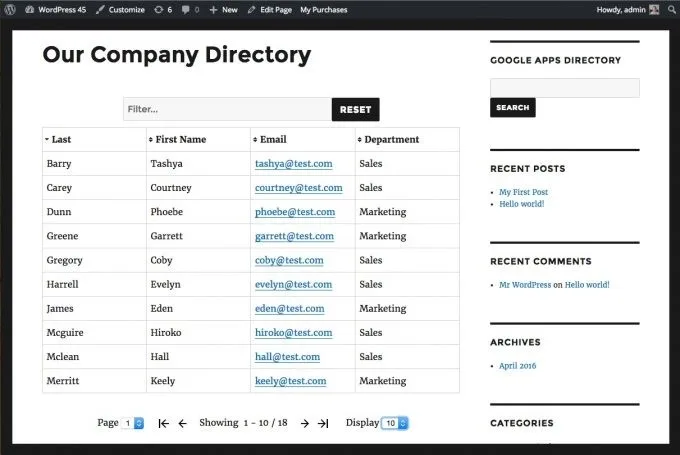
With a shortcode you embed on any page a table with all staff, or only with the organizational units you choose. Visitors can sort it by clicking any column heading or filter it by text. You decide which columns appear and in what order, and the table supports optional pagination and a search box. Its look can also be adapted to your site's design.
Live data, with no outdated copies inside WordPress
The information is fetched directly from Google Workspace and no static copy is stored in WordPress. So when someone changes phone, location or email, the directory shows the updated detail rather than a version that has gone out of date. Phone, location, name, email and photo come as standard.
Relies on Google Apps Login to connect to your Google Workspace
The Google Apps settings are configured through another plugin.
- What it already handles: searching contacts across the whole domain, showing the details also to people who have no WordPress user, and restricting the table to specific organizational units.
- What it needs: the Google Apps Login plugin installed, which manages your Google Apps configuration.
Internal or public use depending on what your site needs
You can use it on an intranet so the directory is visible only to those with permission, or show public contact details to the visitors of your website. The security controls let you restrict who can see the directory. If you need fields the plugin does not include as standard, you can add them with custom code.
Frequently asked questions about Google Apps Directory Enterprise
Do people need a WordPress account to view the directory?
No. Contact information is also shown to people who have no WordPress user, according to the security controls you configure.
Is my employees' data stored in WordPress?
Not as a static copy. The information is fetched live from Google Workspace, so no outdated version of the contacts remains in WordPress.
Can I show only part of the staff?
Yes. You can restrict the table to specific Google Apps organizational units and choose which columns appear and in what order.
Can I add my own fields to the directory?
Yes, through custom code. The fields included as standard are the photo, name, email, phone and location.
Topics
Version history
-
v
1.6.3 Current 15 May 2024
Customer reviews
Sign in to leave a review. Only people who have the product can review it.
No reviews for this product yet.
Frequently asked questions
-
GPL (General Public License) is the license under which WordPress and most premium plugins/themes are distributed. It grants you the right to use, modify and redistribute the software in as many projects as you want, with no domain restrictions.
-
Yes. With membership you get automatic updates via our GPLClub Updater plugin (installed on your WP, detects new versions and applies them). With individual purchase, you get one year of manual updates from your account.
-
Depends on the plan. Monthly: 3 domains. Semi-annual: 7. Annual and Lifetime: 15. Individual purchase: 1 domain.
-
GPLClub offers its own support for installation, configuration and compatibility. For direct support from the original author (feature requests, product-specific bugs), a license purchased from the author is required.