Gravity Forms Booking
Antivirus scan
Powered by ClamAV
✅ Verified clean
This product file has passed our security filters.
Want to run a fresh ClamAV scan right now? Takes a few seconds and shows scanner version, signature DB and live result.
This can take 5 to 30 seconds.
Clean file Threat detected
No threats detected in this file.
- File
- Size
- Scanned
- ClamAV
- Signature database
⚡ Powered by ClamAV
Scan could not be completed
Report product
If you detected an issue (broken file, malware, inappropriate content, etc.) let us know and we'll review it ASAP.
Sign in to report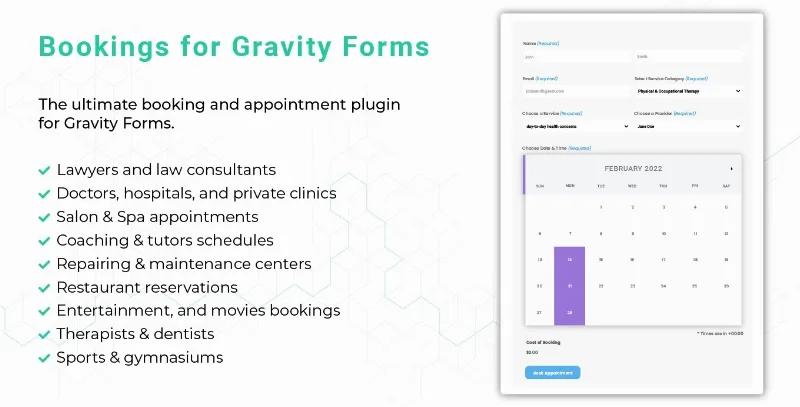
About Gravity Forms Booking
If you already run Gravity Forms, the booking system is half built
There are many appointment plugins for WordPress and almost all start from scratch: their own form, their own fields, their own logic. And then it turns out you need a conditional field, or a file upload, or to push the data into your management system, and you discover that plugin does not reach where Gravity Forms reaches.
This one takes the other route: it adds booking to Gravity Forms instead of replacing it. The calendar and the availability become one more field on the form you already know how to build.
What that means in practice
That the booking form inherits everything Gravity has: conditional logic, fields of any type, calculations, file uploads, notifications to several addresses, and the integrations you already have set up with your email, your spreadsheet or your management system.
For a business with a booking process that is not standard (one asking for documentation, changing the questions by service, calculating price from variables) that is a large difference against a closed system.
What it brings
- Unlimited services and bookings, with different staff and per-person availability.
- One-off and recurring appointments, for the client who comes every week.
- Two-way synchronisation with Google Calendar and with Outlook 365.
- Holidays and days off, and booking that accounts for time zones.
- Mobile app, for checking the diary from a phone.
Two things to count in the budget
Gravity Forms is bought separately. It is a commercial product with its own licence. If you already have it, this fits beautifully. If not, you are buying two things, and then it is worth comparing against a standalone appointment system.
The payment gateways are its own. It takes payment with Square and with Mollie. If your shop already works with another gateway, worth checking how that fits first: changing processor purely for the booking system rarely works out.
Frequently asked questions
Do I need Gravity Forms?
Yes. This plugin adds booking to Gravity Forms and does not work without it.
Does it sync with the calendar?
Yes, two-way with Google Calendar and with Outlook 365.
What does it take payment with?
With Square and with Mollie.
Can I have several practitioners?
Yes, with their own availability and days off per person.
Topics
Version history
-
v
2.20 Current 22 Jan 2025
Customer reviews
Sign in to leave a review. Only people who have the product can review it.
No reviews for this product yet.
Frequently asked questions
-
GPL (General Public License) is the license under which WordPress and most premium plugins/themes are distributed. It grants you the right to use, modify and redistribute the software in as many projects as you want, with no domain restrictions.
-
Yes. With membership you get automatic updates via our GPLClub Updater plugin (installed on your WP, detects new versions and applies them). With individual purchase, you get one year of manual updates from your account.
-
Depends on the plan. Monthly: 3 domains. Semi-annual: 7. Annual and Lifetime: 15. Individual purchase: 1 domain.
-
GPLClub offers its own support for installation, configuration and compatibility. For direct support from the original author (feature requests, product-specific bugs), a license purchased from the author is required.