Gravity Forms Styler For Divi
Antivirus scan
Powered by ClamAV
✅ Verified clean
This product file has passed our security filters.
Want to run a fresh ClamAV scan right now? Takes a few seconds and shows scanner version, signature DB and live result.
This can take 5 to 30 seconds.
Clean file Threat detected
No threats detected in this file.
- File
- Size
- Scanned
- ClamAV
- Signature database
⚡ Powered by ClamAV
Scan could not be completed
Report product
If you detected an issue (broken file, malware, inappropriate content, etc.) let us know and we'll review it ASAP.
Sign in to report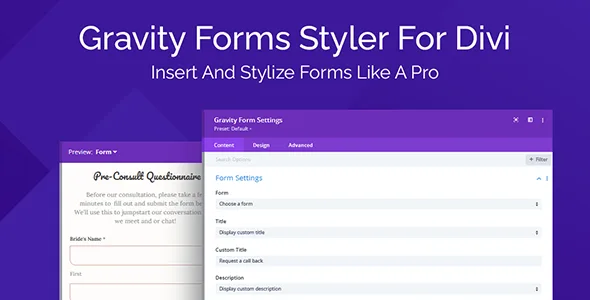
About Gravity Forms Styler For Divi
A form that looks like it belongs to another website
You build the page with Divi, take care of typography and spacing, and when you insert the form a block shows up that looks like it came from another site: fields with different margins, a button in a different color and a shortcode nobody dares to touch. You end up pasting CSS by hand every time the design changes.
This module brings the Gravity Forms form inside the Divi Builder, so you can treat it like any other element on the page.
Gravity Forms Styler For Divi: insert and style without shortcodes
You add the module to a page or post, choose which of your Gravity Forms forms you want to display and adjust details such as the title and description from there. There is no more jumping between the front end and the back end.
- Design settings: text size and color, spacing, margin and padding of the fields, among others, handled in a way similar to Divi's native contact module.
- Real-time preview: you see every change as you make it, without reloading the published page.
- No custom CSS: the look is controlled from the module options.
The three states of the form that almost nobody designs
A form is not just what you see when the page loads. The visitor also meets the validation message when a field is wrong and the confirmation message after sending.
The module lets you switch the preview with one click between the normal form, the form with a validation message and the confirmation message. That way you fine-tune the design of all three without going back and forth between the Gravity Forms settings.
If you don't want to start from scratch, there is a library of premade design templates: you pick one and tweak it until it fits your site.
Decide whether it saves you CSS or just moves it elsewhere
It is a styling add-on, not a form builder. It needs Divi and Gravity Forms already on your site: the fields and their setup are still created in Gravity Forms, and the module handles placing them and giving them their look. If you want a form that works without that plugin, this is not the product.
Does it replace Gravity Forms?
No. It displays and styles forms you have already created with Gravity Forms.
Do I have to use shortcodes?
No. You add the module, choose the form from a list and adjust the parameters from its options.
Can I see how the error and confirmation messages look?
Yes, the preview switches between the normal form, the validation one and the confirmation while you design.
Topics
Version history
-
v
1.0.6 Current 8 May 2024
Customer reviews
Sign in to leave a review. Only people who have the product can review it.
No reviews for this product yet.
Frequently asked questions
-
GPL (General Public License) is the license under which WordPress and most premium plugins/themes are distributed. It grants you the right to use, modify and redistribute the software in as many projects as you want, with no domain restrictions.
-
Yes. With membership you get automatic updates via our GPLClub Updater plugin (installed on your WP, detects new versions and applies them). With individual purchase, you get one year of manual updates from your account.
-
Depends on the plan. Monthly: 3 domains. Semi-annual: 7. Annual and Lifetime: 15. Individual purchase: 1 domain.
-
GPLClub offers its own support for installation, configuration and compatibility. For direct support from the original author (feature requests, product-specific bugs), a license purchased from the author is required.