Item Lists Pro for Elementor
Antivirus scan
Powered by ClamAV
✅ Verified clean
This product file has passed our security filters.
Want to run a fresh ClamAV scan right now? Takes a few seconds and shows scanner version, signature DB and live result.
This can take 5 to 30 seconds.
Clean file Threat detected
No threats detected in this file.
- File
- Size
- Scanned
- ClamAV
- Signature database
⚡ Powered by ClamAV
Scan could not be completed
Report product
If you detected an issue (broken file, malware, inappropriate content, etc.) let us know and we'll review it ASAP.
Sign in to reportNewer version out, or a problem?
About Item Lists Pro for Elementor
Item Lists Pro for Elementor: lists that get skimmed stop being filler
A five-step work process, the company history or the list of services often end up as long paragraphs or as plain default bullets, and the visitor runs through them without retaining anything. Item Lists Pro for Elementor is a plugin that adds designed list widgets to the Elementor editor, so that content is understood at a glance.
Lists are the one thing many people really read on a website: steps, services, milestones, quotes. If they look like default bullets, they are perceived as filler. If they have shape, order and color, the visitor understands how you work before reading a single full sentence.
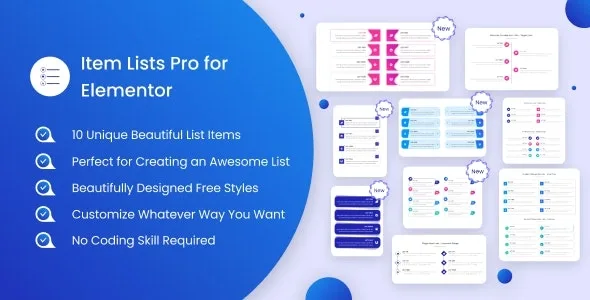
Ten bullet styles, each one designed for a type of content
The plugin comes with ten ready-made styles. They are not variations of the same one, but different formats depending on what you want to tell:
- Material, Material Curve and Material Angle: lists with icons, colors or images, in classic, curved or angled versions, with smooth animation.
- Shape: bullets with different shapes to give personality to a short list.
- Timeline and Alternate Timeline: a timeline, with the items on one side or alternating, useful for a company history or a career path.
- Gradient Ordered and Skew Ordered: ordered bullets with a gradient or with slanted shapes, designed to explain a process step by step.
- Service Ordered and Gradient Service: formats for the services section or to highlight the main benefits.
Animation, shadow and border from the Elementor panel
When you edit a page with Elementor, the plugin appears as a section called Item Lists in the side panel. From there you choose the style and change the texts, icons and descriptions of each item by dragging and dropping, without writing code.
On each list you can apply ready-made animation or hover effects, shadow and different types of border. The designs adapt to mobile, tablet and desktop, and work in the usual browsers. It is useful for several lists on the same page, a list of quotes or a company timeline, each with a different look.
Choose this pack if your problem is lists, not the whole layout
Item Lists Pro for Elementor does one thing: well-designed lists. If what you need is a full page, tables, galleries or sliders, this does not cover it.
Does it work without Elementor?
No. It is an add-on used inside the Elementor editor, so you need Elementor on your site. If your website uses another page builder, it is no use to you.
Does it include other widgets besides lists?
No. It offers ten list styles with their animation, shadow and border options. For other elements you will need other plugins.
Can I use images instead of icons?
Yes, in the styles that support it, such as the Material and Timeline ones, which accept icons, colors and images. If your design idea depends on a specific image in a particular style, check it in the demo first.
Do I need to know how to code to customize it?
No. Changing the style, texts, icons and descriptions is done from the panel. If your texts are very long, check in the demo how they look on mobile before choosing a style.
Version history
-
v
1.5.3 Current 20 May 2026
-
v
1.4 8 Apr 2024
Customer reviews
Sign in to leave a review. Only people who have the product can review it.
No reviews for this product yet.
Frequently asked questions
-
GPL (General Public License) is the license under which WordPress and most premium plugins/themes are distributed. It grants you the right to use, modify and redistribute the software in as many projects as you want, with no domain restrictions.
-
Yes. With membership you get automatic updates via our GPLClub Updater plugin (installed on your WP, detects new versions and applies them). With individual purchase, you get one year of manual updates from your account.
-
Depends on the plan. Monthly: 3 domains. Semi-annual: 7. Annual and Lifetime: 15. Individual purchase: 1 domain.
-
GPLClub offers its own support for installation, configuration and compatibility. For direct support from the original author (feature requests, product-specific bugs), a license purchased from the author is required.