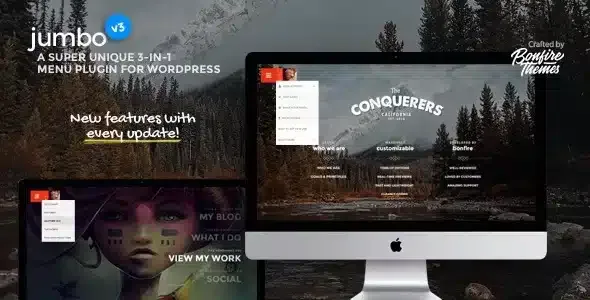
Jumbo: A 3-in-1 full-screen responsive menu for WordPress
Antivirus scan
Powered by ClamAV
✅ Verified clean
This product file has passed our security filters.
Want to run a fresh ClamAV scan right now? Takes a few seconds and shows scanner version, signature DB and live result.
This can take 5 to 30 seconds.
Clean file Threat detected
No threats detected in this file.
- File
- Size
- Scanned
- ClamAV
- Signature database
⚡ Powered by ClamAV
Scan could not be completed
Report product
If you detected an issue (broken file, malware, inappropriate content, etc.) let us know and we'll review it ASAP.
Sign in to reportNewer version out, or a problem?
About Jumbo: A 3-in-1 full-screen responsive menu for WordPress
A personal blog that introduces its author before the categories
A personal blog usually has the same menu as any other website: home, categories, contact. Someone who arrives from a search engine reads an article without knowing who signed it, and the menu does nothing to fix that. Jumbo is a WordPress menu plugin that can be added to any theme and adds a full-screen menu that is bold, memorable and fully responsive, with a profile image next to its button.
Step by step: from your theme's menu to a full-screen menu
Suppose you have a personal blog with a simple theme. The first thing you decide is the shape of the menu. Jumbo offers two options: a standard vertical menu or a column-based full-screen menu.
Then you adjust the look. You can change the colors, add a background image (also as a pattern), rearrange the elements, choose where the menu slides in from (top, left, right or bottom, or a simple fade) and change the transition speed. You can also lock the page scroll while the menu is open.
The Jumbo profile photo that leads to your author page
This is the part that matters most to a personal blog. You can show a Gravatar image next to the menu buttons or an image that is not from Gravatar, and link it to the page you want: a custom profile or an "about me" page. On hover, a tooltip you write can appear, so the reader knows where it goes before clicking.
If you prefer text on the main button instead of an icon, you can put your own label on it. And if you want to open the menu from an element in your theme, Jumbo can hide its main button and offer a standalone close button, with configurable position, color and thickness.
Hiding your theme's original menu so there aren't two menus
If your theme already shows its own menu, you can hide it by entering its class or ID, so visitors only see Jumbo's. To control who sees it, the menu can be limited to logged-in users, hidden at certain screen widths, or opened by default only on the front page.
Below the menu there is a free area for widgets. The text widget accepts shortcodes, so you can place your social links or any other block you generate with a shortcode there.
A secondary dropdown menu with descriptions for each link
If your blog has sections with subsections, the optional secondary dropdown menu organizes that second layer. It supports several levels: submenus open with an arrow, and a top-level item can also be a link. Each item can carry a description.
When the dropdown has so many items that they don't fit on screen, it becomes scrollable, which is useful on phones. Font sizes and line heights can be adjusted separately for the top level and for the submenus.
Common questions about Jumbo before setting it up on a personal blog
Can I use my own photo instead of Gravatar?
Yes. Gravatar is optional: you can use an image that is not from Gravatar.
Does it work with any theme?
Jumbo is designed to be integrated into any theme. If your theme already has a menu, you can hide it by its class or ID so that two menus don't show.
Can I show the menu only to some people?
Yes, you can limit it to users who are logged in.
Does it adapt to small screens?
The menu is fully responsive and the dropdown scrolls when it has many items. You can also hide it at specific screen widths.
Can I change the background to match my style?
Yes. You can add a background image, display it as a pattern, and change the colors of the main items and the submenus separately.
Version history
-
v
3.9.1 Current 13 Jan 2025
Customer reviews
Sign in to leave a review. Only people who have the product can review it.
No reviews for this product yet.
Frequently asked questions
-
GPL (General Public License) is the license under which WordPress and most premium plugins/themes are distributed. It grants you the right to use, modify and redistribute the software in as many projects as you want, with no domain restrictions.
-
Yes. With membership you get automatic updates via our GPLClub Updater plugin (installed on your WP, detects new versions and applies them). With individual purchase, you get one year of manual updates from your account.
-
Depends on the plan. Monthly: 3 domains. Semi-annual: 7. Annual and Lifetime: 15. Individual purchase: 1 domain.
-
GPLClub offers its own support for installation, configuration and compatibility. For direct support from the original author (feature requests, product-specific bugs), a license purchased from the author is required.