KnowHow – A Knowledge Base WordPress Theme
Antivirus scan
Powered by ClamAV
✅ Verified clean
This product file has passed our security filters.
Want to run a fresh ClamAV scan right now? Takes a few seconds and shows scanner version, signature DB and live result.
This can take 5 to 30 seconds.
Clean file Threat detected
No threats detected in this file.
- File
- Size
- Scanned
- ClamAV
- Signature database
⚡ Powered by ClamAV
Scan could not be completed
Report product
If you detected an issue (broken file, malware, inappropriate content, etc.) let us know and we'll review it ASAP.
Sign in to report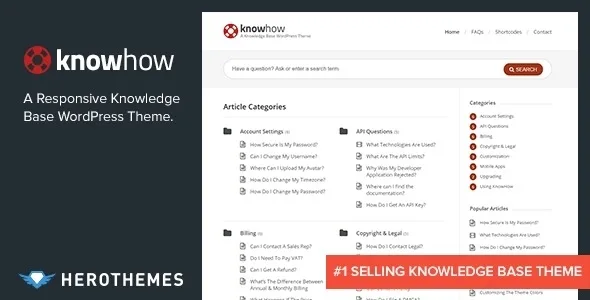
About KnowHow – A Knowledge Base WordPress Theme
When the same question reaches you twenty times by email
Answering the same questions over and over is what drowns a small support team. A knowledge base should prevent that, but many fail for another reason: the content exists and nobody finds it. KnowHow is built for that moment, when someone arrives with a doubt and types into a search box instead of reading a menu.
Whoever sets up a knowledge base usually believes the problem is writing more articles. Almost always it is structure: clear categories, a search that answers as you type and a homepage that shows what is there without making people wander. This theme from HeroThemes takes care of that part.
KnowHow organizes categories, articles and FAQs from the homepage
It is a theme for publishing help or a wiki. This is what it solves:
- Live search: shows results as you type, FAQ items included. If you don't want it, you can turn it off.
- Configurable homepage: categories and subcategories in view, how many articles appear under each one, which ones (recent, popular or random) and a sidebar on the left, on the right or none.
- Its own FAQs: they are ordered by hand and their address (slug) can be changed in the options.
- Navigation: animated multilevel menu and breadcrumbs.
- Widgets: two of its own, latest articles and popular articles.
Shortcodes, video and translation, but content and measurement are not included
For long articles, the theme adds shortcodes for columns, buttons, alerts, toggles, tabs and accordions, inserted straight from the editor. It also supports video posts (YouTube, Vimeo or self-hosted), a colour picker to match your brand and simple unbranded options. It includes .po and .mo files for translation, is compatible with WPML and Gravity Forms, and basic SEO is built in.
Now, what it does not do. KnowHow organizes and presents: the articles, their quality and their upkeep are up to you. The Heroic table of contents and glossary blocks are supported, but they are separate tools you must install if you want them. And the AI chatbot advertised alongside the theme is another service (HelpJet), not a feature of the theme.
Common questions before building the knowledge base
Can I match the colours to my brand?
Yes, with a colour picker. The theme options are simple and carry no third-party branding.
Does it work for a multilingual site?
It includes translation files and is compatible with WPML. You will still have to translate the articles yourself.
Can I customize it without touching the theme files?
It includes a base child theme, which is the recommended way to add your own changes.
Does it look good on mobile?
The design is responsive, and the live search has its own adaptive CSS.
The category structure is decided before the design
Start with the tree: which categories, which subcategories and which questions repeat most in your support. KnowHow's homepage shows exactly that, so if the categories are confusing, the homepage will be too.
Then adjust how many articles appear under each category and whether you prefer recent, popular or random ones, place the widgets in the sidebar and order the FAQs. Before publishing, test the search with real phrases from your customers: if it doesn't return the answer, the problem is usually the article title.
Version history
-
v
1.1.20 Current 14 Jun 2024
Customer reviews
Sign in to leave a review. Only people who have the product can review it.
No reviews for this product yet.
Frequently asked questions
-
GPL (General Public License) is the license under which WordPress and most premium plugins/themes are distributed. It grants you the right to use, modify and redistribute the software in as many projects as you want, with no domain restrictions.
-
Yes. With membership you get automatic updates via our GPLClub Updater plugin (installed on your WP, detects new versions and applies them). With individual purchase, you get one year of manual updates from your account.
-
Depends on the plan. Monthly: 3 domains. Semi-annual: 7. Annual and Lifetime: 15. Individual purchase: 1 domain.
-
GPLClub offers its own support for installation, configuration and compatibility. For direct support from the original author (feature requests, product-specific bugs), a license purchased from the author is required.