Legacy - White label WordPress Admin Theme
Antivirus scan
Powered by ClamAV
✅ Verified clean
This product file has passed our security filters.
Want to run a fresh ClamAV scan right now? Takes a few seconds and shows scanner version, signature DB and live result.
This can take 5 to 30 seconds.
Clean file Threat detected
No threats detected in this file.
- File
- Size
- Scanned
- ClamAV
- Signature database
⚡ Powered by ClamAV
Scan could not be completed
Report product
If you detected an issue (broken file, malware, inappropriate content, etc.) let us know and we'll review it ASAP.
Sign in to report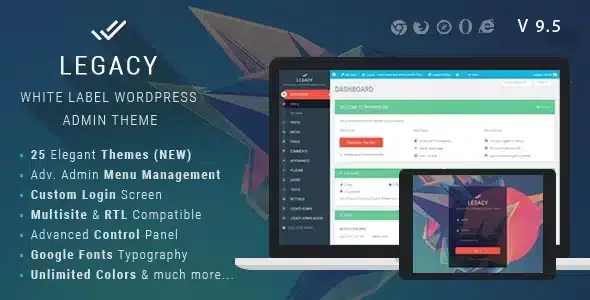
About Legacy - White label WordPress Admin Theme
Handing a client a WordPress site with the stock dashboard, the WordPress logo on the login screen, the "Howdy" greeting and a menu full of entries they will never use makes the project feel unfinished. And the dashboard is what that client sees every day, not your portfolio.
Legacy changes how the dashboard looks, not what it does
Legacy is a white label plugin for the WordPress admin. It comes with 20 ready-made color themes (light, dark and multicolor) and lets you create your own or edit the existing ones by importing a settings file. For anyone delivering sites to clients, the value is that the dashboard looks like part of your studio rather than generic WordPress.
The dashboard your client sees every day: menu, top bar and footer
This is what matters most in the daily life of a non-technical client:
- Top bar: you control its links and styles, can remove unwanted ones by their identifier, show the logout link, enable or disable it (on the front end and back end) and change "Howdy" to other text. There are two styles: full width and partial width.
- Admin footer: your own text and the option to hide the WordPress version.
- Logo and favicon: your own for the dashboard. Images can be loaded from an external URL, handy if you want to change them across all your client sites from one place.
- Styling details: primary and secondary buttons with hover colors, forms, content boxes, main color, page loader and smooth scrolling.
A login screen with your brand
The login screen is the first thing the client sees. You can add your logo, control colors, opacity, background and fonts of each element, and show or hide links such as "Back to site" or "Forgot password". Hiding the latter has a practical consequence: if you do, make sure the client knows how to recover access another way.
Typography and styling without touching code
It includes more than 650 Google Fonts and supports different fonts for headings, menu and body text, with system fonts as a fallback. You can adjust size, line height, weight and subset. If you need something finer, there is a field to add your own CSS.
Reordering the menu depends on a separate add-on
This is where it is easiest to end up with the wrong expectation. Here is what comes solved and what you will need to cover another way:
- Already solved by Legacy: full dashboard appearance, login, top bar, footer, typography, and import and export of settings between sites.
- Solved with the menu management add-on: renaming and reordering entries and submenus by dragging, changing icons and enabling or disabling items. It is a separate add-on, so check that you have it available before promising it to a client.
- On your own: a site template, the content or the front-end design.
- With another plugin: if you already use Admin Menu Editor Pro, compatibility is declared.
Nor is it a role builder or a full permissions system. It does have plugin access control, but it does not replace a roles plugin if you need fine-grained permissions per user.
Multisite, RTL and compatibility
It works on multisite networks, with activation for the whole network or for individual sites. It supports both left-to-right and right-to-left languages. Its compatibility with other plugins and themes is stated as broad, but with highly customized dashboards of their own, check in the demo that the screens of each plugin you use look right.
Frequently asked questions
Can I create my own color theme?
Yes. You can start from one of the 20 included, edit it by importing its settings or build one from scratch.
Does it work on a multisite network?
Yes, it can be activated across the whole network or on specific sites.
Can I move my configuration to another site?
Yes, there is an import and export panel to transfer the settings to any other site.
Version history
-
v
9.6 Current 8 Jan 2025
Customer reviews
Sign in to leave a review. Only people who have the product can review it.
No reviews for this product yet.
Frequently asked questions
-
GPL (General Public License) is the license under which WordPress and most premium plugins/themes are distributed. It grants you the right to use, modify and redistribute the software in as many projects as you want, with no domain restrictions.
-
Yes. With membership you get automatic updates via our GPLClub Updater plugin (installed on your WP, detects new versions and applies them). With individual purchase, you get one year of manual updates from your account.
-
Depends on the plan. Monthly: 3 domains. Semi-annual: 7. Annual and Lifetime: 15. Individual purchase: 1 domain.
-
GPLClub offers its own support for installation, configuration and compatibility. For direct support from the original author (feature requests, product-specific bugs), a license purchased from the author is required.