ListingPro – Directory & Listing WordPress Theme
Antivirus scan
Powered by ClamAV
✅ Verified clean
This product file has passed our security filters.
Want to run a fresh ClamAV scan right now? Takes a few seconds and shows scanner version, signature DB and live result.
This can take 5 to 30 seconds.
Clean file Threat detected
No threats detected in this file.
- File
- Size
- Scanned
- ClamAV
- Signature database
⚡ Powered by ClamAV
Scan could not be completed
Report product
If you detected an issue (broken file, malware, inappropriate content, etc.) let us know and we'll review it ASAP.
Sign in to report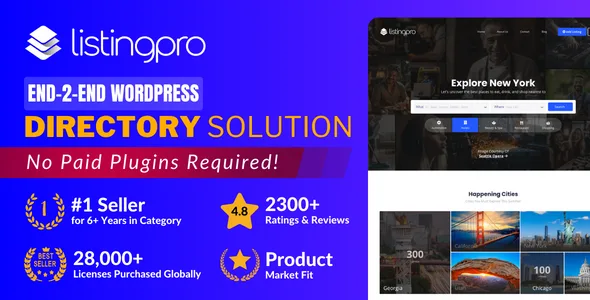
About ListingPro – Directory & Listing WordPress Theme
Building a directory often ends in a patchwork of plugins: one for search, one for payments, one for reviews, all fighting each other. ListingPro tries to avoid that with a theme that bundles search, listing submission, payments and ratings in one package.
A directory doesn't fill itself: the first problem is getting listings
Anyone launching a directory soon finds that the challenge isn't the website but the content. An empty directory attracts no visitors, and without visitors nobody wants to publish. That's why you should be clear on the whole journey before choosing a theme, and ListingPro is easiest to understand by following it step by step.
The ListingPro journey, from demo to first income
Step 1: choose a starting point. The theme includes demos for different sectors: lawyers, wedding vendors, pet finding, Black-owned businesses, yellow pages and automotive. They import with one click, and then you adjust layouts, colors and typography. It works with Elementor and WPBakery, so decide which one you'll use before you start.
Step 2: define what data each listing asks for. There are custom fields for the listing forms. A restaurant needs opening hours and price range; a lawyer needs specialty and area. This is where the real work lies: thinking about what visitors compare before they call.
Step 3: let others publish. Front-end submission lets each business create and manage its listing from its own user dashboard, without touching the WordPress admin.
Step 4: help visitors find things. Advanced search includes auto-suggestions, filters, "near me" and "open now". With geolocation you can build a multi-city directory.
Step 5: charge.
- Paid listings and subscriptions with membership plans.
- Listing claims, free or paid.
- Ad campaigns to promote listings.
- A pay-per-lead model.
The built-in checkout accepts Stripe, PayPal, 2CO and bank transfer. Other gateways (PayFast, Paystack, Razorpay, PayU India, Mollie, eWAY, Mercadopago) are available as add-ons, free or paid, so if your market uses one of them, check which one before launching.
Reviews, messages and coupons: what keeps people coming back
Ratings are multi-criteria, with spam protection. There is an internal messaging inbox between users, coupons and deals, and a system for events and appointment booking. If you work in healthcare or events, there are specific add-ons (MedicalProWP and EventProWP) sold separately, so don't assume they are included.
Limits to accept from the start
- It is a theme: if you change design, part of the directory functionality will depend on it.
- The theme is generic: for a highly specialized sector you will need to adapt fields and texts.
- It doesn't provide listings or traffic: that is your job.
- It is advertised as GDPR compatible, but you must review the privacy policy and consent yourself, especially with user and payment data.
Frequently asked questions about ListingPro
Is it suitable for real estate?
It can work for a property listings portal with listings, filters and a map, but it is not a theme specialized in properties: check in the demo that the fields fit what you need.
Do I need to know how to code?
Not for the basics: there is a setup wizard, demo import and a visual builder. For very specific changes you will need technical help.
Can I build a multilingual directory?
It is ready for WPML and Polylang, which are separate plugins.
Can it handle many listings?
It is designed to manage thousands of listings, although real performance also depends on your hosting.
Topics
Version history
-
v
2.9.12 Current 5 Sep 2026
-
v
2.9.11 18 Mar 2026
Customer reviews
Sign in to leave a review. Only people who have the product can review it.
No reviews for this product yet.
Frequently asked questions
-
GPL (General Public License) is the license under which WordPress and most premium plugins/themes are distributed. It grants you the right to use, modify and redistribute the software in as many projects as you want, with no domain restrictions.
-
Yes. With membership you get automatic updates via our GPLClub Updater plugin (installed on your WP, detects new versions and applies them). With individual purchase, you get one year of manual updates from your account.
-
Depends on the plan. Monthly: 3 domains. Semi-annual: 7. Annual and Lifetime: 15. Individual purchase: 1 domain.
-
GPLClub offers its own support for installation, configuration and compatibility. For direct support from the original author (feature requests, product-specific bugs), a license purchased from the author is required.