Loco Translate
Antivirus scan
Powered by ClamAV
✅ Verified clean
This product file has passed our security filters.
Want to run a fresh ClamAV scan right now? Takes a few seconds and shows scanner version, signature DB and live result.
This can take 5 to 30 seconds.
Clean file Threat detected
No threats detected in this file.
- File
- Size
- Scanned
- ClamAV
- Signature database
⚡ Powered by ClamAV
Scan could not be completed
Report product
If you detected an issue (broken file, malware, inappropriate content, etc.) let us know and we'll review it ASAP.
Sign in to report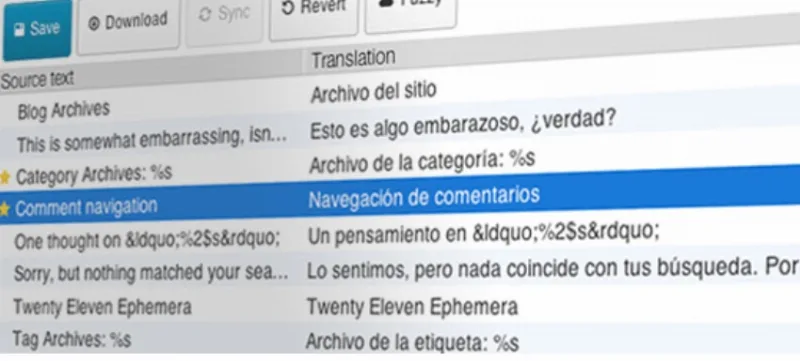
About Loco Translate
When the theme speaks English and you only need to change four texts
Your site is finished and, in the middle of it, there's a 'Read more', an 'Add to cart' or a 'Leave a reply' that the theme hasn't translated into your language. Or the booking plugin speaks your language only halfway. Setting up a full multilingual system for that is overkill, and touching files over FTP is scary.
Loco Translate solves exactly that part: the interface texts of themes and plugins. Translating the interface and translating the content are two different jobs, and this plugin only does the first.
A PO file editor inside the WordPress dashboard
Loco Translate opens the translation files of each installed theme or plugin in the browser and lets you translate string by string, with no external software. Here is what it offers:
- Built-in editor with keyboard shortcuts: move to the next string, jump to the next untranslated one, copy the source text, mark a translation as fuzzy, or save and compile with Ctrl S.
- Automatic translation with DeepL, Google, Lecto, Microsoft and OpenAI, as suggestions that you review.
- Protected directory to store your own translations, separate from the theme or plugin folder.
- Configurable backups of the PO files, with a diff comparison and a restore option.
- Source view of the PO, with clickable references to where each text appears.
What falls outside its job
It doesn't translate posts, pages, products or menus, it doesn't create versions of a page in several languages and it doesn't add a language switcher. If your site has to be bilingual for visitors, you need another plugin on top of this one. And usually only the texts the theme or plugin author left ready for translation will show up.
Common questions about Loco Translate
Can I use it to make my site multilingual?
No. It's for translating the interface of themes and plugins. Having your page and post content in several languages requires another tool.
Do I have to use automatic translation?
No, it's optional. You can translate everything by hand in the editor.
Do I need Gettext installed on the server?
No. The plugin compiles the MO files on its own, without depending on Gettext on your system.
Can I undo a wrong change?
Yes, if you keep the PO file backups active: you can see the differences and revert to an earlier version.
If you develop themes or plugins: from code to a POT file
For anyone who distributes their own product, Loco Translate includes these tools:
- String extraction from the source code to generate the translation template.
- JSON (Jed) files compatible with WordPress script localization, in addition to MO files.
- Standard PO features: comments, references and plural forms.
The languages folder has to be writable
To translate a theme that isn't yours, it's best to create the protected directory at wp-content/languages/loco/themes and give the web server write permission.
If you translate your own theme or plugin, the languages folder goes in the package root, with the same permission. If an error appears when saving, check the permissions on that folder first.
Topics
Version history
-
v
2.6.4-dev Current 14 May 2024
Customer reviews
Sign in to leave a review. Only people who have the product can review it.
No reviews for this product yet.
Frequently asked questions
-
GPL (General Public License) is the license under which WordPress and most premium plugins/themes are distributed. It grants you the right to use, modify and redistribute the software in as many projects as you want, with no domain restrictions.
-
Yes. With membership you get automatic updates via our GPLClub Updater plugin (installed on your WP, detects new versions and applies them). With individual purchase, you get one year of manual updates from your account.
-
Depends on the plan. Monthly: 3 domains. Semi-annual: 7. Annual and Lifetime: 15. Individual purchase: 1 domain.
-
GPLClub offers its own support for installation, configuration and compatibility. For direct support from the original author (feature requests, product-specific bugs), a license purchased from the author is required.