MailChimp for WooCommerce Memberships
Antivirus scan
Powered by ClamAV
✅ Verified clean
This product file has passed our security filters.
Want to run a fresh ClamAV scan right now? Takes a few seconds and shows scanner version, signature DB and live result.
This can take 5 to 30 seconds.
Clean file Threat detected
No threats detected in this file.
- File
- Size
- Scanned
- ClamAV
- Signature database
⚡ Powered by ClamAV
Scan could not be completed
Report product
If you detected an issue (broken file, malware, inappropriate content, etc.) let us know and we'll review it ASAP.
Sign in to report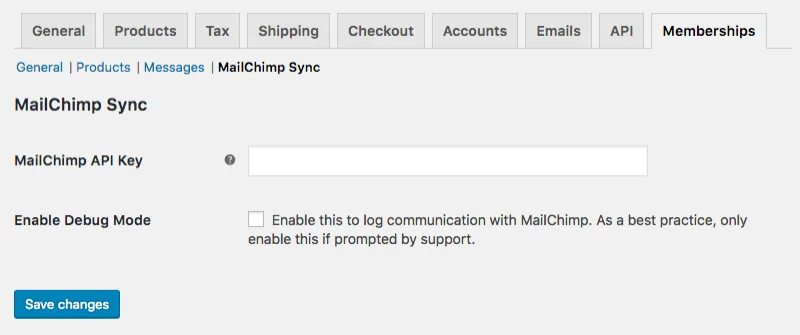
About MailChimp for WooCommerce Memberships
When your Mailchimp list is already behind your store
You have membership plans in WooCommerce and a list in Mailchimp. Every week someone joins, cancels, pauses or switches plans, and the CSV you exported yesterday is already out of date. The result is a familiar one: you send a renewal offer to someone who already renewed, or you forget the person who just cancelled.
In a membership business the money is in renewals, and the emails that support them (welcome, notices to paused members, win-back for cancellations) only work if you know each person's real status. MailChimp for WooCommerce Memberships sends those changes to the subscriber profiles in Mailchimp automatically, so you can segment without exporting or importing anything.
From the API key to the first email for members who cancelled
This is what the process looks like for someone who wants to launch a win-back campaign:
- You start from WooCommerce Memberships. This plugin is an add-on and that extension is purchased separately. It does not create plans or restrict content: it only carries your members' data to Mailchimp.
- You paste the Mailchimp API key into the settings and choose the list your members will belong to.
- You choose the merge fields for plan data. The plugin creates one field per plan for you, so you don't have to set them up by hand in Mailchimp.
- You sync the member list you already have.
- In Mailchimp you create the segment you need: active members of a specific plan, cancelled members for a win-back campaign, or paused members to invite them back.
The limit is in the last step: the email is designed and sent from Mailchimp. The plugin does not send messages or build automations from WordPress, it only keeps up to date the data you segment with.
Common questions before connecting your list
Does it work without WooCommerce Memberships? No, it needs it installed and with plans created.
Do I have to export a CSV again from time to time? No. When a membership is added or removed, changes status or is transferred, the change is sent to Mailchimp on its own.
Can I email all active members at once? Yes. Besides the per-plan fields, the plugin maintains a field called Is Active, with a yes or no value for each member, designed for exactly that.
Can I use it to send emails from my store? No. It makes sure Mailchimp has the right data; you send the emails there.
Is Active and members with more than one plan
If you sell several plans, the awkward case is the customer who cancels one and stays active on another. Here the Is Active field does not change to no until all of their memberships are inactive, so they won't get a win-back email by mistake while still paying for another plan.
Run the first sync on a small list
Syncing touches real contacts in a tool with its own rules: in Mailchimp, anyone marked as unsubscribed must opt in again to receive emails, and there is no mass undo. So before connecting your main list, try a test list or a few contacts and check that each person's subscription status ends up as you expect.
Also check that the plan fields are filled with the right values before building segments for large campaigns. If your store has many members, that prior test saves you a problem that is hard to undo.
Version history
-
v
1.5.3 Current 30 Oct 2026
-
v
1.5.2 7 Sep 2026
-
v
1.5.1 19 Nov 2025
Customer reviews
Sign in to leave a review. Only people who have the product can review it.
No reviews for this product yet.
Frequently asked questions
-
GPL (General Public License) is the license under which WordPress and most premium plugins/themes are distributed. It grants you the right to use, modify and redistribute the software in as many projects as you want, with no domain restrictions.
-
Yes. With membership you get automatic updates via our GPLClub Updater plugin (installed on your WP, detects new versions and applies them). With individual purchase, you get one year of manual updates from your account.
-
Depends on the plan. Monthly: 3 domains. Semi-annual: 7. Annual and Lifetime: 15. Individual purchase: 1 domain.
-
GPLClub offers its own support for installation, configuration and compatibility. For direct support from the original author (feature requests, product-specific bugs), a license purchased from the author is required.