Master Popups WordPress Plugin
Antivirus scan
Powered by ClamAV
✅ Verified clean
This product file has passed our security filters.
Want to run a fresh ClamAV scan right now? Takes a few seconds and shows scanner version, signature DB and live result.
This can take 5 to 30 seconds.
Clean file Threat detected
No threats detected in this file.
- File
- Size
- Scanned
- ClamAV
- Signature database
⚡ Powered by ClamAV
Scan could not be completed
Report product
If you detected an issue (broken file, malware, inappropriate content, etc.) let us know and we'll review it ASAP.
Sign in to report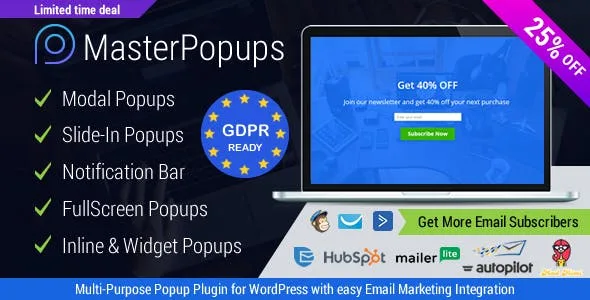
About Master Popups WordPress Plugin
Thousands of visits a month and not one email on your list
Bringing someone to your site costs time or money, and if they leave without giving you any data, you have no way to talk to them again. A blog, a shop or a service site lives on visits that rarely come back on their own. An email list is one of the few audiences that belong to you and don't depend on an algorithm.
The catch is that a badly placed popup annoys more than it converts: it appears as soon as someone arrives, covers what they came to read and repeats on every page. Master Popups lets you decide when each window appears, to whom, and what happens to the data afterwards.
Master Popups step by step: from a reader who is leaving to a subscriber in your Mailchimp
Imagine a blog that gives away a PDF in exchange for an email address. Here is how the process runs, limits included.
1. Choose the format
You can create modals, full screen popups, notification bars, slide-ins, sticky popups and inline popups (before or after the content, or in a widget area). For a giveaway in exchange for an email, a slide-in or an inline popup is usually less intrusive than a full screen one.
2. Start from a template and edit it
There are more than 70 customizable templates, including subscription, contact and legal notice ones. The editor is drag and drop: size, background, overlay, entrance and exit animations. Inside you can place images, YouTube, Vimeo or HTML5 videos, WordPress editor content or shortcodes.
3. Connect where the data goes
It integrates with more than 50 services, such as Mailchimp, MailPoet, Mailster, Sendinblue, GetResponse, ActiveCampaign, FluentCRM, HubSpot or Klaviyo. It pulls in custom fields and lets you pick the lists. If your service isn't listed, you can paste the code of an HTML form, or store contacts in a list inside the plugin itself. You need an account with whichever service you choose: Master Popups captures and hands over the data, and you send campaigns from your own tool.
4. Filter fake emails and bots
All forms support Google reCAPTCHA. There are also six email validators (MX Record, KickBox, NeverBounce, AlgoCheck, Proofy and TheChecker) that connect through each service's API, so they are set up separately.
5. Decide when and where it appears
It can launch on a click, on page load after a few seconds, on exit intent, after a period of inactivity or on scroll (a set amount, after the content or on reaching an element). As for where: the whole site, homepage, archives, pages, posts, categories, tags, specific URLs, custom post types, and depending on whether the user is logged in or not. With cookies you can show it only once to each visitor.
6. What happens when the form is submitted
You can send an email message, offer a PDF download or redirect to another page. That is where you deliver the gift you promised.
Does it work if I already use Contact Form 7, WPML or need to comply with GDPR?
Can I place another plugin's form inside?
Yes. You can embed the shortcode of plugins such as Contact Form 7 or Gravity Forms inside a popup, although it also includes native contact and subscription forms.
Does it work in several languages?
It is compatible with WPML, so you can show each popup in the language of the page.
Is it GDPR compliant?
It is set up to work with it, but compliance depends on your configuration: you write the consent text and the privacy policy yourself.
Can I move a popup to another site?
Yes, there is an option to export a popup and use it on another site.
Do I need to code?
No. If you are a developer, Javascript events are available to hook in your own code.
Locked content, countdowns and notification bars: uses beyond subscribing
The content locker protects content with a password and shows it only to your subscribers, which is handy for guides or premium material. There are also countdown timers, notification bars and disclaimer templates.
Master Popups is not just a popup: it also works as a contact form on any page. It also comes with five additional extensions to expand it. Even so, it is a capture and notice tool; it does not replace your email marketing platform or a page builder.
Topics
Version history
-
v
4.0.0 Current 26 Oct 2026
-
v
3.9.4 14 Oct 2025
Customer reviews
Sign in to leave a review. Only people who have the product can review it.
No reviews for this product yet.
Frequently asked questions
-
GPL (General Public License) is the license under which WordPress and most premium plugins/themes are distributed. It grants you the right to use, modify and redistribute the software in as many projects as you want, with no domain restrictions.
-
Yes. With membership you get automatic updates via our GPLClub Updater plugin (installed on your WP, detects new versions and applies them). With individual purchase, you get one year of manual updates from your account.
-
Depends on the plan. Monthly: 3 domains. Semi-annual: 7. Annual and Lifetime: 15. Individual purchase: 1 domain.
-
GPLClub offers its own support for installation, configuration and compatibility. For direct support from the original author (feature requests, product-specific bugs), a license purchased from the author is required.