WP Travel Engine - Advanced Itinerary Builder
Antivirus scan
Powered by ClamAV
✅ Verified clean
This product file has passed our security filters.
Want to run a fresh ClamAV scan right now? Takes a few seconds and shows scanner version, signature DB and live result.
This can take 5 to 30 seconds.
Clean file Threat detected
No threats detected in this file.
- File
- Size
- Scanned
- ClamAV
- Signature database
⚡ Powered by ClamAV
Scan could not be completed
Report product
If you detected an issue (broken file, malware, inappropriate content, etc.) let us know and we'll review it ASAP.
Sign in to reportNewer version out, or a problem?
About WP Travel Engine - Advanced Itinerary Builder
Advanced Itinerary Builder: the day-by-day itinerary for your trips
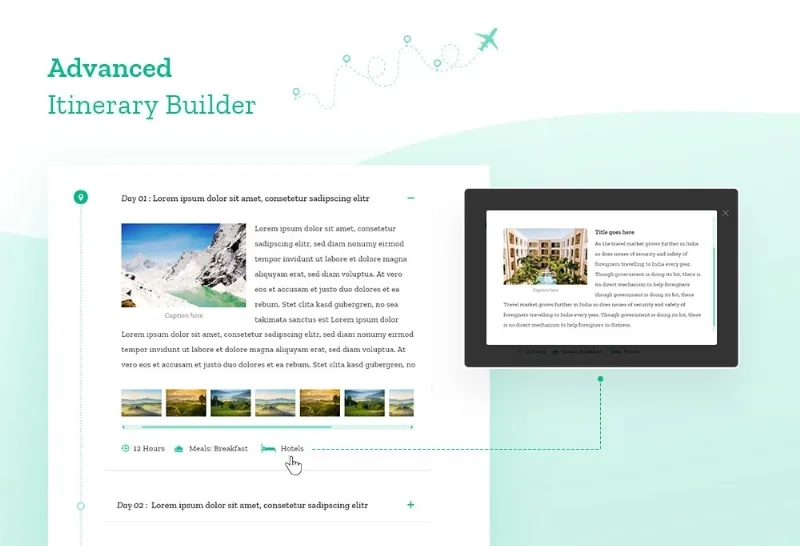
Advanced Itinerary Builder is an add-on for WP Travel Engine that lets you create detailed, interactive day-by-day itineraries for each trip.
With it you describe each day separately. Each day can carry several images, so potential customers get a better sense of what they will experience during the trip before booking.
Accommodation and meals, with transparency
You can detail where travelers sleep, from a five-star hotel to a homestay, and add extra descriptions for each accommodation. You also indicate whether breakfast, lunch and dinner are included each day, so travelers know what to expect.
Altitude and activity duration for adventure trips
For adventure travelers and trekkers, who want to know the specifics of their journey, Advanced Itinerary Builder shows the duration of each activity with optional hours and minutes, so the customer can plan their time and know what to expect during the day.
On adventure trips you can add the location and altitude of each day, and generate an elevation chart that highlights the changes in height along the trip. You can adjust its colors, labels and format so they match your brand's style.
- Duration per activity, with hours and minutes if you need them.
- Location and altitude per day, designed for adventure travelers and trekkers.
- Elevation chart with adjustable colors, labels and format.
Show the full itinerary or day by day
You can show the full itinerary at once or let customers move from one day to the next. With the second option, they go at their own pace.
Compatibility with WP Travel Engine and related add-ons
Advanced Itinerary Builder is an extension of WP Travel Engine, so it needs that plugin installed and active.
- It is also compatible with WP Travel Engine Pro.
- Its related add-ons include the GetYourGuide integration, to sell on that platform without losing control of your bookings, and Resource Management, to set capacity limits for accommodations and extra services.
Frequently asked questions about Advanced Itinerary Builder
Can I show the full itinerary at once?
Yes. You can choose between showing all the days in a row or letting the customer switch day by day.
Can I indicate how long each activity lasts?
Yes. Each activity accepts an optional duration in hours and minutes.
Does it work for luxury hotels as well as simple accommodation?
Yes. Accommodation can range from a five-star hotel to a homestay, with additional descriptions in each case.
Can the elevation chart follow my website's style?
Yes. You can adjust the colors, labels and format of the elevation chart so they follow your brand's style.
Can I add extra information to each day?
Yes. There are additional information fields to show details for each day.
Topics
Version history
-
v
2.1.1 Current 8 Jan 2025
Customer reviews
Sign in to leave a review. Only people who have the product can review it.
No reviews for this product yet.
Frequently asked questions
-
GPL (General Public License) is the license under which WordPress and most premium plugins/themes are distributed. It grants you the right to use, modify and redistribute the software in as many projects as you want, with no domain restrictions.
-
Yes. With membership you get automatic updates via our GPLClub Updater plugin (installed on your WP, detects new versions and applies them). With individual purchase, you get one year of manual updates from your account.
-
Depends on the plan. Monthly: 3 domains. Semi-annual: 7. Annual and Lifetime: 15. Individual purchase: 1 domain.
-
GPLClub offers its own support for installation, configuration and compatibility. For direct support from the original author (feature requests, product-specific bugs), a license purchased from the author is required.