Max Addons Pro for Bricks Builder
Antivirus scan
Powered by ClamAV
✅ Verified clean
This product file has passed our security filters.
Want to run a fresh ClamAV scan right now? Takes a few seconds and shows scanner version, signature DB and live result.
This can take 5 to 30 seconds.
Clean file Threat detected
No threats detected in this file.
- File
- Size
- Scanned
- ClamAV
- Signature database
⚡ Powered by ClamAV
Scan could not be completed
Report product
If you detected an issue (broken file, malware, inappropriate content, etc.) let us know and we'll review it ASAP.
Sign in to report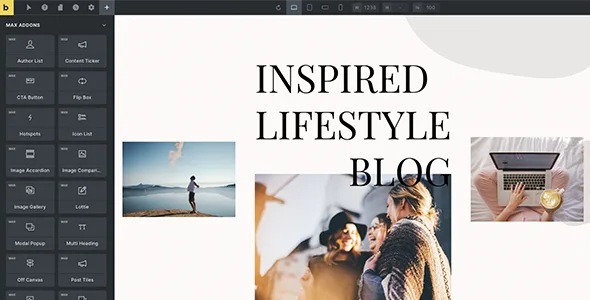
About Max Addons Pro for Bricks Builder
The Bricks freelancer hitting the editor's limits, and the person who doesn't have Bricks yet
Building sites with Bricks Builder is fast until the client asks for a dynamic table, a popup, a different checkout or a form that doesn't clash with the design. That's when you start hunting for separate plugins, each with its own style, its own scripts and its own way of breaking.
Max Addons Pro for Bricks Builder is for people who already work with Bricks and want to fill those gaps with a single package of elements. It isn't for anyone who hasn't chosen a builder yet: it's an add-on and doesn't work without Bricks. It also doesn't replace form plugins: it styles other plugins' forms, but doesn't create them.
Max Addons Pro elements that cover what Bricks leaves half done
The package brings together more than 55 elements, grouped by function:
- Content: CTA button, flip box, icon list, modal popup, multi heading, table of contents, timeline, toggle, ratings and reviews.
- Creative: animated heading, Lottie, SVG animation and countdown timer.
- Tables and charts: nestable table, dynamic table and dynamic charts.
- Image and video: thumbnail slider, hotspots, image comparison, filterable gallery, Instagram feed, video gallery.
- Navigation: breadcrumbs, off canvas and slide menu.
There are also cross-cutting features: display conditions, masks, its own query loop (Max Query Loop), dynamic tags, tooltips, a link wrapper for containers and a background slideshow.
Forms that match your design without hand-written CSS
Max Addons includes elements that let you design Contact Form 7, Fluent Forms, Gravity Forms and Formidable Forms forms from the Bricks editor.
Important: you need the corresponding form plugin installed. Max Addons doesn't handle submissions or fields for you.
A store built with Bricks: from the product page to the completed order
If you sell with WooCommerce, the package adds elements to design parts that tend to keep their default look:
- Checkout builder and thank-you page builder.
- Add to cart and buy now buttons.
- Product gallery, image, badges and reviews.
- Variation swatches, wishlist, free shipping bar and stock progress bar.
- Empty cart button.
It requires WooCommerce to be active. If your site isn't a store, this part adds nothing for you.
Load only what you use and switch off the rest
A package with this many elements raises concerns about weight. Max Addons loads each element's scripts only on the pages where it's used, and lets you enable or disable elements one by one. If you only use ten, disable the rest and the editor stays cleaner.
Maintenance mode and white label for those who work with clients
You can design your own maintenance or coming soon page with Bricks, include or exclude pages and whitelist certain IP addresses so you or your client can see the site without logging in.
If you're an agency or a freelancer, the white label feature lets you show your own name and brand instead of the plugin's.
Frequently asked questions before you decide
Do I need to know how to code?
No. The elements are used from the Bricks visual editor.
Does it work without Bricks Builder?
No. It's an add-on designed exclusively for Bricks.
Is it useful for sites that aren't stores?
Yes. The content, forms, navigation and table elements and maintenance mode are independent of WooCommerce.
Can I remove elements I don't use?
Yes, you can enable and disable them individually.
Can I use it for client sites?
Yes, and with white label you can present it under your own brand.
Version history
-
v
1.18.1 Current 19 Oct 2026
-
v
1.18.0 29 Jul 2026
-
v
1.17.1 21 Apr 2026
Customer reviews
Sign in to leave a review. Only people who have the product can review it.
No reviews for this product yet.
Frequently asked questions
-
GPL (General Public License) is the license under which WordPress and most premium plugins/themes are distributed. It grants you the right to use, modify and redistribute the software in as many projects as you want, with no domain restrictions.
-
Yes. With membership you get automatic updates via our GPLClub Updater plugin (installed on your WP, detects new versions and applies them). With individual purchase, you get one year of manual updates from your account.
-
Depends on the plan. Monthly: 3 domains. Semi-annual: 7. Annual and Lifetime: 15. Individual purchase: 1 domain.
-
GPLClub offers its own support for installation, configuration and compatibility. For direct support from the original author (feature requests, product-specific bugs), a license purchased from the author is required.