Min Max Default Quantity for WooCommerce
Antivirus scan
Powered by ClamAV
✅ Verified clean
This product file has passed our security filters.
Want to run a fresh ClamAV scan right now? Takes a few seconds and shows scanner version, signature DB and live result.
This can take 5 to 30 seconds.
Clean file Threat detected
No threats detected in this file.
- File
- Size
- Scanned
- ClamAV
- Signature database
⚡ Powered by ClamAV
Scan could not be completed
Report product
If you detected an issue (broken file, malware, inappropriate content, etc.) let us know and we'll review it ASAP.
Sign in to reportNewer version out, or a problem?
About Min Max Default Quantity for WooCommerce
Orders that cost more than they earn
Many WooCommerce stores find out too late that a single-unit order of a cheap product can cost more in shipping, handling and payment fees than it earns in margin. Others sell in packs and end up shipping loose quantities that don't match the pack. Min Max Default Quantity for WooCommerce lets you decide how many units each customer can order, by product, by category or globally.
Minimum, maximum, step and default quantity
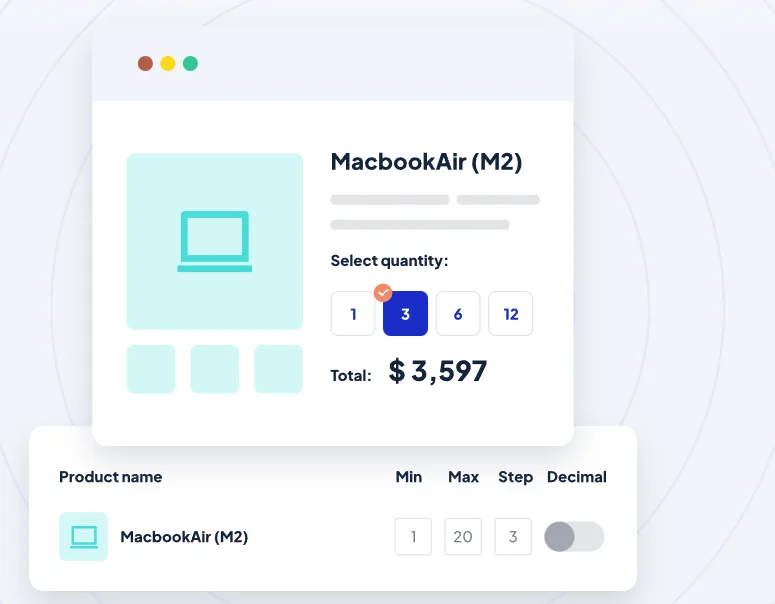
These are the basic rules. The minimum sets the lowest quantity that can be added to the cart, the maximum the highest, and the step the increment between them: if the step is 6, the customer orders 6, 12 or 18, and cannot submit 7. The default quantity is the value the product page opens with, so you can set a product sold in packs to 6 instead of 1.
Each rule can apply to all products, a category, a tag, an attribute or a specific product, and you can exclude the ones that should not have it. Rules can also be adjusted per variation.
Decimal quantities and lists of fixed values
If you sell honey by the kilo, fabric by the metre or services billed by the hour, whole numbers don't work. With decimal quantities the customer can order 0.5 kg or 1.5 hours, and the step sets the precision: with a 0.5 kg step, the customer moves up in half-kilo increments.
At the other extreme, fixed-value mode lets customers choose only from the quantities you enter, for example 5, 8, 15 or 50. It is useful when the product only makes sense in specific sizes and you don't want intermediate quantities to appear.
Dropdown, total price and starting quantity on the product page
The number field can be replaced by a dropdown with the permitted quantities, which is easier to use on a phone than a small field. The plugin can also show the total price as the customer changes the quantity, so they see the real amount before adding to the cart.
Another option is for the page to open with a quantity other than 1, whichever one you choose.
Rules by role and unit labels in your language
You can set one minimum for wholesale customers and another for retail customers in the same store, or different rules per category. Each rule applies only to the group it is meant for.
Unit labels show the measure next to the quantity: “10 KG” instead of “10”, or “6-pack” instead of “6”. They support singular and plural forms, and are compatible with WPML and Polylang so the labels can be translated into other languages.
Frequently asked questions about Min Max Default Quantity for WooCommerce
Can I use different rules for each category?
Yes. Minimum, maximum, step and default quantity rules can apply to all products, to a category or to a specific product, and a product can be excluded.
Does it work for selling by weight or decimal measures?
Yes. Decimal quantities let customers order fractions such as 0.25 m or 1.5 kg, and the step determines how much they move up each time.
Can I show a dropdown instead of the quantity field?
Yes. You can replace the number field with a dropdown listing the quantities you allow.
Can I see the total price before adding to the cart?
Yes. The price updates when the quantity changes, so the customer sees the amount before buying.
Where it fits: WooCommerce stores selling by packs, weight or role
This plugin is an add-on for WooCommerce, so it needs WooCommerce active to work. It fits stores that sell by pack, by weight or by volume, and that have wholesale and retail customers with different conditions.
If your store needs rules on the total order amount, check in the demo whether they cover your case before deciding.
Topics
Version history
-
v
4.4 Current 8 Apr 2024
Customer reviews
Sign in to leave a review. Only people who have the product can review it.
No reviews for this product yet.
Frequently asked questions
-
GPL (General Public License) is the license under which WordPress and most premium plugins/themes are distributed. It grants you the right to use, modify and redistribute the software in as many projects as you want, with no domain restrictions.
-
Yes. With membership you get automatic updates via our GPLClub Updater plugin (installed on your WP, detects new versions and applies them). With individual purchase, you get one year of manual updates from your account.
-
Depends on the plan. Monthly: 3 domains. Semi-annual: 7. Annual and Lifetime: 15. Individual purchase: 1 domain.
-
GPLClub offers its own support for installation, configuration and compatibility. For direct support from the original author (feature requests, product-specific bugs), a license purchased from the author is required.