Nearby Places
Antivirus scan
Powered by ClamAV
✅ Verified clean
This product file has passed our security filters.
Want to run a fresh ClamAV scan right now? Takes a few seconds and shows scanner version, signature DB and live result.
This can take 5 to 30 seconds.
Clean file Threat detected
No threats detected in this file.
- File
- Size
- Scanned
- ClamAV
- Signature database
⚡ Powered by ClamAV
Scan could not be completed
Report product
If you detected an issue (broken file, malware, inappropriate content, etc.) let us know and we'll review it ASAP.
Sign in to reportNewer version out, or a problem?
About Nearby Places
What visitors look for when they see a map with your location
A map with a single pin shows where you are, but it rarely answers what visitors ask next: what is around, how far it is and how to get there without getting lost.
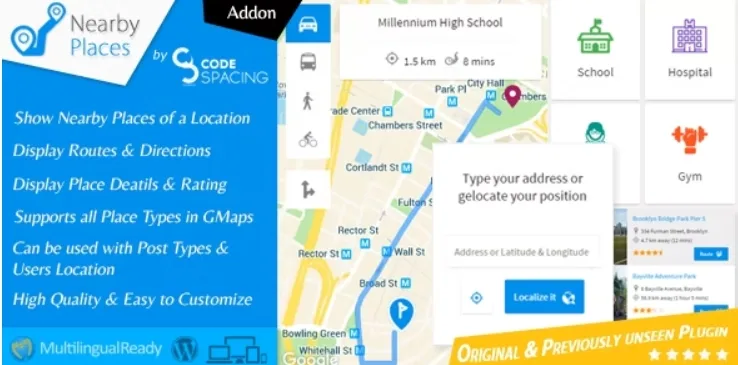
Nearby Places is an extension of Progress Map that shows, around a location or post, the points of interest obtained from Google Maps. Visitors can start from their current location or type a specific address in the search form, then pick the type of place they want. It supports all place types available in Google Maps, for example schools.
Route, travel mode and results sorted your way
When a place type is selected, a list of nearby places appears. Each one has its own page with address, distance, website, photos and reviews, plus the Plus Code address. From there visitors can see the route on the map, all inside a widget that doesn't reload the page. These are the main features:
- Travel modes: driving, transit, walking or cycling, switching between modes.
- Step-by-step directions: the turns are shown inside the widget, without reloading the page.
- Result order: by distance or by importance.
Appearance and behavior are adjusted from the admin panel so the widget matches your website design. If you want to narrow results by keyword as well as place type, the shortcode accepts a keyword attribute.
When adding nearby places to your Progress Map is worth it
It is the natural choice if you already use Progress Map and your posts or locations are the centre of the site: restaurants with their premises, properties with their surroundings or clinics with services nearby. It needs Progress Map installed and active, because it extends that plugin and works with the locations you have already added with it.
Redux Framework is not needed to use it. The data comes from Google Maps: check in the demo whether the results for your area are useful to you.
Frequently asked questions about Nearby Places
Can I use Nearby Places without Progress Map?
No. It is an extension of Progress Map, so that plugin must be installed and active.
Where do the places shown come from?
The points of interest come from Google Maps, and you can search for any of the place types Google makes available.
Can I search by keyword?
Yes. By adding the keyword attribute to the shortcode, the search can be narrowed by keyword.
How are the results sorted?
You can sort them by distance or by importance from the plugin's general settings.
Topics
Version history
-
v
2.6.7 Current 14 May 2024
Customer reviews
Sign in to leave a review. Only people who have the product can review it.
No reviews for this product yet.
Frequently asked questions
-
GPL (General Public License) is the license under which WordPress and most premium plugins/themes are distributed. It grants you the right to use, modify and redistribute the software in as many projects as you want, with no domain restrictions.
-
Yes. With membership you get automatic updates via our GPLClub Updater plugin (installed on your WP, detects new versions and applies them). With individual purchase, you get one year of manual updates from your account.
-
Depends on the plan. Monthly: 3 domains. Semi-annual: 7. Annual and Lifetime: 15. Individual purchase: 1 domain.
-
GPLClub offers its own support for installation, configuration and compatibility. For direct support from the original author (feature requests, product-specific bugs), a license purchased from the author is required.