Norge – Responsive Blog WordPress Theme
Antivirus scan
Powered by ClamAV
✅ Verified clean
This product file has passed our security filters.
Want to run a fresh ClamAV scan right now? Takes a few seconds and shows scanner version, signature DB and live result.
This can take 5 to 30 seconds.
Clean file Threat detected
No threats detected in this file.
- File
- Size
- Scanned
- ClamAV
- Signature database
⚡ Powered by ClamAV
Scan could not be completed
Report product
If you detected an issue (broken file, malware, inappropriate content, etc.) let us know and we'll review it ASAP.
Sign in to report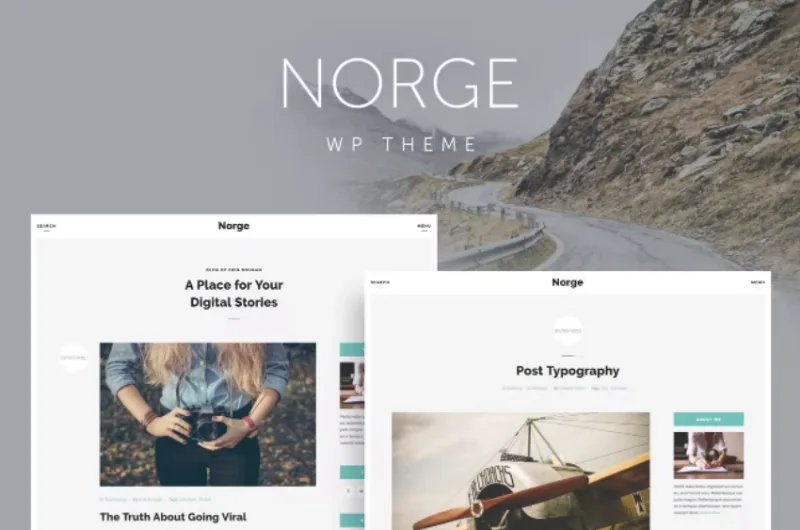
About Norge – Responsive Blog WordPress Theme
Your readers land on a post, not on your homepage
Anyone who runs a personal blog tends to spend weeks polishing the home page and almost no time on the template for each article, when a good share of visits land straight on a post from a search engine. Norge is a blog theme with a clean, editorial look that splits the care between the list and the single post, which is where people actually read.
It is built for writing: the list shows excerpts with date, category, author, tags and a link to keep reading, with numbered pagination and access to older posts.
A blog with Norge, from the first post to the maintenance page
Picture someone who publishes articles on several topics (technology, interviews, hobbies) and wants a tidy site without building anything complicated. This would be the path.
Step 1: decide where the sidebar goes
The demo offers the blog list in three versions: full width, right sidebar and left sidebar. The single post works the same way. Full width favors long texts; with a sidebar you have the subscription and the categories at hand. Choose based on what you want the reader to see right after reading.
Step 2: publish according to the type of content
Norge includes example posts with an image, a gallery, video and audio, plus a typography page to see how headings, quotes and paragraphs look. It covers a narrative or multimedia blog well. It is not a shop or portfolio theme, so do not count on it.
Step 3: fill the sidebar
The demo shows blocks for a personal introduction («About Me»), subscription, categories, monthly archive and a tag cloud. These are widgets you will have to set up yourself. If the subscription block must connect to an email service, check in the demo how it is handled before you decide.
Step 4: complete the supporting pages
There are templates for an about page, contact, a 404 error and maintenance mode, which is handy while you finish preparing the site. The contact form comes as a shortcode: check in the demo how it handles sending and whether you need anything extra against spam.
Common questions about Norge
Does it work for a shop or a portfolio?
It is a blog theme; to sell you would need to solve it some other way.
Can I add a slider?
Among its shortcodes there is one for Nivo Slider, so you can insert it inside your content.
Can I use the front page at full width?
Yes, the list has a full width variant in addition to the two with a sidebar.
Does it support video and audio?
Yes: there are video and audio post formats, and also shortcodes to insert them into the text.
Norge shortcodes: handy until the day you change theme
The theme comes with a good range for formatting without touching code:
- Audio and video
- Quote, drop cap and preformatted text
- Divider, space, list and header
- Column layout, iframe and Nivo Slider
- Contact form, sitemap and social icons
Use them wisely: shortcodes belong to the theme, and if you change it later, those snippets may show up as loose text in your older posts.
Topics
Version history
-
v
2.0 Current 8 Jan 2025
Customer reviews
Sign in to leave a review. Only people who have the product can review it.
No reviews for this product yet.
Frequently asked questions
-
GPL (General Public License) is the license under which WordPress and most premium plugins/themes are distributed. It grants you the right to use, modify and redistribute the software in as many projects as you want, with no domain restrictions.
-
Yes. With membership you get automatic updates via our GPLClub Updater plugin (installed on your WP, detects new versions and applies them). With individual purchase, you get one year of manual updates from your account.
-
Depends on the plan. Monthly: 3 domains. Semi-annual: 7. Annual and Lifetime: 15. Individual purchase: 1 domain.
-
GPLClub offers its own support for installation, configuration and compatibility. For direct support from the original author (feature requests, product-specific bugs), a license purchased from the author is required.