OneListing – Minimal WordPress Directory Theme
Antivirus scan
Powered by ClamAV
✅ Verified clean
This product file has passed our security filters.
Want to run a fresh ClamAV scan right now? Takes a few seconds and shows scanner version, signature DB and live result.
This can take 5 to 30 seconds.
Clean file Threat detected
No threats detected in this file.
- File
- Size
- Scanned
- ClamAV
- Signature database
⚡ Powered by ClamAV
Scan could not be completed
Report product
If you detected an issue (broken file, malware, inappropriate content, etc.) let us know and we'll review it ASAP.
Sign in to report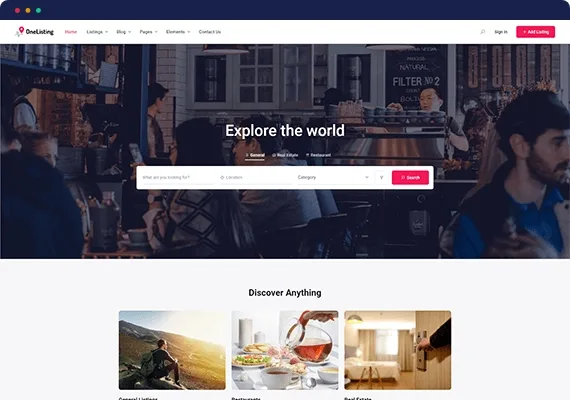
About OneListing – Minimal WordPress Directory Theme
Building a directory often starts with a clear idea and ends with a theme that forces every listing to look the same, a weak search and a dashboard where users can't find their ads. OneListing is a theme designed for the Directorist plugin, and it is best understood as the visible face of a directory, not as a complete directory on its own.
A directory lives on being found and being filled in
The typical mistake when building a real estate directory, or one in any other sector, is to think about the homepage design and forget what decides whether the site grows: owners being able to upload their listings without effort, and visitors reaching the right listing in a few clicks. With OneListing the journey is easier to understand step by step.
Step 1: what you need installed first
OneListing requires the Directorist plugin; without it the theme has no listings to show. For page layout it uses Elementor, so if you don't know it, expect to learn its editor. It also includes one-click demo import, useful for starting from a ready-made design and tweaking it instead of starting from scratch.
Step 2: loading listings from a CSV
If you already have your properties, businesses or vehicles in a spreadsheet, the theme lets you import thousands of listings from a CSV file and export them too. It is the realistic way to avoid copying ads one by one. Check beforehand that the columns in your sheet match the custom fields you plan to use.
Step 3: cards and single listing tailored to you
Each listing card can be customized, and the single listing page lets you enable or disable sections depending on what you want to show, as well as configure the image slider. There are also customizable badges to highlight listings.
Step 4: letting visitors filter without getting lost
The search and filter form builder works with custom fields, tags and price range. It includes geolocation search, nearby listings and radius distance search. The search widget supports 14 different filters. Maps can be Google Maps or OpenStreetMap, so you are not tied to a single source.
- Star ratings that the administrator approves or rejects.
- Saving to bookmarks, even without registering.
- Submitting listings or reviews as a guest, without logging in.
- Private directory: parts of the content only for certain users.
Step 5: users, expiry and communication
The user dashboard shows profile updates, active packages and each person's listings. As an administrator, you can schedule when submitted listings expire and generate custom emails to notify about changes or promotions. You get spam protection with Google reCAPTCHA, RTL support, translation of every element, Yoast SEO and Mailchimp integration, and Gutenberg compatibility. It also supports multi-directory, useful if you want to separate sales and rentals into different directories.
OneListing frequently asked questions
Is it only for real estate agencies?
No. It can be used for restaurants, automobiles, classified ads, hotels and other directories, as well as real estate.
Does it work without Directorist?
No, the Directorist plugin is a requirement. Some paid Directorist features may require additional extensions, so check the demo to see what comes built in.
Can I charge for publishing ads?
The dashboard shows active packages and invoice and tax support is among its features, but check in the demo how charging is configured before basing your business on it.
Can it be translated and used in right-to-left languages?
Yes, every element can be translated and it has RTL support.
Topics
Version history
-
v
1.6 Current 15 Jun 2024
Customer reviews
Sign in to leave a review. Only people who have the product can review it.
No reviews for this product yet.
Frequently asked questions
-
GPL (General Public License) is the license under which WordPress and most premium plugins/themes are distributed. It grants you the right to use, modify and redistribute the software in as many projects as you want, with no domain restrictions.
-
Yes. With membership you get automatic updates via our GPLClub Updater plugin (installed on your WP, detects new versions and applies them). With individual purchase, you get one year of manual updates from your account.
-
Depends on the plan. Monthly: 3 domains. Semi-annual: 7. Annual and Lifetime: 15. Individual purchase: 1 domain.
-
GPLClub offers its own support for installation, configuration and compatibility. For direct support from the original author (feature requests, product-specific bugs), a license purchased from the author is required.