Partdo Auto Parts and Tools Shop Theme
Antivirus scan
Powered by ClamAV
✅ Verified clean
This product file has passed our security filters.
Want to run a fresh ClamAV scan right now? Takes a few seconds and shows scanner version, signature DB and live result.
This can take 5 to 30 seconds.
Clean file Threat detected
No threats detected in this file.
- File
- Size
- Scanned
- ClamAV
- Signature database
⚡ Powered by ClamAV
Scan could not be completed
Report product
If you detected an issue (broken file, malware, inappropriate content, etc.) let us know and we'll review it ASAP.
Sign in to report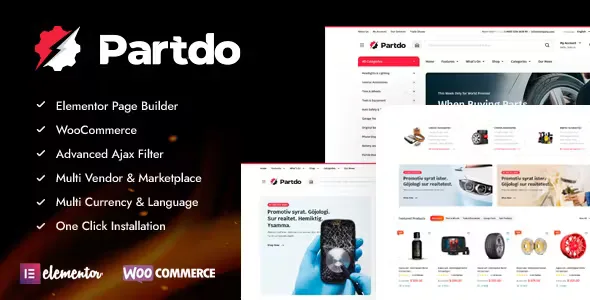
About Partdo Auto Parts and Tools Shop Theme
Your parts store serves two different customers
One person arrives with the part number written on a slip of paper. Another only knows which car they drive and that something broke. Both need different routes to the same part.
Partdo, by KlbTheme, is a WooCommerce and Elementor theme for stores selling auto parts, tools, tires, phone parts and electronics. Its search tools serve the customer who already knows which part they want: SKU, brand, category and attributes. For the second customer, the advanced header search works with WooCommerce attributes, which you must create and assign to each part.
So the first question before choosing it is who buys from you. If you sell to workshops and trade buyers who order by part number, the theme covers that route. If you sell to drivers who do not know the code, prepare those attributes from the start or add a fitment plugin.
How customers reach the part in Partdo
- AJAX product search, which covers variation SKUs and tags.
- SKU shown on the product card, to confirm the part number without opening the page.
- AJAX shop filters, by category and by attributes with advanced search, with a mobile version.
- Brand filter and an A to Z brand list.
- Search in the mobile header and a bottom menu for browsing from a phone.
All of this works with the data you load. An empty SKU cannot be found and an attribute spelled two ways splits into two filters, so review your product sheet before loading it.
Product page, orders and ways of selling
On the product page. Image zoom, YouTube and Vimeo video, 360 view, stock bar, countdown and a sticky add to cart button on mobile. Also quick view, wishlist, a buy now button, recently viewed products and the lowest price of the last 30 days.
In the order. Minimum and maximum quantity, minimum order amount, free shipping bar and order tracking.
Other ways of selling. Catalog mode and ordering through WhatsApp let you serve customers without online payment. For several sellers, the theme is ready for Dokan and WC Marketplace, two multivendor plugins.
In day-to-day management. Product description generation with OpenAI, Google login, a newsletter popup, cookie notice and maintenance mode.
Vehicles and comparison depend on your data
Vehicle fitment. The vehicle list and its link to each part are up to you, as attributes for the advanced search or with a plugin like those listed below. Test the search on part of your catalog before relying on it.
Data to compare. Partdo Core brings its own product comparison, with the [klbcp_list] shortcode; it only helps if your parts have the same attributes filled in.
Installing Partdo from the package
You need WordPress with WooCommerce and Elementor. It is compatible with Elementor Pro, Contact Form 7, WPML, Polylang and Loco Translate, and it supports right-to-left writing. To get it running:
- Unzip the package: the installable theme is the partdo.zip file in the main-theme folder.
- Upload that file as a WordPress theme and activate it along with the Partdo Core plugin.
- Run the one-click demo importer.
- Load your products with SKU, brand and attributes before tuning the filters.
- Search for several real part numbers from a phone to check the route.
If your customer searches by car, not by code
Vehicle Parts Finder adds a search by year, make, model and engine to WooCommerce, with CSV import, if you prefer a dedicated finder. Mobex comes with a vehicle filter, VIN search and a customer garage.
RBpazt is another parts theme on WooCommerce, which needs a separate finder. If your focus leans toward phones and electronics, Digitek likewise builds on WooCommerce and Elementor.
Quick answers for your parts store
Can customers search by SKU?
Yes. The AJAX search covers SKUs, including those of variations, and the product card can show them.
Does it include a make, model and year search?
You build it with the theme's attribute search, creating those attributes and assigning them to each part, or with a fitment plugin.
Can I sell without online payment?
It has catalog mode and ordering through WhatsApp.
Does it support several sellers?
Yes, with Dokan or WC Marketplace, installed separately.
Topics
Version history
-
v
1.5.2 Current 26 Oct 2026
-
v
1.5.0 5 Sep 2026
-
v
1.4.8 13 May 2026
-
v
1.4.5 4 Feb 2026
Customer reviews
Sign in to leave a review. Only people who have the product can review it.
No reviews for this product yet.
Frequently asked questions
-
GPL (General Public License) is the license under which WordPress and most premium plugins/themes are distributed. It grants you the right to use, modify and redistribute the software in as many projects as you want, with no domain restrictions.
-
Yes. With membership you get automatic updates via our GPLClub Updater plugin (installed on your WP, detects new versions and applies them). With individual purchase, you get one year of manual updates from your account.
-
Depends on the plan. Monthly: 3 domains. Semi-annual: 7. Annual and Lifetime: 15. Individual purchase: 1 domain.
-
GPLClub offers its own support for installation, configuration and compatibility. For direct support from the original author (feature requests, product-specific bugs), a license purchased from the author is required.