ProVision Image Editor for WordPress / WooCommerce with Folders File Manager
Antivirus scan
Powered by ClamAV
✅ Verified clean
This product file has passed our security filters.
Want to run a fresh ClamAV scan right now? Takes a few seconds and shows scanner version, signature DB and live result.
This can take 5 to 30 seconds.
Clean file Threat detected
No threats detected in this file.
- File
- Size
- Scanned
- ClamAV
- Signature database
⚡ Powered by ClamAV
Scan could not be completed
Report product
If you detected an issue (broken file, malware, inappropriate content, etc.) let us know and we'll review it ASAP.
Sign in to reportNewer version out, or a problem?
About ProVision Image Editor for WordPress / WooCommerce with Folders File Manager
Automatic thumbnails that cut faces and product photos badly framed
When WordPress crops each image around its center, a team photo can lose the head of the person on the right, and a full-body shot ends up cut at the neck.
Every image size and WooCommerce product photos, one by one
ProVision lets you edit the Original, Post_Thumbnail, Large, Medium_Large, Medium and Thumbnail sizes in WordPress, and also WooCommerce product images. You don't have to accept the automatic crop of every size: you adjust each thumbnail separately if one isn't centered or looks bad.
Face detection to center the thumbnail
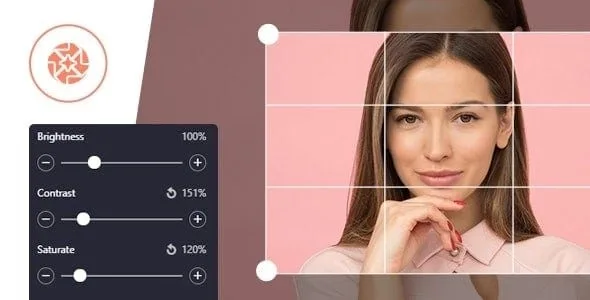
The tool detects whether an image contains human faces and, when generating thumbnails, centers the image on the face. It helps generate thumbnails without cutting heads or faces.
Brightness, filters and crops without leaving the dashboard
You can adjust brightness, contrast, saturation, color temperature, sepia and grayscale effects, blur and color inversion. Changes are applied in real time, so you see the result while you work. There are also 27 Instagram-style filters and effects such as 1997, Clarendon or Aden.
Basic operations are handled with one click:
- Rotate the image 360 degrees clockwise or counterclockwise.
- Flip it vertically or horizontally.
- Crop by dragging a corner or a side of the frame.
Compare with the original, restore and check the file size
Before saving, the comparison tool shows the original image next to the edited one, so you can decide whether the change really improves it. If you saved a version you don't like, the reset button returns to the original and restore brings back the previous version. After saving, you can preview the image and check its new file size.
Folders and subfolders for a library of thousands of images
The file manager lets you create virtual folders and subfolders to organize media. The default WordPress library doesn't let you arrange files logically, and with thousands of images finding a specific one gets complicated.
Frequently asked questions about ProVision Image Editor
Can I edit WooCommerce product images?
Yes. ProVision edits WooCommerce product images as well as the WordPress image sizes.
What happens to the original image if I edit a thumbnail?
You can use the reset button to go back to the original image. If you saved a change you don't like, restore brings back the previous version.
Do I need technical knowledge to use it?
No. It is suitable for beginners and requires no technical knowledge, and cropping and rotating are done with one click.
What to know about ProVision Image Editor if your library has thousands of images
Before deciding, think about which images will go through the editor. If you work with the image sizes WordPress generates, they are covered; if you sell with WooCommerce, product photos are covered too. If your site doesn't use WooCommerce, the product part doesn't apply to you.
Topics
Version history
-
v
1.0.0 Current 30 May 2024
Customer reviews
Sign in to leave a review. Only people who have the product can review it.
No reviews for this product yet.
Frequently asked questions
-
GPL (General Public License) is the license under which WordPress and most premium plugins/themes are distributed. It grants you the right to use, modify and redistribute the software in as many projects as you want, with no domain restrictions.
-
Yes. With membership you get automatic updates via our GPLClub Updater plugin (installed on your WP, detects new versions and applies them). With individual purchase, you get one year of manual updates from your account.
-
Depends on the plan. Monthly: 3 domains. Semi-annual: 7. Annual and Lifetime: 15. Individual purchase: 1 domain.
-
GPLClub offers its own support for installation, configuration and compatibility. For direct support from the original author (feature requests, product-specific bugs), a license purchased from the author is required.