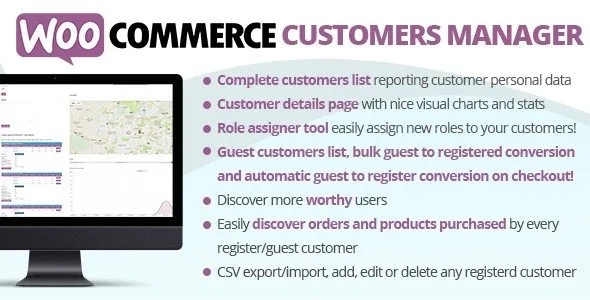
WooCommerce Customers Manager
Antivirus scan
Powered by ClamAV
✅ Verified clean
This product file has passed our security filters.
Want to run a fresh ClamAV scan right now? Takes a few seconds and shows scanner version, signature DB and live result.
This can take 5 to 30 seconds.
Clean file Threat detected
No threats detected in this file.
- File
- Size
- Scanned
- ClamAV
- Signature database
⚡ Powered by ClamAV
Scan could not be completed
Report product
If you detected an issue (broken file, malware, inappropriate content, etc.) let us know and we'll review it ASAP.
Sign in to reportNewer version out, or a problem?
About WooCommerce Customers Manager
Guest buyers who slip through the cracks of your store
A WooCommerce store piles up orders from people who never created an account, and their data ends up scattered across loose orders. WooCommerce Customers Manager gathers that information so you can see your customers as a whole.
The starting point is the customer list. It shows the address, email, registration date, total spent, number of orders and the date of the last order, which shows each customer's last activity. You can filter it by time range, export it as CSV, edit each customer, delete them or add a new one.
With large datasets, the plugin's calculations have a real server cost, so a hosting plan with enough resources is advisable, such as dedicated hosting.
Questions about WooCommerce Customers Manager before using it in your store
Do I need WooCommerce to use it?
Yes. It is a plugin that extends WooCommerce, so you need WooCommerce active on the store.
Are user metadata exported too?
No. The plugin does not export user metadata, although you can view and edit it from the customer's profile.
Can I import customers from a file?
Yes, from a .csv file, including files with more than 5000 rows. If the file has no password, the system can generate one and email it to the customer.
Does it work with other WooCommerce plugins?
Yes. It is compatible with WPML, WooCommerce Subscriptions, WooCommerce Tickets, WooCommerce Shipping Tracking and WooCommerce Multiple Customer Addresses, as well as WordPress User Extra Fields.
Opening a customer's profile to read their orders and spending
When you open a customer's profile you see their billing and shipping details, name, surname and phone. Below are all their orders and the products included in them, filterable by time range, with charts showing which products they buy most and how much they spend per order.
From the same profile you can add notes, email them and review each order, and the orders list links directly to their profile. The map on the profile uses the free OpenQuest APIs, so it may stop working once its daily request quota is exceeded.
Finding the customers worth a special coupon
The Discover feature lets you filter by orders: registered and guest customers who bought a specific product, a variation, all the products in a category, or who spent a minimum or maximum amount in total or on a single order. This way you choose who gets a coupon based on what they buy, not by guessing.
The plugin also highlights your most valuable customers of all time or within a specific period. In the product list you can see how many registered and guest customers bought each item, variations included.
Turning guests into registered customers from the order page
A guest can become a registered customer with the button the plugin adds on the order page or on the guest list. You can also enable automatic conversion when checkout is completed. If the billing email already belonged to a registered customer, their orders move to that account.
When converting, you can email them their login credentials. You can also create a customer from a new order: fill in their details, save the order, convert them to registered and complete the order without leaving the screen.
Blocking a customer and reassigning orders by hand
To stop a user from buying in your store, assign them the Blocked Customer role that the plugin adds, either from their profile or with the role assigner tool on the customer list. That same tool can assign roles to several users at once, and if you have users with the subscriber role you can switch them all to the WooCommerce customer role in one go.
With the order assigner tool you choose which orders belong to a customer, from their profile or when creating them, and you can overwrite their billing and shipping data with the customer's data.
Topics
Version history
-
v
31.9 Current 4 Jul 2025
Customer reviews
Sign in to leave a review. Only people who have the product can review it.
No reviews for this product yet.
Frequently asked questions
-
GPL (General Public License) is the license under which WordPress and most premium plugins/themes are distributed. It grants you the right to use, modify and redistribute the software in as many projects as you want, with no domain restrictions.
-
Yes. With membership you get automatic updates via our GPLClub Updater plugin (installed on your WP, detects new versions and applies them). With individual purchase, you get one year of manual updates from your account.
-
Depends on the plan. Monthly: 3 domains. Semi-annual: 7. Annual and Lifetime: 15. Individual purchase: 1 domain.
-
GPLClub offers its own support for installation, configuration and compatibility. For direct support from the original author (feature requests, product-specific bugs), a license purchased from the author is required.