PW Grid/List Post Layout For Visual Composer
Antivirus scan
Powered by ClamAV
✅ Verified clean
This product file has passed our security filters.
Want to run a fresh ClamAV scan right now? Takes a few seconds and shows scanner version, signature DB and live result.
This can take 5 to 30 seconds.
Clean file Threat detected
No threats detected in this file.
- File
- Size
- Scanned
- ClamAV
- Signature database
⚡ Powered by ClamAV
Scan could not be completed
Report product
If you detected an issue (broken file, malware, inappropriate content, etc.) let us know and we'll review it ASAP.
Sign in to report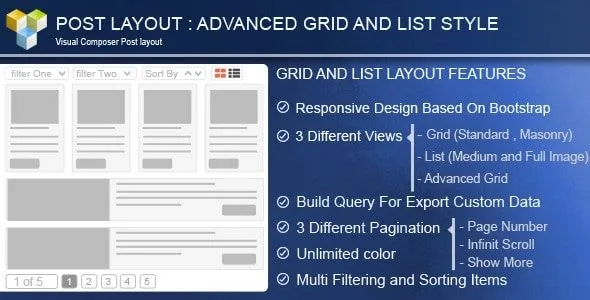
About PW Grid/List Post Layout For Visual Composer
When the blog grows and the default posts page is no longer enough
A site with hundreds of posts, a portfolio or a custom content type ends up with the same problem: the default WordPress listing is an endless column and nobody finds what they are looking for. This plugin builds content grids and lists inside Visual Composer, with filters so visitors reach what they want without scrolling through everything.
How PW Grid/List Post Layout decides which content to show
Everything starts from the query you build in the editor itself:
- Data source: posts, custom post types or pages.
- Number of items and sort criteria.
- Filtering by categories, tags, custom taxonomies, author or specific items.
- Shortcuts such as showing the latest, the oldest, only one category or only one author.
If you choose no content type, WordPress uses regular posts.
Three ways to use it depending on your site
If you run a blog with many categories
Enable the filter control with the taxonomies you want. The visitor clicks a category and the grid rearranges. You can also show a sort control and an icon that switches between grid and list without reloading the page.
If you need a portfolio or a visual catalog
Choose between a standard grid with fixed rows, an advanced grid with Mixitup, or a masonry layout. Set the number of columns separately for desktop, tablet and mobile. The second skin offers preset styles and effects for the items, with four grid effects.
If you prefer a reading list
List mode supports a medium or large image. You can show or hide the excerpt, date, author, tags, categories and comment count, and change fonts and sizes for the title, metadata and excerpt with Google fonts.
Customizing each card without touching code
The first skin offers many fields and options to customize the style of each item. With drag and drop you compose the layout of each item (image, title, excerpt, metadata) and combine pieces as you like. You can set border width, type and color separately on each side, and choose whether the "read more" link is a button or a text link. There are also hover effects on the image and the icon, or you can turn them off if you prefer something sober.
For pagination there are four options: no pagination, a "show more" button, infinite scroll or page numbers.
Questions before installing it
Does it work without Visual Composer?
No. It is an add-on for that page builder and is used from its editor.
Is it suitable for multilingual sites?
It includes WPML compatibility, and the "read more" text can be translated.
Can I list my own content types?
Yes, as long as they are registered in WordPress. You select them as the data source and can filter by their taxonomies.
Does it adapt to mobile?
Yes, it has a responsive layout and configurable columns for mobile.
It needs Visual Composer to work
If your site uses another page builder, this plugin is not for you. It is wise to test it in the demo or in a staging environment together with your page builder version before moving it to production.
Version history
-
v
4.0 Current 30 May 2024
Customer reviews
Sign in to leave a review. Only people who have the product can review it.
No reviews for this product yet.
Frequently asked questions
-
GPL (General Public License) is the license under which WordPress and most premium plugins/themes are distributed. It grants you the right to use, modify and redistribute the software in as many projects as you want, with no domain restrictions.
-
Yes. With membership you get automatic updates via our GPLClub Updater plugin (installed on your WP, detects new versions and applies them). With individual purchase, you get one year of manual updates from your account.
-
Depends on the plan. Monthly: 3 domains. Semi-annual: 7. Annual and Lifetime: 15. Individual purchase: 1 domain.
-
GPLClub offers its own support for installation, configuration and compatibility. For direct support from the original author (feature requests, product-specific bugs), a license purchased from the author is required.