Schedule Delivery for Woocommerce
Antivirus scan
Powered by ClamAV
✅ Verified clean
This product file has passed our security filters.
Want to run a fresh ClamAV scan right now? Takes a few seconds and shows scanner version, signature DB and live result.
This can take 5 to 30 seconds.
Clean file Threat detected
No threats detected in this file.
- File
- Size
- Scanned
- ClamAV
- Signature database
⚡ Powered by ClamAV
Scan could not be completed
Report product
If you detected an issue (broken file, malware, inappropriate content, etc.) let us know and we'll review it ASAP.
Sign in to reportNewer version out, or a problem?
About Schedule Delivery for Woocommerce
Daily-use stores that ship repeat orders on fixed dates
When a customer buys the same thing every week or every month, the problem is not selling it to them but organising the deliveries: what to send, how much and when. This plugin is designed for stores selling everyday consumer products, where the buyer wants scheduled deliveries and the store needs to know how much to prepare on each date.
It requires WooCommerce to be active, as it is an add-on for the store.
How Schedule Delivery for WooCommerce shows the calendar to the customer
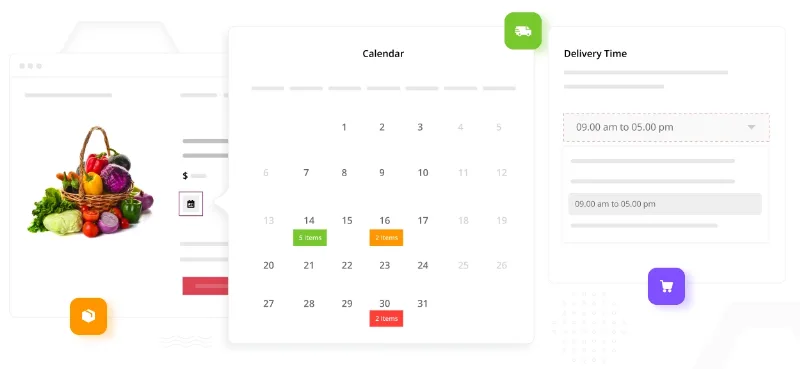
The customer sees a monthly calendar on the product page and adds the quantities they need on each date. That way they work out how much to buy and when.
You can choose between two calendar templates and adjust the colours of the calendar and its text so they match your store theme. It is worth checking, because the default styles do not always suit every theme.
Dates, holidays and rules the store sets before opening deliveries
From the admin area you define the start and end dates, the days of the week when delivery is available, the minimum number of days in advance to schedule it, and the holidays when there is no delivery. These settings also shape the calendar the customer sees, so what you close in the admin area is what they can choose.
If some products have their own needs, you can give them individual settings instead of relying only on the global ones. This helps avoid confusion when the dates or availability of a specific product change.
Pauses, statuses and delivery plan visible to the store and the customer
The status of each delivery appears on the orders page for the store and under My Orders for the customer.
When a customer or a product cannot receive on a particular day, that delivery can be put on hold or cancelled with one click, and the rest of the dates stay the same.
The delivery plan can also be shown in the cart, at checkout and on the thank-you page, not only on the order details. You can also set a delivery schedule with intervals or a fixed time slot, so the customer knows when to expect their delivery.
Delivery times and compatibility with Extra Product Options and WPML
It is compatible with WooCommerce Extra Product Options, so the time picker can be combined with other fields from that plugin. If your store sells in several languages, WPML compatibility lets you translate the plugin's strings.
Before deciding, you can view the product demo.
Frequently asked questions about Schedule Delivery for WooCommerce
Is it useful for a single purchase with a chosen date?
The plugin is designed for weekly or monthly deliveries, with quantities spread across specific dates.
Can I block specific days?
Yes. You can mark holidays with no delivery in the settings, and put a future delivery on hold or cancel it, either from the store or from the customer's account.
What does the customer see of the delivery plan?
The dates and quantities they schedule in the calendar, the plan in the cart, at checkout and on the thank-you page, and the status of each delivery under My Orders.
Can it be used in multilingual stores?
Yes. With WPML compatibility you can translate the plugin's text and run the store in several languages.
Topics
Version history
-
v
1.2.1 Current 17 May 2024
Customer reviews
Sign in to leave a review. Only people who have the product can review it.
No reviews for this product yet.
Frequently asked questions
-
GPL (General Public License) is the license under which WordPress and most premium plugins/themes are distributed. It grants you the right to use, modify and redistribute the software in as many projects as you want, with no domain restrictions.
-
Yes. With membership you get automatic updates via our GPLClub Updater plugin (installed on your WP, detects new versions and applies them). With individual purchase, you get one year of manual updates from your account.
-
Depends on the plan. Monthly: 3 domains. Semi-annual: 7. Annual and Lifetime: 15. Individual purchase: 1 domain.
-
GPLClub offers its own support for installation, configuration and compatibility. For direct support from the original author (feature requests, product-specific bugs), a license purchased from the author is required.