WP Sheet Editor EDD Downloads Pro
Antivirus scan
Powered by ClamAV
✅ Verified clean
This product file has passed our security filters.
Want to run a fresh ClamAV scan right now? Takes a few seconds and shows scanner version, signature DB and live result.
This can take 5 to 30 seconds.
Clean file Threat detected
No threats detected in this file.
- File
- Size
- Scanned
- ClamAV
- Signature database
⚡ Powered by ClamAV
Scan could not be completed
Report product
If you detected an issue (broken file, malware, inappropriate content, etc.) let us know and we'll review it ASAP.
Sign in to reportNewer version out, or a problem?
About WP Sheet Editor EDD Downloads Pro
Stores with large catalogs that change in bulk
When a digital download store grows, the work stops being creating products and becomes maintaining them: raising the price of many downloads at once by 20%, replacing a word in hundreds of descriptions, or finding the downloads that have no image. Done one download at a time, every simple change turns into a series of open pages and repeated clicks.
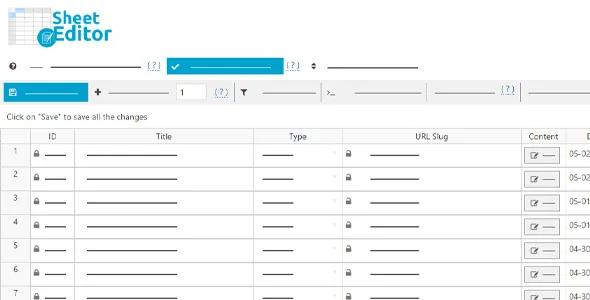
WP Sheet Editor EDD Downloads Pro moves that catalog into a spreadsheet inside WordPress. The changes you make in the sheet apply live on the site, so there is no need to import or export any file to publish them.
Combined searches and bulk changes across the catalog
Advanced search lets you combine several fields and several conditions at once. For example, you can find all downloads in the Music category that cost more than $50, look for files by bundle or bundles by price, or filter downloads by date.
To change many products at once there is the formulas engine. It replaces values in any field, such as prices, words in descriptions, categories, images or file names, and performs math operations, such as raising download prices by 20% or lowering amounts by $10. It also lets you add discounts in bulk, edit categories and tags, and upload download images in bulk.
Only for Easy Digital Downloads downloads
It is an add-on for Easy Digital Downloads, so that plugin must be installed and active for the sheet to show your downloads.
Bundles and variable prices in the WP Sheet Editor EDD Downloads Pro sheet
Each bundle appears as its own column, so you can edit it in the sheet or with the bulk update tool. Variable prices get columns for the price and name of each option, and the number of files per download has no limit: you edit them in the sheet or in bulk.
The master download serves as the base when creating new downloads. You create a base download with the common values, and the downloads you add in the sheet copy those values, so the fields fill in automatically. To complete the list you can copy and paste data from Excel or tables from other websites, and use the autofill tool to bring information to several products at once.
You also manage the columns: you can add columns for custom fields, hide, deactivate or sort columns, and resize or rename them. Custom fields from other plugins appear automatically, with no setup, and Advanced Custom Fields metaboxes show up automatically in the downloads sheet.
Frequently asked questions about WP Sheet Editor EDD Downloads Pro
Do I need to import my downloads before editing them?
No. You work directly on the downloads that already exist on the site, and the changes you make in the sheet apply live.
Are fields from other plugins shown in the sheet too?
Yes. Custom fields added by other plugins show automatically in the sheet, and Advanced Custom Fields metaboxes also appear without extra setup.
Can I create new downloads from the sheet?
Yes. You can write each download's information in the sheet, paste data from Excel or copy tables from other websites, and rely on the master download so the common fields fill in on their own.
Large catalogs without slowing down the rest of the site
The sheet only loads in wp-admin, so it does not affect the speed of your site. You can load thousands of rows without issues, and saving runs in batches: for example, 3 rows every 20 seconds, or 3 rows every 60 seconds if you prefer a slower pace.
Since only the modified cells are saved, if you load 500 rows and change 3 fields, only those 3 are saved.
Easy Digital Downloads as the base and the fields you already have
The starting point is a store on Easy Digital Downloads with downloads you want to maintain in bulk. If you already use Advanced Custom Fields or fields added by other plugins, those fields appear in the sheet from the first moment.
A demo of the sheet in action is available.
Topics
Version history
-
v
1.0.79 Current 21 Jan 2026
Customer reviews
Sign in to leave a review. Only people who have the product can review it.
No reviews for this product yet.
Frequently asked questions
-
GPL (General Public License) is the license under which WordPress and most premium plugins/themes are distributed. It grants you the right to use, modify and redistribute the software in as many projects as you want, with no domain restrictions.
-
Yes. With membership you get automatic updates via our GPLClub Updater plugin (installed on your WP, detects new versions and applies them). With individual purchase, you get one year of manual updates from your account.
-
Depends on the plan. Monthly: 3 domains. Semi-annual: 7. Annual and Lifetime: 15. Individual purchase: 1 domain.
-
GPLClub offers its own support for installation, configuration and compatibility. For direct support from the original author (feature requests, product-specific bugs), a license purchased from the author is required.