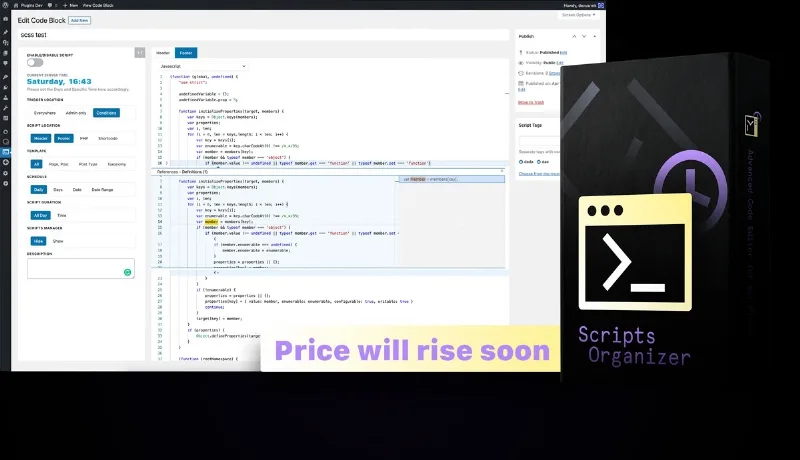
Scripts Organizer
Antivirus scan
Powered by ClamAV
✅ Verified clean
This product file has passed our security filters.
Want to run a fresh ClamAV scan right now? Takes a few seconds and shows scanner version, signature DB and live result.
This can take 5 to 30 seconds.
Clean file Threat detected
No threats detected in this file.
- File
- Size
- Scanned
- ClamAV
- Signature database
⚡ Powered by ClamAV
Scan could not be completed
Report product
If you detected an issue (broken file, malware, inappropriate content, etc.) let us know and we'll review it ASAP.
Sign in to reportNewer version out, or a problem?
About Scripts Organizer
Developers and agencies with snippets scattered across several sites
Scripts Organizer lets you add PHP, JavaScript, CSS, SCSS and HTML to your site from the dashboard, in one centralized place, without editing functions.php or creating a new plugin for every change.
If you want to remove scripts or styles that other plugins load, it is not the tool for that: it only manages the code you add yourself.
PHP, JavaScript, CSS and SCSS without touching functions.php
A PHP block lets you write filters, hooks or shortcodes, and the CSS block is for restyling. If you work with SCSS, the plugin compiles it inside WordPress, so you do not need a separate build process. JavaScript covers interactive features, and you can also insert tracking scripts such as Google Analytics or HotJar.
For styles, SCSS partials let you split CSS into small files and load each one only on the pages or content types that need it.
Seeing your CSS applied on the site as you write it
If you keep the editor in one tab and the website in another, saving updates every open tab with the new CSS, with no manual reload. If you prefer everything in one tab, the editor and the website can share it and reload when you save. You can also use the inspection tools and resize the screen with predefined sizes, from desktop to mobile.
The variable scraper reads the CSS loaded on the selected page and extracts the variables from the theme or plugins, so you can pick them from a selector without memorizing them. With Oxygen, Bricks, Elementor or other builders, you can also get their global colors as code values, which update when they change in the builder.
A code error does not have to take the whole site down
Safe mode catches broken PHP before it takes the site down. Your code is assessed in the background and, if an error appears, you are offered the option to deactivate only the problematic block, with an explanation that pinpoints the source of the fault.
Running each snippet only where and when it is needed
Each block can be limited to pages, posts, content types, categories or taxonomies, or applied to the whole site with exceptions. You can also use WordPress conditions such as is_home(), conditions from other plugins, or write your own. And if you want code only for the dashboard, there is a mode for changing the admin area without touching the front end.
- Daily or weekly scheduling, for example to change styles during opening hours or outside them.
- One specific day, for the whole day or a time window, for temporary designs or special events.
- A date range, designed for promotions or seasonal campaigns.
With the Trigger everywhere option, code runs before themes and plugins activate, with access to hooks such as plugins_loaded or wp_footer. That lets you replace functions.php without modifying your theme, and the code is not lost when the theme updates.
Where the code is saved and how it loads
By default CSS goes in the header and JavaScript in the footer, although you can change that. For PHP there are several hooks available, such as init or body open. CSS or JS libraries can be linked from a CDN or uploaded to the media library like any other file, and if you update a file, the change reaches every block that uses it.
For performance, CSS and JavaScript can be inlined in the HTML or saved as separate files to take advantage of caching. SCSS and PHP blocks are always saved as files, so they are not read from the database on every load unless they are updated. If you prefer to edit those files in your own editor, the plugin takes the code from them, and you can sync it back to the database. By default they are saved inside wp-content, and you can change that path for security or other reasons.
Frequently asked questions about Scripts Organizer
What happens if a PHP snippet has an error?
Code is assessed in the background. If there is an error, you can deactivate only the problematic block, and the plugin explains where the fault is.
Can it insert Google Analytics or HotJar?
Yes, you can add tracking scripts such as Google Analytics, HotJar or others, and choose the pages or moments when they load.
Does it work with Elementor, Bricks or Oxygen?
Yes. It integrates with classic and block themes and with visual builders, and can read their global colors and variables.
Version history
-
v
3.5.3 Current 12 May 2024
Customer reviews
Sign in to leave a review. Only people who have the product can review it.
No reviews for this product yet.
Frequently asked questions
-
GPL (General Public License) is the license under which WordPress and most premium plugins/themes are distributed. It grants you the right to use, modify and redistribute the software in as many projects as you want, with no domain restrictions.
-
Yes. With membership you get automatic updates via our GPLClub Updater plugin (installed on your WP, detects new versions and applies them). With individual purchase, you get one year of manual updates from your account.
-
Depends on the plan. Monthly: 3 domains. Semi-annual: 7. Annual and Lifetime: 15. Individual purchase: 1 domain.
-
GPLClub offers its own support for installation, configuration and compatibility. For direct support from the original author (feature requests, product-specific bugs), a license purchased from the author is required.