Search and Filtering for WP Job Manager
Antivirus scan
Powered by ClamAV
✅ Verified clean
This product file has passed our security filters.
Want to run a fresh ClamAV scan right now? Takes a few seconds and shows scanner version, signature DB and live result.
This can take 5 to 30 seconds.
Clean file Threat detected
No threats detected in this file.
- File
- Size
- Scanned
- ClamAV
- Signature database
⚡ Powered by ClamAV
Scan could not be completed
Report product
If you detected an issue (broken file, malware, inappropriate content, etc.) let us know and we'll review it ASAP.
Sign in to reportNewer version out, or a problem?
About Search and Filtering for WP Job Manager
Job boards and resume databases that need filters with their own fields
This plugin is aimed at anyone who already runs their job board with WP Job Manager and wants job and resume search to match their business, by adding, removing or modifying the fields.
It needs WP Job Manager installed and active. Company search fields are not available yet. The date and time pickers, the star rating field and the switch are still in development, so you cannot use them today, and the side map layout for WorkScout is not available yet.
The Search and Filtering visual editor is built by seeing the result, not blind
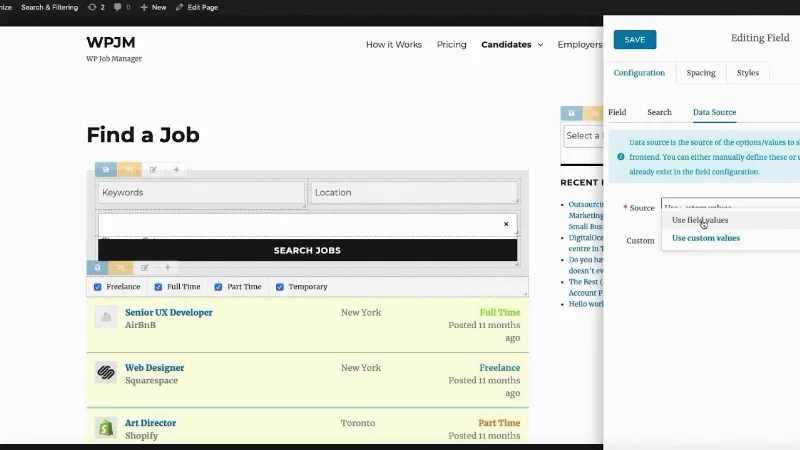
With the frontend visual editor you drag, reorder and resize each field, and you instantly see how the visitor will see it, without reloading the page. The grid adjusts itself to the content of each field.
There is a mobile edit mode, a spacing editor and a styles editor where you adjust the CSS of the field, its wrapper and its label, with suggestions as you type. The initial wizard includes example templates adapted to the theme you use.
Field types for jobs and resumes, each one adjustable
- Standard or geolocation text: with a clear or search icon, or with the Locate Me button using Google Maps and latitude and longitude.
- Checkboxes: with the label on the left, above or below, and the HTML element you prefer for it.
- Dropdowns: single or multiple selection, with Select2 or Element UI, filterable, clearable and with a selection limit.
- Radio buttons and checklists: to choose one option or several, with their own wrapper and style.
- Sliders: single value or range, with tooltips, text before or after the figure and number formatting with thousands separators.
- Buttons: that run the search, reset the results or do nothing, and can be buttons, links or inputs.
- Google Places autocomplete: suggestions for places, addresses or businesses, with a configurable country.
Salary ranges and search radius that adjust themselves to your listings
The minimum and maximum are calculated from the values of existing listings, although you can also set them yourself with your own interval.
Radius search narrows the results to a distance around the place typed in, and you can show that distance in each result. You can also include listings without a location in the results. The map can be displayed inside the grid or anywhere on the page, with Google Maps, MapBox or OpenStreetMaps, which is free.
Advanced filters: matching rules, deep search and checkbox-based rules
Each search can require that any of the criteria match or that all of them match, and each field can compare by equals, contains, does not contain, greater than or less than. For resumes you can enable search across all the metadata of the resume, not just the fields you have chosen. The filter can also wait until a few characters are typed or a set time has passed before searching.
- Conditional blocks: a checkbox such as advanced search reveals extra fields only when it is ticked.
- JSON import and export: you copy settings and styles from one field or section to another.
- Order and activation: you turn sections on or off without deleting them and choose which one appears first when several share the same location.
Where the filters appear: automatic, shortcodes, widgets and your theme
You can display the filters automatically, with the [jobs] or [resumes] shortcodes, with custom shortcodes or with widgets.
There is ready integration with Cariera, which is the recommended option, plus Jobify, Listify, Jobhunt, WorkScout, Listable and Job Tags. There is also integration with WP Resume Manager. Any other theme should work as long as the hooks and WP Job Manager templates have not been removed. Scripts and styles only load when the configuration needs them.
Frequently asked questions about Search and Filtering for WP Job Manager
Do I need WP Job Manager to use it?
Yes. Search and Filtering extends WP Job Manager, so that plugin must be installed and active.
Can I filter jobs by company?
Not yet. Company search fields are not available.
Can I search resumes by all their data?
You can enable search across all the metadata of resumes, so the filter is not limited to the fields you have added.
Topics
Version history
-
v
1.1.7 Current 14 May 2024
Customer reviews
Sign in to leave a review. Only people who have the product can review it.
No reviews for this product yet.
Frequently asked questions
-
GPL (General Public License) is the license under which WordPress and most premium plugins/themes are distributed. It grants you the right to use, modify and redistribute the software in as many projects as you want, with no domain restrictions.
-
Yes. With membership you get automatic updates via our GPLClub Updater plugin (installed on your WP, detects new versions and applies them). With individual purchase, you get one year of manual updates from your account.
-
Depends on the plan. Monthly: 3 domains. Semi-annual: 7. Annual and Lifetime: 15. Individual purchase: 1 domain.
-
GPLClub offers its own support for installation, configuration and compatibility. For direct support from the original author (feature requests, product-specific bugs), a license purchased from the author is required.