Search & Filter - Elementor Extension
Antivirus scan
Powered by ClamAV
✅ Verified clean
This product file has passed our security filters.
Want to run a fresh ClamAV scan right now? Takes a few seconds and shows scanner version, signature DB and live result.
This can take 5 to 30 seconds.
Clean file Threat detected
No threats detected in this file.
- File
- Size
- Scanned
- ClamAV
- Signature database
⚡ Powered by ClamAV
Scan could not be completed
Report product
If you detected an issue (broken file, malware, inappropriate content, etc.) let us know and we'll review it ASAP.
Sign in to report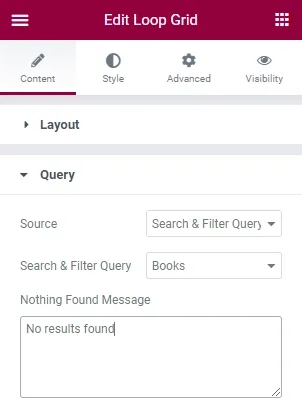
About Search & Filter - Elementor Extension
When a filter returns zero results, visitors don't try again
A list of hundreds of posts, projects or products forces people to click through page after page, and someone looking for something specific gets tired before finding it. Worse still: a filter that offers options with no results is a dead end. Search & Filter - Elementor Extension brings Search & Filter filtering to Elementor so visitors can narrow down by what actually exists in your content.
Filters are built from your own data: taxonomies, categories, custom fields and post meta. There is instant search with real-time filtering, and dynamic fields avoid showing options that have no results. A query builder lets you adjust what is listed without writing code, and the look of the fields can be customized with design options.
Now, the limits. It is an extension: it does not work on its own and depends on Search & Filter (the advanced features are in the Pro version). Nor does it design your grid: the look of each card is still defined in Elementor. Check in the demo that your Elementor installation includes the widgets you want to filter.
Common questions before filtering with Elementor
Can I filter by custom fields?
Yes, Search & Filter builds filters from custom fields, post meta, taxonomies and categories.
Does it work for a store?
Yes, Search & Filter supports WooCommerce among its ecommerce integrations.
Do I have to code the queries?
No, the query builder adjusts results without code.
Filtering products takes more than a list of categories
Online shoppers often combine several criteria at once, and every combination that doesn't exist is a lost sale. With dynamic fields, the store only offers combinations that have a product behind them. Even so, the tidier your catalog is (consistent categories and attributes), the better it will filter: the plugin works with your data, it does not fix it.
Decide the filter fields before opening Elementor
A filter is only as useful as the data feeding it. Before configuring anything, define which taxonomies or custom fields you want to offer and check that your posts or products have them filled in. If half of your projects have no category, the category filter will leave out exactly those. Start with two or three criteria your visitors would really use and expand later.
Version history
-
v
1.2.3 Current 14 May 2024
Customer reviews
Sign in to leave a review. Only people who have the product can review it.
No reviews for this product yet.
Frequently asked questions
-
GPL (General Public License) is the license under which WordPress and most premium plugins/themes are distributed. It grants you the right to use, modify and redistribute the software in as many projects as you want, with no domain restrictions.
-
Yes. With membership you get automatic updates via our GPLClub Updater plugin (installed on your WP, detects new versions and applies them). With individual purchase, you get one year of manual updates from your account.
-
Depends on the plan. Monthly: 3 domains. Semi-annual: 7. Annual and Lifetime: 15. Individual purchase: 1 domain.
-
GPLClub offers its own support for installation, configuration and compatibility. For direct support from the original author (feature requests, product-specific bugs), a license purchased from the author is required.