SeaShell – Modern Responsive WordPress Blog Theme
Antivirus scan
Powered by ClamAV
✅ Verified clean
This product file has passed our security filters.
Want to run a fresh ClamAV scan right now? Takes a few seconds and shows scanner version, signature DB and live result.
This can take 5 to 30 seconds.
Clean file Threat detected
No threats detected in this file.
- File
- Size
- Scanned
- ClamAV
- Signature database
⚡ Powered by ClamAV
Scan could not be completed
Report product
If you detected an issue (broken file, malware, inappropriate content, etc.) let us know and we'll review it ASAP.
Sign in to report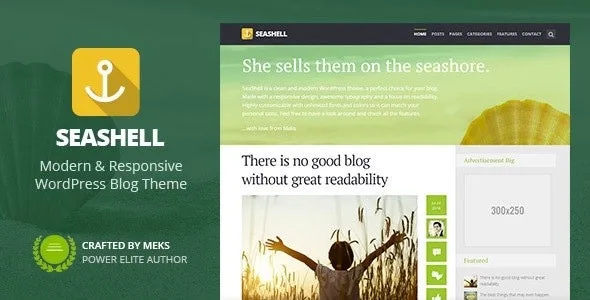
About SeaShell – Modern Responsive WordPress Blog Theme
A blog with several sections can't look like a single block
Anyone who writes about several topics often ends up with a blog where everything looks the same: the reader who lands on a travel article sees the same thing as the one who lands on a cooking article and can't tell which part of the site they are in. SeaShell is a blog theme with a responsive design and typography built for reading.
Almost nobody enters a blog through the front page: they arrive through a single article sent by a search engine or a social network. That is why each post and each category should be recognizable on its own, without relying on the visitor passing through the home page first.
SeaShell: color, background and sidebar for each category
You assign each category its own color, background image and sidebar. There are also several blog page templates, and each one can show posts from one or several specific categories, so you can have a different design for each section.
You can also give a post or a page its own color with a color picker, handy for highlighting the article that matters most to you. And you can create as many sidebars as you need and link them to specific posts or pages; the footer accepts widgets.
Three ways to use SeaShell depending on what you publish
If you write long articles
A sticky navigation follows you as you read and lets you jump to another post without going back. The meta data (date, author, comments, categories and tags) can use icons and appear in the order you prefer. And with 12 shortcodes you add columns, highlights, dropcaps, buttons, pull quotes or progress bars without touching code.
If you mix video, audio and galleries
The theme supports the video, audio, image, quote, gallery and link post formats, and embedded content from Facebook, Twitter and Instagram works.
If you have your own brand or write in another language
There are options for unlimited fonts and color combinations, and sections to upload your logo and your icons. A built-in translator lets you modify or translate any text from the options panel. And you can import the demo content with one click to start from a site similar to the demo and adjust it.
Common questions before building a blog with SeaShell
Can I add a contact form?
Yes. There is official support for the WPForms plugin, and the theme's contact template works with the SeaShell Buddy plugin.
Does it look good with the block editor?
The theme includes styles for WordPress blocks and for the editing screen.
Can I add Google Analytics from the theme options?
No. For code in the header or footer you need a plugin such as Insert Headers and Footers.
Where do I put additional CSS and the favicon?
In the native WordPress fields: Appearance, Customize, Additional CSS and Site Identity.
The options panel, custom widgets and social sharing need separate plugins
To get the theme options panel back you need to install Redux Framework. The custom widgets and the contact template come with SeaShell Buddy. Social sharing is handled by Meks Easy Social Share, where you choose the networks you want to show. They are installed from Appearance, in the SeaShell plugins section. If you are looking for a theme that includes everything built in, count on these three add-ons.
Topics
Version history
-
v
1.9.1 Current 16 Jun 2024
Customer reviews
Sign in to leave a review. Only people who have the product can review it.
No reviews for this product yet.
Frequently asked questions
-
GPL (General Public License) is the license under which WordPress and most premium plugins/themes are distributed. It grants you the right to use, modify and redistribute the software in as many projects as you want, with no domain restrictions.
-
Yes. With membership you get automatic updates via our GPLClub Updater plugin (installed on your WP, detects new versions and applies them). With individual purchase, you get one year of manual updates from your account.
-
Depends on the plan. Monthly: 3 domains. Semi-annual: 7. Annual and Lifetime: 15. Individual purchase: 1 domain.
-
GPLClub offers its own support for installation, configuration and compatibility. For direct support from the original author (feature requests, product-specific bugs), a license purchased from the author is required.
Related products
Startus – Multipurpose Business WordPress Theme

Kapa – Car Repair & Auto Services WordPress Theme
MagicBook – A 3D Flip Book WordPress Theme