Sell Media Stripe
Antivirus scan
Powered by ClamAV
✅ Verified clean
This product file has passed our security filters.
Want to run a fresh ClamAV scan right now? Takes a few seconds and shows scanner version, signature DB and live result.
This can take 5 to 30 seconds.
Clean file Threat detected
No threats detected in this file.
- File
- Size
- Scanned
- ClamAV
- Signature database
⚡ Powered by ClamAV
Scan could not be completed
Report product
If you detected an issue (broken file, malware, inappropriate content, etc.) let us know and we'll review it ASAP.
Sign in to report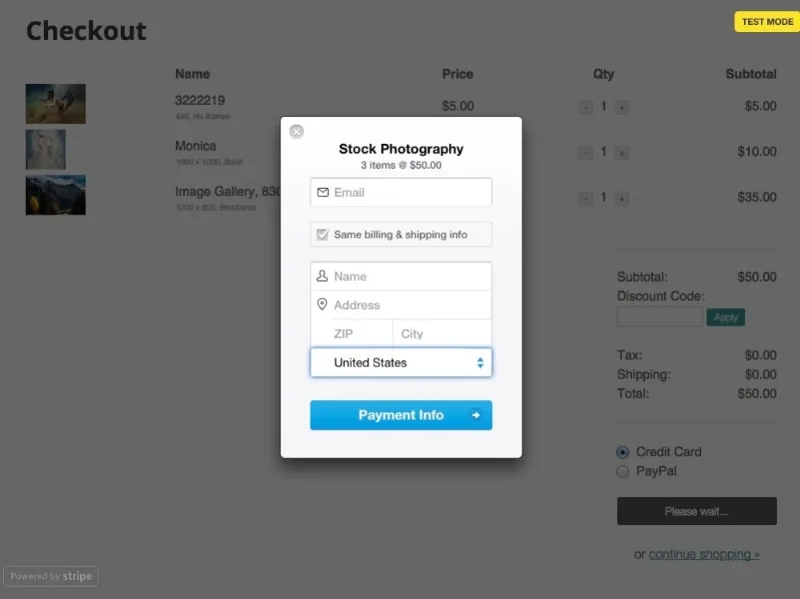
About Sell Media Stripe
Visitors to your photo store who leave without paying
Filling an image store with traffic and seeing sales barely move is frustrating. Sometimes the problem is not the photo or the price but the moment of payment: people usually buy an image on impulse, and that impulse does not survive too many steps or a demand for an account they do not have.
Every extra screen between "I'll take it" and the download is a chance for that desire to fade. Sell Media Stripe removes one of those screens: the card payment happens inside your own website.
Sell Media Stripe: the card, in your own checkout
It is a payment gateway extension for the Sell Media plugin. It adds credit card fields to your store's payment page: the customer enters their details and gets what they bought, without being sent to another company's website.
With PayPal the journey is longer: the customer is redirected to PayPal's website, enters a card or logs in, confirms they accept the charge and returns to your site. With Stripe they enter the card and that is it. Also, anyone with a card can buy, without a PayPal account, which is useful because PayPal is not available in some countries.
- Card fields at checkout: the customer pays without leaving your store.
- Panels inside WordPress: a Stripe overview, the list of payments, the list of customers and the account settings.
- Test mode and live mode: each with its own pair of keys, so you can test a transaction before charging for real.
There is a side effect worth keeping in mind: someone who pays on your site stays on it while completing the purchase and may keep looking at other photos in your collection. It is a possibility, not a guarantee.
Who notices the difference most when charging by card
If you sell to buyers in other countries
Not everyone has PayPal or can use it where they live. With a card, the barrier disappears and your store stops depending on a method not everybody has at hand.
If your store is already built with Sell Media
The extension adds to what you already do: photos, galleries, prints, price groups and discount codes remain the base plugin's business. Stripe only changes how people pay, so you do not have to rebuild your catalog.
If today you only charge with PayPal
Think about what the customer sees right before paying. If most of your visitors drop off at that point, trying a card checkout on your own site is a small change.
Common questions before activating Sell Media Stripe
Does it work without the Sell Media plugin? No. It is an extension of that plugin and makes no sense without it.
Do I need a Stripe account? Yes, a free Stripe account. With it you get four keys and paste them into Sell Media's payment settings.
Does the customer have to pay with PayPal? No. A credit card is enough.
Can I try it before charging for real? Yes, using the test mode keys.
Without SSL and Stripe keys it does not charge
To charge for real you need an SSL certificate on your website, because Stripe requires it. You also need the four keys (two for testing and two live) copied into Sell Media, under Settings and Payment. The extension only handles card payment: the catalog, prices and file protection depend on Sell Media.
Topics
Version history
-
v
2.1.7 Current 16 May 2024
Customer reviews
Sign in to leave a review. Only people who have the product can review it.
No reviews for this product yet.
Frequently asked questions
-
GPL (General Public License) is the license under which WordPress and most premium plugins/themes are distributed. It grants you the right to use, modify and redistribute the software in as many projects as you want, with no domain restrictions.
-
Yes. With membership you get automatic updates via our GPLClub Updater plugin (installed on your WP, detects new versions and applies them). With individual purchase, you get one year of manual updates from your account.
-
Depends on the plan. Monthly: 3 domains. Semi-annual: 7. Annual and Lifetime: 15. Individual purchase: 1 domain.
-
GPLClub offers its own support for installation, configuration and compatibility. For direct support from the original author (feature requests, product-specific bugs), a license purchased from the author is required.