SEO Images Optimizer Pro
Antivirus scan
Powered by ClamAV
✅ Verified clean
This product file has passed our security filters.
Want to run a fresh ClamAV scan right now? Takes a few seconds and shows scanner version, signature DB and live result.
This can take 5 to 30 seconds.
Clean file Threat detected
No threats detected in this file.
- File
- Size
- Scanned
- ClamAV
- Signature database
⚡ Powered by ClamAV
Scan could not be completed
Report product
If you detected an issue (broken file, malware, inappropriate content, etc.) let us know and we'll review it ASAP.
Sign in to report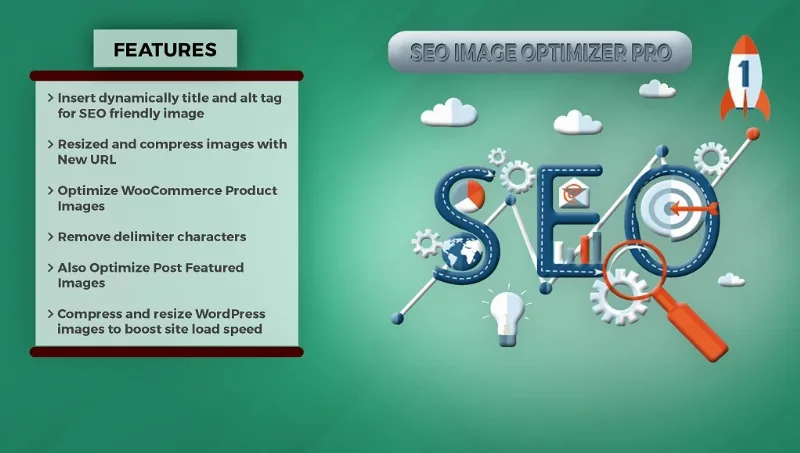
About SEO Images Optimizer Pro
Years of photos with no alt text, and nobody will open them one by one
A site that has been publishing for a while tends to carry the same debt: hundreds of images with an empty alt field and photos heavier than the design needs. Fixing that by hand means opening every image, one by one.
SEO Images Optimizer Pro, by Weblizar, tackles both: it inserts title and alt text dynamically and compresses images so the page loads sooner. What you need to understand before installing it changes how it should be used: the dynamic title and alt text are inserted when the page loads, without being saved to the database.
Titles, alt and weight: what it includes
- Dynamic title and alt text on images, with an option to remove delimiters such as dots and dashes.
- Compression to reduce image size and speed up loading.
- Resized images when uploading them for posts.
- WooCommerce support, which extends the optimization to product images.
- Your own text per image: custom title, description and caption.
- Multisite and translation: it supports multisite and is ready for other languages.
An alt that is not stored lasts as long as the plugin does
That text not being written to the database sounds like a pure advantage: you test it and leave no trace in the image's fields. But it has a less visible side: an attribute that is not stored is not yours, it belongs to the plugin. If you deactivate it one day or switch tools, expect those texts to vanish from the HTML while the media library keeps its fields as they were.
So treat it as a permanent part of the site, not as a one-off cleanup. To check it, look at a page's code with the plugin active, deactivate it on a copy and look again.
Google uses alt text along with computer vision and the page's content to understand what an image shows. It asks for useful, information-rich text and warns against filling these attributes with keywords, because that hurts the experience and can make a site look like spam.
The per-image text covers title, description and caption, not alt, which stays dynamic. For the photos that matter to the business, such as the main shot of each product or those on your service pages, write the alt in the media library and review the setting that overrides existing alt text, on by default in the free version.
No WebP, no lazy loading and no CDN on its list
This is an attributes and compression plugin, not a performance suite. Its features include no conversion to modern formats, lazy loading or image CDN.
In the free version, resizing and compression apply on upload and overwrite the file, so they do not clean up what you already have. On a test install, check three things first: compression level, size limits and how it composes the generated text.
Try it on a copy of the site
It installs like any plugin. The prudent order is this:
- Copy the site and the image folder before activating the plugin.
- Turn on dynamic text and review the result in the code of several pages.
- Upload a small group of images and compare the quality with their originals.
- Write by hand the alt text for the images that matter most.
Other ways to handle attributes and weight
If you want compression plus lazy loading, WP Smush Pro compresses, keeps a backup of the originals and defers loading. To fill attributes from the file name and bulk update existing images there is Image Attributes Pro.
If you already use All in One SEO, its Image SEO addon fills alt text from templates.
Database, WooCommerce and WebP in short answers
Does it modify the database?
The dynamic texts are not stored in it: they are inserted when the page loads. The plugin's settings are stored, and compression changes the image file.
What happens to the texts if I deactivate it?
Since they are not stored in the database, expect them to stop appearing.
Does it work with WooCommerce images?
Yes, the Pro version includes support for product images.
Can I write the text for a specific image?
Yes, in Pro you can add your own title, description and caption to each image. Alt is not on that list.
Does it convert images to WebP?
That is not among its features. If you need it, look at a performance tool first.
Topics
Version history
-
v
5.5 Current 24 Feb 2025
Customer reviews
Sign in to leave a review. Only people who have the product can review it.
No reviews for this product yet.
Frequently asked questions
-
GPL (General Public License) is the license under which WordPress and most premium plugins/themes are distributed. It grants you the right to use, modify and redistribute the software in as many projects as you want, with no domain restrictions.
-
Yes. With membership you get automatic updates via our GPLClub Updater plugin (installed on your WP, detects new versions and applies them). With individual purchase, you get one year of manual updates from your account.
-
Depends on the plan. Monthly: 3 domains. Semi-annual: 7. Annual and Lifetime: 15. Individual purchase: 1 domain.
-
GPLClub offers its own support for installation, configuration and compatibility. For direct support from the original author (feature requests, product-specific bugs), a license purchased from the author is required.