Social Share Buttons for WordPress
Antivirus scan
Powered by ClamAV
✅ Verified clean
This product file has passed our security filters.
Want to run a fresh ClamAV scan right now? Takes a few seconds and shows scanner version, signature DB and live result.
This can take 5 to 30 seconds.
Clean file Threat detected
No threats detected in this file.
- File
- Size
- Scanned
- ClamAV
- Signature database
⚡ Powered by ClamAV
Scan could not be completed
Report product
If you detected an issue (broken file, malware, inappropriate content, etc.) let us know and we'll review it ASAP.
Sign in to report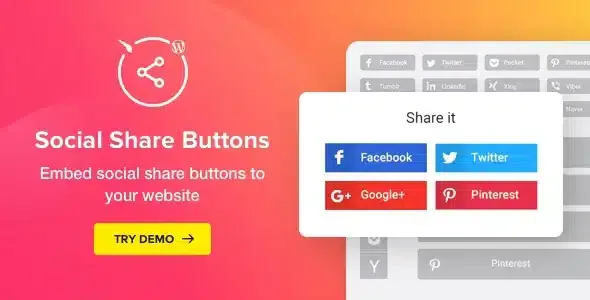
About Social Share Buttons for WordPress
Sharing depends less on your content than on how easy it is
You publish an article worth spreading, and instead of sharing it the reader closes the tab because they can't find the button or their favorite network isn't an option. Every extra step you ask of a visitor is a share that never happens. Social Share Buttons for WordPress, by Elfsight, puts that action one click away, with no coding.
40+ networks and two ways to display them
You can choose from more than 40 networks and services. They include Facebook, Twitter, Pinterest, Amazon, Blogger, Email, Facebook Messenger, LiveJournal, Skype, Telegram, Tumblr, Viadeo and Viber. That matters because your audience doesn't use the same network you do: if you sell to people who live on Telegram or Messenger, offering only the usual two or three leaves them out.
The plugin has two layouts:
- Built-in: the buttons sit in a specific spot on the page, for example above or below the content.
- Floating: the buttons follow the visitor as they scroll, so they are always within reach.
Adjustable design without writing code
These are the customization options for the buttons:
- Shape and transparency of the buttons.
- Predefined color schemes, or your own colors and fonts.
- Alignment to the left, right or center.
- Gutter size between buttons, number of columns and width of each button.
- Which elements each button displays.
- Duplicate, edit and reorder buttons, and add as many as you want.
With the shortcode generator you can place them wherever you need: in the content area, before or after the text, in a popup, in a side panel or in any sidebar. You can also embed them in the theme code with the shortcode.
Sharing doesn't gain followers on its own
The plugin gives you the button, not the reason to click it. Here is what it solves and what is up to you:
- It solves: share buttons for more than 40 networks, built-in and floating layouts, your own design and placement with a shortcode.
- You cover: the original, appealing content people want to spread.
- You cover: the presence and activity on your profiles, because the plugin shares to the networks, it doesn't manage them.
- You cover: deciding which networks to offer based on your audience, so the page isn't filled with icons nobody uses.
It is also not a plugin for displaying your feed or automatically publishing your posts to social networks: its job is to let the visitor share what they read.
How to get the most out of Social Share Buttons for WordPress
Start with a few networks, the ones your audience really uses, and place them where the reader finishes reading, or use the floating version if your texts are long. Check in the demo how they look on mobile before choosing the layout, because that is where most sharing happens and where a floating block can get in the way.
Frequently asked questions
Can I add several network buttons at once?
Yes. You can add any number of buttons and choose the networks from a list of more than 40.
Can I change how the buttons look?
Yes: shape, transparency, predefined or custom colors, and fonts.
Can I make floating buttons?
Yes. With the floating layout the buttons follow the visitor's scroll and are always visible.
Where can I place them?
In the content, above or below the text, in a popup, in side panels, in any sidebar or in the theme code with the shortcode.
Topics
Version history
-
v
1.6.1 Current 8 Jan 2025
Customer reviews
Sign in to leave a review. Only people who have the product can review it.
No reviews for this product yet.
Frequently asked questions
-
GPL (General Public License) is the license under which WordPress and most premium plugins/themes are distributed. It grants you the right to use, modify and redistribute the software in as many projects as you want, with no domain restrictions.
-
Yes. With membership you get automatic updates via our GPLClub Updater plugin (installed on your WP, detects new versions and applies them). With individual purchase, you get one year of manual updates from your account.
-
Depends on the plan. Monthly: 3 domains. Semi-annual: 7. Annual and Lifetime: 15. Individual purchase: 1 domain.
-
GPLClub offers its own support for installation, configuration and compatibility. For direct support from the original author (feature requests, product-specific bugs), a license purchased from the author is required.