SS WooCommerce Myaccount Ajax Tabs
Antivirus scan
Powered by ClamAV
✅ Verified clean
This product file has passed our security filters.
Want to run a fresh ClamAV scan right now? Takes a few seconds and shows scanner version, signature DB and live result.
This can take 5 to 30 seconds.
Clean file Threat detected
No threats detected in this file.
- File
- Size
- Scanned
- ClamAV
- Signature database
⚡ Powered by ClamAV
Scan could not be completed
Report product
If you detected an issue (broken file, malware, inappropriate content, etc.) let us know and we'll review it ASAP.
Sign in to reportNewer version out, or a problem?
About SS WooCommerce Myaccount Ajax Tabs
Stores with a lot of traffic in their account area
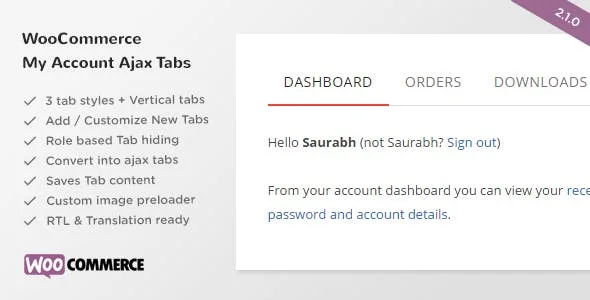
As of WooCommerce 2.6, the My Account links are shown as tabs. Every click on a WooCommerce tab loads an entire new page, and with heavy traffic that weighs on the server and on the patience of the buyer. SS WooCommerce Myaccount Ajax Tabs turns those tabs into ajax tabs, so the content loads on the same page.
It is aimed at WooCommerce stores that want faster browsing in their customer area. It needs WooCommerce active, because it works on the My Account tabs that WooCommerce generates.
How SS WooCommerce Myaccount Ajax Tabs navigates without reloading the page
The first time a tab is opened, its content is requested by ajax and shown on the same page. Once all tabs are loaded, the plugin saves that content and serves it without requesting it from the server again, so the customer can switch tabs several times during the session with no extra server load.
If you prefer classic navigation at any point, the option to enable or disable ajax is in the plugin settings, and you can also set the maximum wait time for the request.
Custom tabs, your own order and free content
You can add as many new tabs as you want and reorder them by dragging them in a list. If a tab is no longer needed, you delete it and can restore it whenever you like. You can also remove WooCommerce's default tabs from its settings and add them back with this plugin to change their position.
The content of each tab supports HTML, shortcodes and complex markup. If you need custom PHP code, you copy the endpoint file with the same name into the theme and the plugin detects it.
Tab styles and how it works with other plugins
- Three styles: default, classic and flat.
- Vertical orientation in all styles.
- Additional tabs are automatically grouped into a More dropdown.
- Built-in CSS styles, which can be disabled in the settings.
It is compatible with the YITH WooCommerce Customize My Account Page plugin, and sliders and JavaScript work in the content that plugin adds, including Visual Composer and Revolution Slider. It is also compatible with YITH WooCommerce Order Tracking and with the custom tab links of the WoodMart theme.
Settings, languages and page weight
- Enable or disable the ajax feature.
- Custom loading image.
- Custom error message.
- Maximum wait time for the request.
It includes a sample .pot file for translation and supports right-to-left languages. It works in modern browsers and is compatible with WooCommerce high-performance order storage (HPOS). Its assets do not exceed 60 KB, of which 28 KB is the loading image.
Frequently asked questions about SS WooCommerce Myaccount Ajax Tabs
Do I need WooCommerce to use it?
Yes. The plugin works on the WooCommerce My Account tabs, so WooCommerce must be active.
Can I put my own content in a tab?
Yes. Each tab supports HTML and shortcodes, and if you need PHP, you copy the endpoint file into the theme.
Does the page reload when switching tabs?
With ajax enabled, no: the content appears on the same page and, once loaded, it is served from what was saved.
Does it work with YITH WooCommerce Customize My Account Page?
Yes, it is compatible with that plugin, and the content it adds can include sliders or JavaScript.
Topics
Version history
-
v
2.8.0 Current 8 Jan 2025
Customer reviews
Sign in to leave a review. Only people who have the product can review it.
No reviews for this product yet.
Frequently asked questions
-
GPL (General Public License) is the license under which WordPress and most premium plugins/themes are distributed. It grants you the right to use, modify and redistribute the software in as many projects as you want, with no domain restrictions.
-
Yes. With membership you get automatic updates via our GPLClub Updater plugin (installed on your WP, detects new versions and applies them). With individual purchase, you get one year of manual updates from your account.
-
Depends on the plan. Monthly: 3 domains. Semi-annual: 7. Annual and Lifetime: 15. Individual purchase: 1 domain.
-
GPLClub offers its own support for installation, configuration and compatibility. For direct support from the original author (feature requests, product-specific bugs), a license purchased from the author is required.