Synopter for Elementor
Antivirus scan
Powered by ClamAV
✅ Verified clean
This product file has passed our security filters.
Want to run a fresh ClamAV scan right now? Takes a few seconds and shows scanner version, signature DB and live result.
This can take 5 to 30 seconds.
Clean file Threat detected
No threats detected in this file.
- File
- Size
- Scanned
- ClamAV
- Signature database
⚡ Powered by ClamAV
Scan could not be completed
Report product
If you detected an issue (broken file, malware, inappropriate content, etc.) let us know and we'll review it ASAP.
Sign in to reportNewer version out, or a problem?
About Synopter for Elementor
A weather block for bookings, trips and events
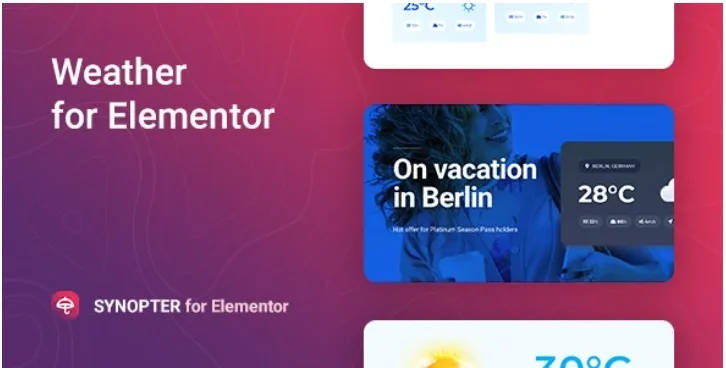
Anyone booking a trip, an excursion or an outdoor event asks about the weather before paying. Synopter for Elementor adds a block with the current weather for a specific city to your WordPress site.
Works on top of Elementor and needs an OpenWeatherMap key
Synopter is an Elementor widget, so Elementor needs to be installed and active. The data comes from OpenWeatherMap, so you also need an API key from that platform. Here is what it covers and what is up to you:
- Up-to-date weather data for the city you choose, with the language, time zone and location you set.
- A complete block that you can adjust from the Elementor interface, without code knowledge.
- Control over which weather characteristics are shown, with icons from the library or your own SVG icons.
- The free OpenWeatherMap key has some limitations, and the service offers paid plans with more capabilities.
Styling and templates without touching code
It includes five templates as a starting point. They are examples that can inspire you to create your own style. From there you change the color, the typography, the text shadow, the background color, the border, the margins and the padding of each characteristic. Everything is configured from Elementor. There are also settings to adapt the block to different screens, and it works with any WordPress theme built on Elementor.
Which businesses get the most out of a weather block
It is especially practical for travel agencies, weather stations, booking or event planning, and any company whose activity may depend on the weather. It does not matter what kind of site you have: even a small weather block can be a useful element for your visitors.
Translation into any language and right-to-left text
You can choose the language of the data, and the block includes a file to translate its texts into any language. It also works with right-to-left reading directions, and it is built with SEO in mind.
Frequently asked questions about Synopter for Elementor
Do I need Elementor to use it?
Yes. Synopter is an Elementor widget, so it has to be installed and active.
Can I use it for free?
You can start with a free OpenWeatherMap API key, which has some limitations. If you need more, that service offers paid plans with expanded capabilities.
Can I change the weather icons?
Yes. You can choose each icon from the library or upload your own in SVG format.
Do I have to write code to customize the look?
No. The color, typography, backgrounds, borders and margins are adjusted from the Elementor interface.
Can it be translated?
Yes. It includes a file to translate the block into any language.
Version history
-
v
1.1.12 Current 7 Nov 2026
-
v
1.1.11 14 Apr 2026
Customer reviews
Sign in to leave a review. Only people who have the product can review it.
No reviews for this product yet.
Frequently asked questions
-
GPL (General Public License) is the license under which WordPress and most premium plugins/themes are distributed. It grants you the right to use, modify and redistribute the software in as many projects as you want, with no domain restrictions.
-
Yes. With membership you get automatic updates via our GPLClub Updater plugin (installed on your WP, detects new versions and applies them). With individual purchase, you get one year of manual updates from your account.
-
Depends on the plan. Monthly: 3 domains. Semi-annual: 7. Annual and Lifetime: 15. Individual purchase: 1 domain.
-
GPLClub offers its own support for installation, configuration and compatibility. For direct support from the original author (feature requests, product-specific bugs), a license purchased from the author is required.