The Events Calendar Pro
Antivirus scan
Powered by ClamAV
✅ Verified clean
This product file has passed our security filters.
Want to run a fresh ClamAV scan right now? Takes a few seconds and shows scanner version, signature DB and live result.
This can take 5 to 30 seconds.
Clean file Threat detected
No threats detected in this file.
- File
- Size
- Scanned
- ClamAV
- Signature database
⚡ Powered by ClamAV
Scan could not be completed
Report product
If you detected an issue (broken file, malware, inappropriate content, etc.) let us know and we'll review it ASAP.
Sign in to report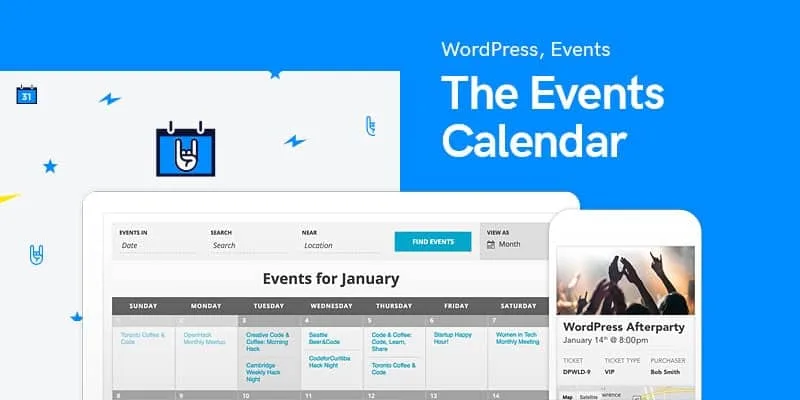
About The Events Calendar Pro
A calendar nobody updates drives away the people who want to attend
Building an events list by hand always ends the same way: the same weekly class copied forty times, past dates nobody deletes, and visitors who can't find what's on this Saturday and leave without asking.
The Events Calendar Pro is built for people who repeat their dates (workshops, classes, talks, concerts, meetings) and need the calendar to take care of itself where things repeat. The real work isn't creating an event, it's not having to recreate it every week. It is installed on top of The Events Calendar plugin and does not work as a standalone plugin.
The Events Calendar Pro and the views for finding a date
Not every visitor searches the same way: some remember the day, others want to see what's nearby, and others just browse. That's why the plugin offers several ways to move through the schedule:
- Month: the classic calendar grid.
- List: upcoming events in chronological order.
- Day: everything happening on a specific day.
- Week: lets you compare several days at a glance.
- Photo: a visual layout led by featured images.
- Map: visitors find events by location on an interactive map.
Visitors can also filter by category, tag or custom fields such as venue, price or city. You decide which filters exist and how they are displayed.
Recurring, virtual and hybrid events without duplicating listings
Recurring events (weekly, monthly or with a custom pattern) are set up once and repeat on their own. If you teach in person and also by video call, the plugin supports virtual and hybrid events, so you don't need to invent categories to tell them apart.
You can also import events from other sources, which saves a lot of time if your schedule already lives somewhere else. Review imported events before publishing them: a calendar with badly copied data causes more confusion than an empty one.
Seat-assigned reservations are not included
It is a calendar with management features, not a complete booking system for every business. Before buying, separate what it solves from what you'll need to cover elsewhere:
- It solves: month, list, day, week, photo and map views; filters; recurring, virtual and hybrid events; event importing.
- You cover with another tool: seating maps with seat selection and hold timers, which belong to a higher plan from the developer.
- You cover with another tool: segmented email campaigns to promote your events.
- You cover yourself: keeping the data up to date, checking capacity and notifying attendees if something changes.
If what you need is for someone to book a specific time slot with a professional (a hair salon, a consultation), this is not an appointment system: it is a public events schedule.
It adapts to your theme and your editor
The calendar adopts the typography, buttons and colors of your active theme, and each view integrates with it. It includes Gutenberg blocks and integrates with page builders such as Elementor and Divi, so you can place calendar views, lists of upcoming events or a single event inside a page without touching code. If your design needs tweaks, there is a custom CSS stylesheet selector in the settings.
Frequently asked questions
Do I also need to install The Events Calendar plugin?
Yes. Pro extends the base plugin, so both must be active.
Does it work for a business that books individual appointments?
It isn't the best fit. It is made for events with a date and an audience, not for one-to-one appointment scheduling.
Will it look right with my theme?
It takes the styles of the active theme and has been tested with frameworks such as Kadence, Astra, GeneratePress and Divi. Still, check the demo with your own design before deciding.
Can I publish an event that repeats every week without creating it each time?
Yes, that is exactly what it is for: you define it once with its repeat pattern.
Topics
Version history
-
v
7.8.5 Current 31 Oct 2026
-
v
7.8.3 22 Sep 2026
-
v
7.8.2 5 Sep 2026
-
v
7.8.0 10 Jul 2026
-
v
7.7.14 12 Mar 2026
Customer reviews
Sign in to leave a review. Only people who have the product can review it.
No reviews for this product yet.
Frequently asked questions
-
GPL (General Public License) is the license under which WordPress and most premium plugins/themes are distributed. It grants you the right to use, modify and redistribute the software in as many projects as you want, with no domain restrictions.
-
Yes. With membership you get automatic updates via our GPLClub Updater plugin (installed on your WP, detects new versions and applies them). With individual purchase, you get one year of manual updates from your account.
-
Depends on the plan. Monthly: 3 domains. Semi-annual: 7. Annual and Lifetime: 15. Individual purchase: 1 domain.
-
GPLClub offers its own support for installation, configuration and compatibility. For direct support from the original author (feature requests, product-specific bugs), a license purchased from the author is required.