Ultimate WooCommerce Brands PRO
Antivirus scan
Powered by ClamAV
✅ Verified clean
This product file has passed our security filters.
Want to run a fresh ClamAV scan right now? Takes a few seconds and shows scanner version, signature DB and live result.
This can take 5 to 30 seconds.
Clean file Threat detected
No threats detected in this file.
- File
- Size
- Scanned
- ClamAV
- Signature database
⚡ Powered by ClamAV
Scan could not be completed
Report product
If you detected an issue (broken file, malware, inappropriate content, etc.) let us know and we'll review it ASAP.
Sign in to reportNewer version out, or a problem?
About Ultimate WooCommerce Brands PRO
Stores with many brands that shoppers want to browse separately
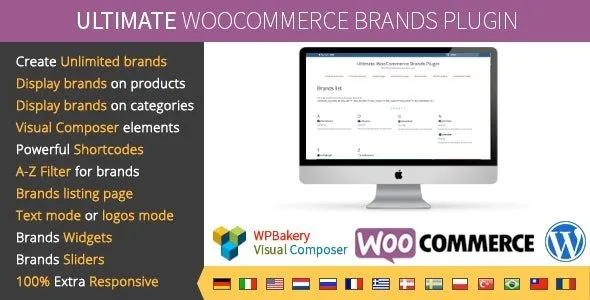
When a store carries products from many manufacturers, shoppers usually search by brand first and only then by product type. If brands don't work as a clear entry point, navigation turns into a maze of categories. Ultimate WooCommerce Brands PRO adds brands with logos to WooCommerce products on a site that is already live.
It fits if you want each manufacturer to have its own space within the store and shoppers to see the products of a brand on its own page. As an add-on for WooCommerce, it needs WooCommerce installed and active to work. The theme must also support WooCommerce. If your store doesn't use WooCommerce, this plugin won't help you.
A dedicated page for each brand and a list with alphabetical filter
Each brand has its own page with the products assigned to it. One product can have several brands assigned, which is useful when an item belongs to more than one manufacturer.
The main brands page gathers them all in a list with an ABC filter, showing each brand's logo, title and number of items. The style of that list can be changed in several ways from the shortcode or WPBakery element settings.
Where the brand appears on the product page, categories and listings
From the admin panel you choose the position where the brand appears on the product page, and decide whether it shows on category pages and in any product listing. You can display the name, the logo or both. The main options are:
- On the product page, with several positions to choose from.
- On category pages and product listings.
- In listings, the logo alone or the brand text without a link.
Slider, widget and shortcodes to place brands on any page
The brand slider is responsive and supports touch gestures. You place it on any page with a shortcode or a WPBakery Page Builder element.
The shortcodes cover three cases: the brands list, the slider and the products of a specific brand. If you prefer something in the sidebar, the widget shows the brand list with logos, titles, counts or as a dropdown.
If your site builds its pages with WPBakery Page Builder, the elements replace the shortcodes.
Languages, themes and responsive design for a store already running
It works with any theme that supports WooCommerce. All its elements and pages are mobile-friendly.
It is ready for translation, with PO and MO files included, and accepts brand names in any language. Brands starting with uppercase or lowercase letters, or with a number or symbol, are grouped automatically into the group that corresponds to them in the list.
Frequently asked questions about Ultimate WooCommerce Brands PRO
Do I need WooCommerce to use Ultimate WooCommerce Brands PRO?
Yes. It is an add-on for WooCommerce, so the store must have WooCommerce installed and active.
Does it work with any WordPress theme?
With any theme that supports WooCommerce, also on a site that is already live.
Can I assign several brands to the same product?
Yes. A product can have several brands, and each one has its own page with the products assigned to it.
Can I show only the brand name, without a logo?
Yes. You can choose between logo, text or both, and in product listings the brand can appear only as text without a link.
Can the brands list be browsed by letter?
Yes. The brands page has an ABC filter and shows the number of items for each brand.
Topics
Version history
-
v
2.0 Current 30 May 2024
Customer reviews
Sign in to leave a review. Only people who have the product can review it.
No reviews for this product yet.
Frequently asked questions
-
GPL (General Public License) is the license under which WordPress and most premium plugins/themes are distributed. It grants you the right to use, modify and redistribute the software in as many projects as you want, with no domain restrictions.
-
Yes. With membership you get automatic updates via our GPLClub Updater plugin (installed on your WP, detects new versions and applies them). With individual purchase, you get one year of manual updates from your account.
-
Depends on the plan. Monthly: 3 domains. Semi-annual: 7. Annual and Lifetime: 15. Individual purchase: 1 domain.
-
GPLClub offers its own support for installation, configuration and compatibility. For direct support from the original author (feature requests, product-specific bugs), a license purchased from the author is required.