User Registration Profile Completeness Addon
Antivirus scan
Powered by ClamAV
✅ Verified clean
This product file has passed our security filters.
Want to run a fresh ClamAV scan right now? Takes a few seconds and shows scanner version, signature DB and live result.
This can take 5 to 30 seconds.
Clean file Threat detected
No threats detected in this file.
- File
- Size
- Scanned
- ClamAV
- Signature database
⚡ Powered by ClamAV
Scan could not be completed
Report product
If you detected an issue (broken file, malware, inappropriate content, etc.) let us know and we'll review it ASAP.
Sign in to report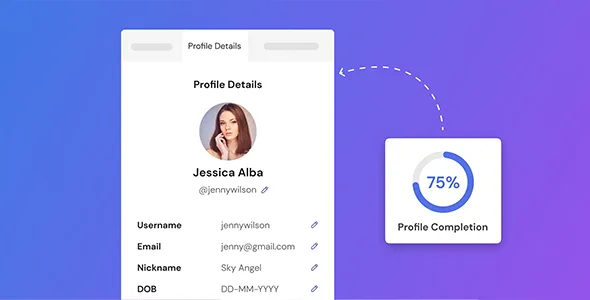
About User Registration Profile Completeness Addon
Registrations that leave the profile almost empty
Anyone running a community, a membership or a member directory knows the pattern: people sign up with an email address and little else, and the profile stays that way forever. If you stuff the registration form with fields to avoid it, you lose sign-ups along the way. If you ask for the minimum, you end up with accounts you know nothing about.
The trick is to separate the two moments: a short registration now, a full profile later. User Registration Profile Completeness Addon works in the second moment: it shows each user, with a percentage meter, how much is missing and what is missing.
A walkthrough: from quick sign-up to a 100% profile
Picture a community of professionals where the profile (photo, bio, contact details) is what makes the directory useful. This is how the add-on fits in:
- Step 1, turn it on: in the User Registration form settings you enable Profile Completeness and the meter appears next to the user's profile. There is no separate setup screen: everything is a toggle or a field inside that panel.
- Step 2, decide what each field is worth: by default the percentage is split evenly across all fields. If you enable a custom percentage for each field, you assign the weight yourself and a remaining-percentage counter warns you until the total reaches 100.
- Step 3, remind users what is missing: with the incomplete profile notice, each user sees your own message until they finish. You can combine it with mandatory fields on the user dashboard for the details that cannot be left blank.
- Step 4, close the loop: if you enable the congratulations email, the user gets an automatic email as soon as they complete their profile.
Be clear about the scope: it is an add-on for User Registration, so it needs that plugin installed and does not work on its own. It measures, reminds and congratulates. What you do next with that data (recommending content, filtering the directory) is work for your site, not for this meter.
Common questions before turning the meter on
What does it mean for a profile to be complete?
It is the percentage of information the user has filled in, for example bio, avatar or contact details. It encourages them to finish adding details.
How is the percentage calculated?
By default, evenly across all profile fields. With the custom percentage for each field, you set the weight of each one.
Can I change the message shown to incomplete profiles?
Yes, the notice text is fully editable.
Do I need to touch code?
No. Everything is configured from the registration form settings panel.
What happens at 100%?
If you have the congratulations email enabled, the user receives an automatic email. Otherwise the profile is simply complete.
Splitting the 100%: the setting that changes the outcome
An even split is convenient, but it treats the profile photo the same as a second surname. If your directory lives on every member having a photo and a decent bio, give those fields more weight and the extras less. That way users do not reach a false 90% with the irrelevant bits done and the important ones empty.
One practical detail: the incomplete profile notice works better when it says what the user gains by finishing (appearing in the directory, for example) than when it just says "complete your profile". And if a detail is essential, do not leave it to the meter: make it mandatory.
Topics
Version history
-
v
1.0.9 Current 26 Jun 2026
-
v
1.0.8 7 Apr 2026
Customer reviews
Sign in to leave a review. Only people who have the product can review it.
No reviews for this product yet.
Frequently asked questions
-
GPL (General Public License) is the license under which WordPress and most premium plugins/themes are distributed. It grants you the right to use, modify and redistribute the software in as many projects as you want, with no domain restrictions.
-
Yes. With membership you get automatic updates via our GPLClub Updater plugin (installed on your WP, detects new versions and applies them). With individual purchase, you get one year of manual updates from your account.
-
Depends on the plan. Monthly: 3 domains. Semi-annual: 7. Annual and Lifetime: 15. Individual purchase: 1 domain.
-
GPLClub offers its own support for installation, configuration and compatibility. For direct support from the original author (feature requests, product-specific bugs), a license purchased from the author is required.