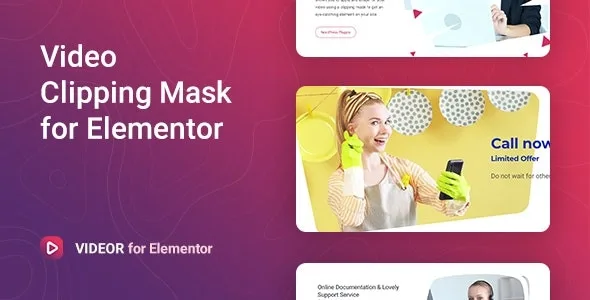
Videor for Elementor
Antivirus scan
Powered by ClamAV
✅ Verified clean
This product file has passed our security filters.
Want to run a fresh ClamAV scan right now? Takes a few seconds and shows scanner version, signature DB and live result.
This can take 5 to 30 seconds.
Clean file Threat detected
No threats detected in this file.
- File
- Size
- Scanned
- ClamAV
- Signature database
⚡ Powered by ClamAV
Scan could not be completed
Report product
If you detected an issue (broken file, malware, inappropriate content, etc.) let us know and we'll review it ASAP.
Sign in to reportNewer version out, or a problem?
About Videor for Elementor
Elementor sites that need a video with its own shape
A rectangular video placed on the homepage tends to get lost between photos and text blocks. Whoever designs the site for a photographer, a creative studio or a portfolio knows that the shape of an image also communicates, and that a standard box does not always convey the style the client wants.
Videor is made for people who already build their pages with Elementor and want that effect without touching code. It requires Elementor to be installed and active, because it works as a widget inside its editor.
It is not for anyone who builds with another page builder or in another way: if your site does not use Elementor, this plugin will not work for you. Everything is configured directly from the Elementor interface.
Preset masks or your own SVG shape
The widget comes with more than 40 preset masks that can be applied in a moment. If your brand has a specific silhouette, you can also upload a custom shape in SVG format. Any shape can give you an eye-catching element on the page.
With the same tool you can use the video as the background of a text block or other blocks.
Video from YouTube, Vimeo or your media library
You can choose the video source depending on where it is hosted. You can use a YouTube link, a Vimeo link, a file from your site's media library, or an internal or external link.
Inside the same box you adjust the width, height, position and scale of the video.
Colors, typography and shadows from the Elementor editor
Style settings are made from the Elementor interface itself, without the need to touch code or CSS. You can change the background colors, the height and width, and the margins and padding of the video, and define the color, typography, shadow and alignment of the title and the description.
The plugin also includes settings for borders, gradients and responsive behavior, so the clipping looks right on mobile and desktop. You can also make the video play when the mouse enters the box and stop when it leaves.
Five starter templates and a translation file ready for other languages
The package includes five example templates that inspire you to create your style and give you a quick start.
- Right-to-left text: the plugin is prepared for RTL direction.
- Translation: it includes a file to translate the plugin into any language.
- Browsers: it works in Chrome, Firefox, Safari, Opera and Edge.
- Search engines: the plugin is built with SEO in mind.
Common questions about video and masks in Videor
Can I use a YouTube or Vimeo video?
Yes. You can choose YouTube, Vimeo, a file from your media library or a link.
Can I use my own shape?
Yes, in SVG format, in addition to the more than 40 preset masks.
Does it work with right-to-left languages?
Yes, it is prepared for RTL text and includes a file to translate it into other languages.
Does it look right on phones and in different browsers?
The settings are responsive, and the plugin is compatible with Chrome, Firefox, Safari, Opera and Edge.
Topics
Version history
-
v
1.1.3 Current 22 Sep 2026
-
v
1.1.1 27 May 2024
Customer reviews
Sign in to leave a review. Only people who have the product can review it.
No reviews for this product yet.
Frequently asked questions
-
GPL (General Public License) is the license under which WordPress and most premium plugins/themes are distributed. It grants you the right to use, modify and redistribute the software in as many projects as you want, with no domain restrictions.
-
Yes. With membership you get automatic updates via our GPLClub Updater plugin (installed on your WP, detects new versions and applies them). With individual purchase, you get one year of manual updates from your account.
-
Depends on the plan. Monthly: 3 domains. Semi-annual: 7. Annual and Lifetime: 15. Individual purchase: 1 domain.
-
GPLClub offers its own support for installation, configuration and compatibility. For direct support from the original author (feature requests, product-specific bugs), a license purchased from the author is required.